Start by checking your computer’s USB port, then measure whether the cable will reach from the port to your head when the desk is at standing height. If you speak often, look for a suitable microphone and easily accessible mute control. If you mainly listen, compare mono and stereo options and try the fit for yourself. Manufacturer specifications can help you choose, but they can’t predict how comfortable a headset will feel or how your voice will sound in your room.
Who is this choice relevant to?
Anyone who needs enough cable reach at a standing desk
You switch between sitting and standing during training and want the cable to reach your computer without being pulled taut. Measure from the USB port along the planned cable route; Logitech lists a 1.9 m cable for the H390.
Anyone who speaks often during training
You ask questions or explain things and want to be able to mute the microphone quickly. Compare the controls and the exact USB version; Trust says you can mute the Ayda USB-ENC by flipping the microphone up.
Anyone who mainly listens for longer periods
You want a style that’s comfortable for a longer session. HP Poly lists mono and stereo versions in the Blackwire 3200 series; try the fit for yourself.
What should you look for when buying?
First, check that the connection is compatible with your computer. Then measure the cable route at standing height, and consider which microphone controls and wearing style suit your training.
| What to consider |
What to look for |
Who might prioritise this? |
| Cable reach at standing height |
Compare the cable length with the route from the USB port, including any section that runs along or under the desk. Measure with the desk at the highest setting you’ll use during training. |
When I raise the desk, I want to move around without the cable pulling on the plug. Around 28% of consumers prioritise cable reach at standing height. |
| A compatible USB connection |
Check the available port on your computer or dock and the connection on the exact version you’re considering. USB-A, USB-C and 3.5 mm aren’t interchangeable. |
I want to plug the headset straight into an available port, so I check the version before buying. Around 28% of consumers consider port compatibility the most important factor. |
| Speaking and muting |
Check the microphone position and whether you can reach the mute control while standing. If possible, test the microphone in your own training app. |
When I ask questions, I want to mute myself quickly and then be heard clearly again. Around 22% of consumers put speaking and muting at the top of their list. |
| Comfort when listening for long periods |
Compare mono and stereo, and consider the headband and ear cushions. A stated weight or material description can’t guarantee a comfortable fit for you. |
When I listen for a long time, I want a comfortable style that suits how much of my surroundings I’d like to hear. Around 22% of consumers prioritise wearing comfort and listening. |
Buying pitfalls
-
Checking the cable while the desk is low
A stated cable length only tells you so much unless you know the route from the USB port at the height you’ll use for training.
Measure with the desk at the highest setting you’ll use during training, and leave enough slack for normal head movements.
-
Assuming all Ayda versions are the same USB headset
Trust distinguishes between the Ayda USB and Ayda USB-ENC. A connection or feature on one version doesn’t automatically apply to the other.
Check the full model name, connection and manufacturer’s information for the version you want to buy.
-
Confusing microphone noise reduction with blocking noise for yourself
Microphone noise reduction affects the sound sent to the other person; passive isolation from the ear cushions is a separate feature.
Decide whether you mainly want your voice to come through clearly, to hear less background noise yourself, or both. Test the relevant feature in your own space.
Brands worth comparing
Logitech
The H390 is a wired USB option for comparing cable reach and controls at a sit-stand desk.
- Logitech lists a 1.9 m cable, an adjustable microphone boom and in-line controls for the H390.
- USB-A and USB-C versions are available. Check which version you’re buying and measure whether the cable route will work.
Trust
The Ayda family includes separate USB and USB-ENC versions for online conversations.
- Trust says you can mute both of the USB versions reviewed by flipping the microphone up. Trust lists a 1.8 m cable for the standard Ayda USB.
- The microphone noise-reduction claim applies specifically to the Ayda USB-ENC. An Ayda with a 3.5 mm connection isn’t the same USB version.
HP Poly
The Blackwire 3200 and 3300 series offer wired business headsets in different wearing styles and with different connections.
- HP lists mono and stereo options in the Blackwire 3200 series.
- Connections vary by version. HP lists a 3.5 mm option for certain models only, not the entire range.
Jabra
The Evolve2 40 SE is a wired office headset available in different mono and stereo versions, with different connections and platform options.
- Jabra describes passive noise isolation and a busylight as product features.
- These manufacturer descriptions aren’t independent measurements of how well the headset performs during your training. Check the exact version and connection; not every USB-C device or app supports audio with the Evolve2 40 SE.
EPOS
The wired IMPACT 100 series is worth considering if you’re comparing a lightweight headset with easy-to-reach call controls.
- EPOS lists a weight of 76 g for stereo versions and a USB-C-to-USB-A adapter within the series described.
- Check the version and fit. EPOS’s statements about class-leading weight or call quality are manufacturer claims.
Joybuy products for wired use at a fixed computer workstation
These options are designed for wired listening and speaking at a fixed computer workstation. Check that the connection, wearing style and cable route on each version suit your desk.
 No image available
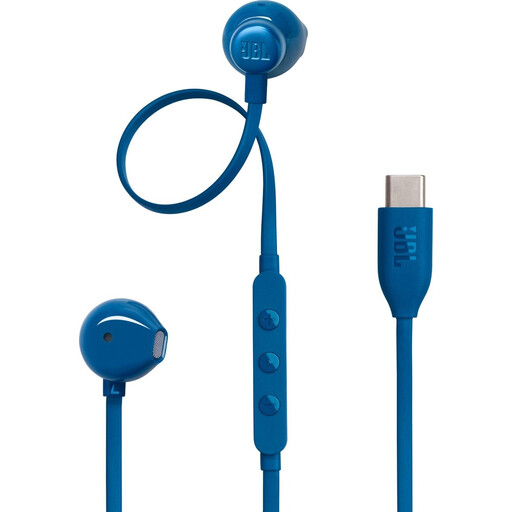
JBL Tune 305C USB-C earphones, blue
This wired USB-C version is an option if your computer has a compatible port and you’d like to use earphones during training.
The product name describes wired USB-C earphones in blue. Check that the connection is compatible with your computer or dock.
View at Joybuy
 No image available
Jabra Evolve2 30 SE
This wired USB option is worth comparing if you want to listen and speak during training at a fixed computer workstation.
Check the connection on the exact version and whether your computer and training app support the audio connection.
View at Joybuy
 No image available
Jabra Evolve2 75
An option to compare if you want to listen and speak over a wired connection at a fixed computer workstation during training.
Check how the version connects and whether it’s compatible with the USB port and training app you use.
View at Joybuy
 No image available
Logitech PC 960 USB
This wired USB headset is an option to compare if you speak during training at a fixed computer workstation.
The product name specifies USB and a wired connection. Measure the cable route at standing height and check that the controls are easy for you to reach.
View at Joybuy
 No image available
Logitech H650e Stereo
This stereo version is an option if you want to listen to training audio through both ears over a wired connection at a fixed workstation.
The product name specifies stereo and wired. Check the exact connection and whether the wearing style suits your listening environment.
View at Joybuy
Frequently asked questions
How do I connect the headset for training?
First, check whether the USB-A or USB-C connection is compatible with a port on your computer or dock. Then select the headset as the speaker and microphone in your training app, and test both. According to Jabra’s user guide, not all USB-C devices or apps support audio with the Evolve2 40 SE.
How can I avoid turning the volume up too high during a long training session?
The World Health Organization advises keeping the volume low and taking regular listening breaks. A well-fitting headset may help you avoid turning the volume up unnecessarily; this is health advice, not a product-specific legal volume limit.
In the Netherlands, am I still covered by the legal guarantee after two years?
You may be, as the Netherlands’ statutory guarantee doesn’t have a fixed two-year limit. According to ACM ConsuWijzer, the period depends on how long you can reasonably expect the product to last with normal use. The retailer is your point of contact, and the assessment depends on the product and the specific fault.
Can I try a headset bought online and return it?
For online consumer purchases, there’s generally a statutory 14-day cooling-off period after delivery. ACM ConsuWijzer advises checking the applicable exceptions and the item’s returns policy; the general rule isn’t an unconditional guarantee for every situation.
Does a CE logo mean a headset has been approved by the EU?
No. According to the European Commission, for products covered by specific EU rules, the CE marking is the manufacturer’s declaration that the product complies with those rules. A CE logo isn’t a general approval from a central EU authority or an independent quality test.


