For a study group at a sit-stand desk, a wired USB headset is suitable if the connection is compatible and the cable has enough slack when the desk is at its highest setting. Then compare how you position and mute the microphone, and whether the fit is comfortable for longer sessions. A claim about microphone noise cancellation does not tell you how much surrounding noise you can hear.
Who uses a headset at a sit-stand desk?
Active speaker at a sit-stand desk
You speak regularly and want to be able to position and quickly mute the microphone, even when standing. Lenovo and Logitech highlight microphone controls and positioning as important considerations for online calls.
Standing participant who moves around
You adjust the desk height or change position, and want to avoid the USB cable pulling taut across your desk. Logitech lists the cable specifications for the H340 and H390, which you can compare with your own cable route.
Someone who listens for long periods
You take part in longer group sessions and are particularly concerned with the fit and how clearly you can hear others in your space. Lenovo and Trust highlight fit and listening conditions as considerations for online learning and headset use.
What should you look for when choosing?
Choose microphone controls, cable routing, connection and fit to suit your setup and the way you take part in the study group.
| Key consideration |
What to look for |
Who is this important for? |
| Microphone and mute |
Check whether the microphone is adjustable and where the mute control is located. Microphone noise cancellation is not the same as hearing less surrounding noise. |
If I speak often, I want to be able to position the microphone and mute calls quickly. Around 33% of consumers put clear speech and muting at the top of their list. |
| Cable clearance |
Measure the route from the USB port to your head with the desk at its highest setting, and leave room to move. Logitech lists 180 cm for the H340 and 1,9 m for the H390; Trust lists 1,8 m for the Ayda 25088. |
If I switch between desk heights, I don’t want the cable to pull taut. Around 27% of consumers give freedom of movement top priority. |
| USB connection |
Check whether the model uses USB-A or USB-C and which adapter is actually included. According to the manufacturer, the H390 is available from Logitech in USB-A and USB-C versions; check the exact version and adapter for the Trust Ayda 25088. |
If I want to use the headset without connection surprises, I check my computer’s port and call settings beforehand. Around 20% of consumers prioritise device connectivity. |
| Fit and listening |
Look at adjustability and the type of ear cushions, then see for yourself how the headset feels during longer sessions. The WHO recommends keeping the volume low and considering both sound level and listening time. |
For longer meetings, comfortable listening and being able to hear the group clearly are my main priorities. Around 20% of consumers give fit and listening comfort top priority. |
Common purchasing mistakes
-
Confusing microphone noise cancellation with silence for you
A claim about background noise in the microphone signal doesn’t tell you how much noise you can hear through or around the ear cushions.
Assess the microphone and your own listening experience separately. If a claim mentions active noise cancellation, check that it applies to the exact version.
-
Looking only at the cable length
A stated length of 180 cm, 1,8 m or 1,9 m doesn’t show how much room you’ll have to move when the cable is routed around the desk.
Measure the route with the desk at its highest setting, and leave extra slack for movement and cable management.
-
Treating USB-A and USB-C as interchangeable
Headsets may be available with different types of plug. The adapter described may also vary between versions.
Before buying, check the full model version, the plug and what’s included in the box.
-
Taking the manufacturer’s warranty as the full statutory guarantee
According to the Dutch government, the Netherlands has no fixed statutory guarantee period of two years. If a product doesn’t meet the expectations you were entitled to have, the retailer is your point of contact.
Keep your proof of purchase and consider any additional manufacturer’s warranty separately from your statutory rights.
Brands to compare
Logitech
The H340 and H390 are wired USB models worth comparing if cable routing, connectivity and controls matter to you.
- Logitech lists an adjustable microphone and a 180 cm cable for the H340. For the H390, the manufacturer lists in-line volume and mute controls and a cable length of 1,9 m.
- According to Logitech, the H390 is available in USB-A and USB-C versions. The stated microphone features are manufacturer specifications, not an independent assessment of speech clarity.
Trust
The Ayda 25088 is worth considering if you want to compare on-ear controls and a USB adapter.
- Trust lists a 1,8 m cable, a flip-up microphone mute and a USB-C-to-A adapter for the Ayda 25088.
- Check the full model code and the adapter direction for the version you’re considering.
HP Poly
The Poly Blackwire 3320 version 8X220AA is a wired stereo headset to consider if USB-C, a USB-A adapter and call controls are important to you.
- HP specifies an adjustable microphone boom and mute and volume controls for this version.
- For any version on offer, check the full model code and whether the fit suits the way you’ll use it.
Jabra
The Evolve2 30 SE range is worth exploring if ear cushions, microphone configuration and meeting platform are factors for you.
- Jabra describes two microphones, memory foam cushions and a separate Teams-certified version.
- Jabra’s claims about concentration and call quality come from the manufacturer; check which version is compatible with your platform.
Joybuy product picks
These wired headsets and earphones with microphones are options for online calls. For each version, check that the connection and cable route work with your computer and sit-stand desk.
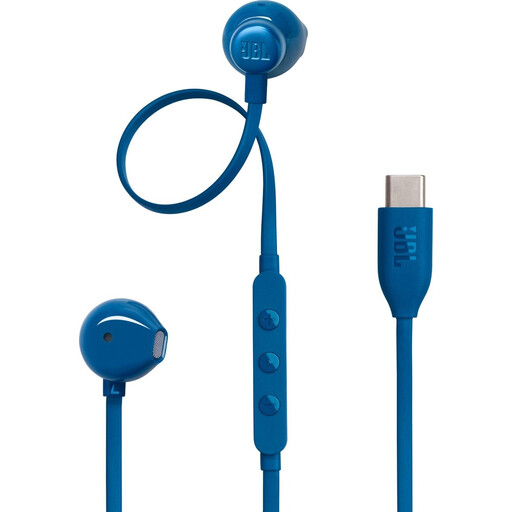 Image unavailable
JBL Tune 305C USB-C earphones, blue
An option if you’re looking for wired USB-C earphones with a microphone and in-line controls.
The product information lists a built-in microphone, USB-C and a three-button remote for music and volume. Check that your device supports the connection.
Joybuy
 Image unavailable
Logitech PC 960 USB headset
An option to compare if you want a wired USB headset with an adjustable microphone and easy-to-reach call controls.
The product information lists a 240 cm cable, an adjustable microphone boom and in-line mute and volume controls. Check whether the cable route leaves enough slack when your desk is at its highest setting.
Joybuy
 Image unavailable
Logitech H650e wired stereo headset
An option to compare if you’re looking for a wired stereo headset with a microphone and controls for calls.
The product information lists a USB connection and in-line volume controls.
Joybuy
 Image unavailable
Logitech H340 USB headset, black
A straightforward wired USB-A option if you want an adjustable microphone and the cable route works with your desk.
Logitech lists a 180 cm cable for the H340. Check whether it leaves enough slack when your desk is at its highest setting.
Joybuy
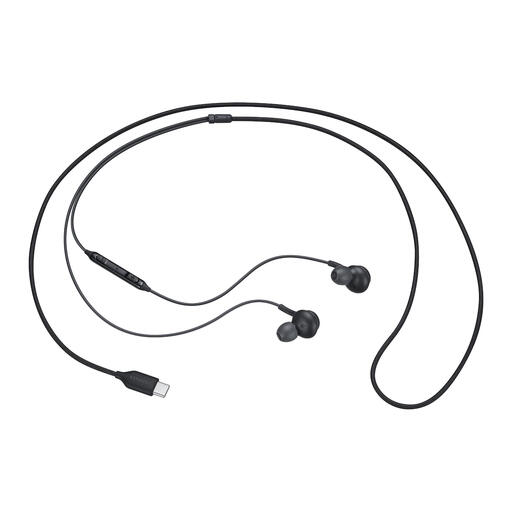 Image unavailable
Samsung EO-IC100 USB-C in-ear headset, black
A wired in-ear option to compare if USB-C and microphone controls are important to you.
The product information lists in-line controls, microphone mute and several sizes of ear tips. Check that your device supports the USB-C connection.
Joybuy
Frequently asked questions
How can you stop the headset cable pulling when you raise the desk?
With the desk at its highest setting, measure the route from the USB port to your head and leave room to turn. Compare this route with the cable length of the exact version; the stated length doesn’t guarantee a particular range of movement.
What can you check if others can’t hear you after you connect the headset?
Check that the headset is selected as the microphone and isn’t muted. Microsoft Support explains how to test a microphone in Windows and make a test call in Teams; also check that the correct speaker is selected.
How should you use a headset during longer sessions?
Keep the listening volume low and take listening breaks. The WHO notes that both sound level and duration of exposure matter; follow the cleaning instructions provided by the manufacturer of your version.
What are your rights if a headset bought online doesn’t work properly?
For a consumer purchase in the Netherlands, the retailer is your point of contact if the product doesn’t meet the expectations you were entitled to have. The Dutch government states that there is no fixed statutory guarantee period of two years. For online purchases from a business, you generally have 14 days to change your mind, subject to legal exceptions.
Does a USB headset need a CE marking?
That depends on the product category and the rules that apply to it. The Dutch government states that many consumer products placed on the market in the European Union must carry a CE marking. If this matters for your purchase, check the product information for the specific version.


