
Online design reviewer
You mainly discuss changes remotely and want your voice to come through clearly, with mute close at hand. Logitech, Trust and Jabra describe call controls across relevant product ranges.


For a call where you’re the only person speaking through your computer, choose a USB headset with a connection that suits your computer, a cable long enough for your desk at its highest setting and an easy-to-reach mute control. A mono headset leaves one ear free to hear colleagues nearby, while a stereo headset lets you focus on the online conversation with both ears. If several people in the room need to join in through one computer, consider a speakerphone for shared audio instead of a personal headset, as Microsoft recommends for shared spaces.
You mainly discuss changes remotely and want your voice to come through clearly, with mute close at hand. Logitech, Trust and Jabra describe call controls across relevant product ranges.
You switch between sitting and standing and want the connection, cable routing and fit to work in both positions. Check the cable length and connection for the specific model against your desk setup.
You take part online but still want to hear colleagues nearby. HP Poly describes mono models that leave one ear free; if several people in the room need to join through one computer, Microsoft recommends speakerphones for shared spaces.
Choose this if: your online conversation on the computer is the main priority and you want to focus on it with both ears.
Bear in mind: two earcups make it less natural to interact directly with colleagues nearby.
Choose this if: you speak online while wanting to keep one ear free for colleagues in the room.
Bear in mind: conversations around you can also be distracting through your free ear; check that the model is genuinely mono.
Choose this if: several colleagues at the desk need to speak and listen through the same computer.
Bear in mind: shared room audio is an alternative to a personal headset and offers less individual sound isolation.
| What to consider | What to check before buying | Who is this important for? |
|---|---|---|
| Clear speech during meetings | Check the microphone and mute control on the exact model; make a short test recording in your workspace. | When I discuss changes online, I want my voice to come through clearly and to be able to mute quickly. Around 29% of consumers put speech clarity first. |
| Cable length and wearing comfort | Measure the route from the USB port to your head with the desk at its highest setting, allowing room to move; check the fit too. | I want to switch between sitting and standing without the cable pulling or the headset becoming uncomfortable. Around 29% of consumers focus most on desk and wearing comfort. |
| Hearing colleagues nearby | Decide who needs to speak through the computer and check whether the model is mono or stereo. If several people in the room need to speak, consider shared room audio. | If colleagues nearby need to be able to talk to me, I want to know whether one ear will be free or whether several people can join through the computer. Around 21% of consumers give local interaction top priority. |
| USB connection and controls | Check whether USB-A or USB-C matches your computer port, and find out where the mute and volume controls are. | I want a model that connects to my computer and has an easy-to-reach mute control during calls. Around 21% of consumers focus most on connection and controls. |
A claim about the microphone refers to the voice being transmitted; how much you can hear from colleagues also depends on the headset’s design.
Assess how well it picks up your speech separately from how well it lets you hear. Choose mono only if you deliberately want to keep one ear free.
Logitech lists a 1.9 m cable for the H390 USB-A, while Jabra lists 1.5 m for the Evolve2 30 SE. These are the product cable lengths, not the usable distance left once the cable is routed around your desk.
Measure from the USB port to your head with the desk at its highest setting, and leave room to move.
Logitech, Jabra and HP Poly describe different USB connections or styles across their product ranges; these don’t automatically apply to every model.
Check the full model name against your computer port and decide whether you want mono or stereo.
A headset designed for one user isn’t necessarily suitable for letting several colleagues join an online call through the same computer. Microsoft recommends speakerphones for personal and shared spaces.
First decide who needs to speak through the computer. If several people in the room need to talk, compare speakerphones for shared audio.
The H390 is worth considering if you’re looking for a wired computer headset with controls on the cable.
The Ayda USB-ENC 25089 is an on-ear alternative with a flip-up microphone and controls on the earcup.
The Blackwire 3200 series is worth considering if you want to compare mono and stereo models.
The Evolve2 30 SE is worth considering if you want to compare different styles and USB connections.
This selection focuses on wired USB headsets for one-to-one online meetings at a sit-stand desk.
 Image unavailable
A wired stereo headset for focusing on online conversations with both ears and keeping mute close at hand during meetings.
Check that the USB-A connection is suitable; the product information lists a compatible adapter for USB-C.
 Image unavailable
A wired USB headset to consider if you want an adjustable microphone and mute control during meetings.
Check the cable routing with the desk at its highest setting, and make sure the controls work with your meeting app.
 Image unavailable
A wired USB stereo headset for online calls where you want to focus on your computer audio with both ears.
Check that the connection suits your computer and that the adjustable microphone and controls are comfortable to use during meetings.
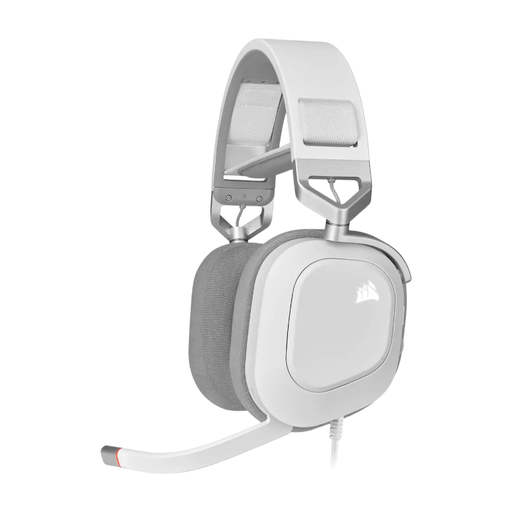 Image unavailable
A wired USB headset to consider if you want to control mute on the headset during calls.
Check that the mute and volume controls are within easy reach whether you’re sitting or standing.
 Image unavailable
This stereo model is designed for use with a USB controller to connect the headset to your computer.
The headset has a 3.5 mm connection; the LINK controller provides the USB connection.
First, check the USB connection and make sure mute is off. Then select the intended microphone and speaker in both your operating system and meeting app; Logitech describes these steps for the H390.
Keep the listening volume as low as is practical. VeiligheidNL notes that a well-fitting pair of headphones can reduce background noise, making it less necessary to turn the volume up; check the fit and volume in your own workspace.
For a consumer purchase, the seller must offer a solution if the product is faulty. According to the Dutch Government, there is no fixed statutory guarantee period in the Netherlands; what you can expect depends, among other things, on the product and the information provided by the seller. A manufacturer’s guarantee does not replace this right.
Applicable European product safety rules apply to electrical and electronic equipment. Business.gov.nl states that CE marking is compulsory for certain product groups; whether it applies to a specific model depends on the relevant product rules. According to the Dutch Government, when buying a new appliance, private individuals can hand in an old, similar electrical appliance free of charge, including when buying online; this arrangement for consumers does not apply to business equipment.