Who is this choice for?

Quiz host speaking alone

You run the quiz from one computer and want to ask questions, hear answers and mute quickly. A personal USB headset could suit you; check its connection and controls. Logitech describes these features for specific headset versions.

Quiz team around one table

Several people need to be heard by remote participants through one computer. First decide whether a personal headset suits this kind of conversation; a speakerphone is a separate solution. Jabra publishes room and microphone range specifications for the Speak2 55.

Quiz host using different laptops

You use different computers and want to check in advance that the USB connection is compatible, which microphone the meeting app uses and how the cable will sit. Logitech lists USB-A for the H390 version reviewed; HP lists USB-C with an attached USB-A adaptor for the Blackwire 3320 version 8X220AA.

What should you look for when buying?

USB headset for one quiz host

Choose this option: if one person is asking the questions and listening to the answers. A microphone boom, mute control and compatible USB connection are all worth checking.

Bear in mind: a personal headset isn’t specified for picking up voices from people spread around a room, and a wired version limits how far you can move.

USB speakerphone for the room

Consider this option: if several people need to exchange questions or answers through the same computer. Jabra gives a recommended room size of up to 4.5 × 4.5 m and a microphone range of up to 2.3 m for the Speak2 55; compare these figures with the seating arrangement.

Bear in mind: a speakerphone isn’t a headset and plays audio out loud in the room. The stated dimensions and range don’t guarantee the same results in your meeting room’s acoustics.

What to consider What to look for when buying Who is this important for?
Controls for one speaker Check for a microphone boom and physical mute control; test that muting works as you expect in the app you use. If I’m hosting the quiz myself, I want to mute quickly while speaking and then hear the answers. Around 36% of consumers prioritise clear speech and controls for one speaker.
Voices around the table Compare the distance to the furthest speaker with the stated microphone range; test the set-up for echo. When several people are answering around the table, I want to know whether everyone’s voices will reach the remote participants through one set-up. Around 29% of consumers prioritise letting the whole group join in.
Connection and set-up Check whether your computer has USB-A or USB-C and confirm the exact product version; consider cable length and audio settings. If I’m preparing the quiz on different laptops, I want the connection to be compatible and the right microphone and speaker to be selected. Around 21% of consumers prioritise a trouble-free laptop set-up.
Wearing comfort Check the wearing style, adjustability and ear cushions of the exact version; try it on if possible. For a long quiz, I want a comfortable headset that suits how I want to hear people in the room. Around 14% of consumers make long-term wearing comfort their top buying priority.

Common buying mistakes

  • Choosing a headset for one person when the whole table needs to speak

    A personal headset is designed for the wearer. Jabra describes the separate Speak2 55 as having a room and microphone range for shared use; that doesn’t automatically make a headset suitable for picking up the voices of people around the table.

    Before buying, work out who will be speaking and from which seats. Then choose between a personal headset and a shared audio set-up.

  • Assuming noise cancellation means people around the table will be heard clearly

    A manufacturer’s description of microphone noise cancellation isn’t a test of voices coming from further away in the room.

    Test both questions and answers from the intended seats with someone joining remotely.

  • Overlooking the USB connection or product version

    According to Logitech, the H390 version reviewed has USB-A. For the Blackwire 3320 version 8X220AA, HP lists USB-C with an attached USB-A adaptor. Connections can therefore vary between versions.

    Compare your computer’s port with the connection and included items for the exact version.

  • Confusing a manufacturer’s warranty with your statutory rights

    According to ACM ConsuWijzer, the Dutch statutory guarantee doesn’t automatically end after a fixed period of two years. What you can reasonably expect depends on factors including the product and how it is used.

    Check who the seller is, keep your proof of purchase and distinguish between a manufacturer’s warranty and your statutory rights if a product is faulty.

Brands to consider

Logitech

Logitech describes the H390 as a personal USB headset; the Zone Wired is a separate wired range with its own controls.

  • For the H390 version reviewed, Logitech lists USB-A, in-line controls and a 1.9 m cable.
  • These features don’t automatically apply to other Logitech models. The product specifications don’t confirm that voices from everyone around a meeting table will be picked up.

HP Poly

The Blackwire 3320 is a personal business stereo headset; check the connection and version you’re considering.

  • For version 8X220AA, HP lists a flexible microphone boom, mute control and an attached USB-A adaptor with the USB-C cable.
  • These features apply to the version specified and shouldn’t be assumed to apply to other variants without checking.

EPOS

The IMPACT 100 range includes wired headsets for personal conversations; check the exact mono, stereo and platform version.

  • According to EPOS, the range reviewed comes with a USB-C-to-USB-A adaptor and a directional microphone with noise-reducing processing.
  • These are EPOS product claims, not independent measurements taken during a quiz in your room.

Jabra

The Evolve 20 is a personal USB headset; the Speak2 55 is a separate speakerphone for conversations with several people in a room.

  • Jabra lists a USB connection and controls for the Evolve 20. For the Speak2 55, Jabra gives room dimensions and microphone range.
  • A speakerphone isn’t a room-microphone feature of an Evolve headset. Compare the Speak2 55 specifications with your room and seating arrangement.

USB headsets on Joybuy

These product suggestions are for quiz hosts who speak and listen through a wired USB headset.

Trust GXT 490 FAYZO wired USB Type-A headset in white

Trust GXT 490 FAYZO, wired, USB Type-A, white

An option to compare if you’re hosting the quiz yourself and looking for a wired USB headset; check that the connection is compatible with your computer.

Joybuy

Jabra Evolve2 30 SE headset

Jabra Evolve2 30 SE

An option to compare if you’re hosting the quiz yourself and want to be able to mute the microphone while presenting; check the connections and controls on the version you choose.

Joybuy
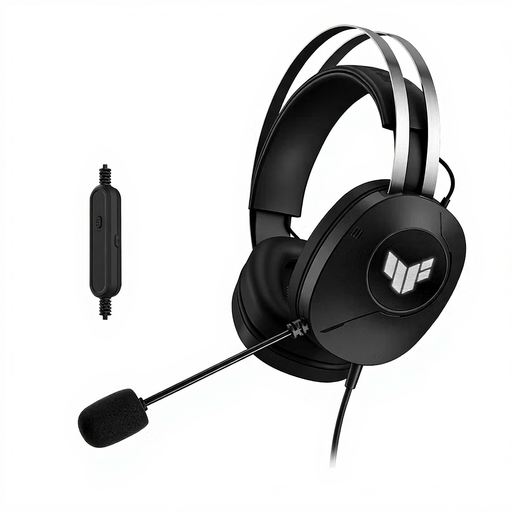
ASUS TUF Gaming H1 Gen II wired USB Type-A headset in black

ASUS TUF Gaming H1 Gen II, wired, USB Type-A, black

An option to compare if you’ll be speaking and listening through a wired headset; check that USB Type-A is compatible with your computer.

Joybuy
Logitech PC 960 USB wired headset

Logitech PC 960 USB Wired Headset

An option to compare if you’re hosting the quiz yourself and want to mute quickly or adjust the volume; check the connection on the version you’re considering.

Joybuy

Logitech H340 USB headset, wired, black

Logitech H340 USB headset, wired, black

An option to compare if you’re hosting the quiz yourself and looking for a wired USB headset with a microphone; check that the connection is compatible with your computer.

Joybuy

Frequently asked questions

How do I set up the audio for the quiz?

Connect a version with a compatible USB connection, then select the intended microphone and speaker in your operating system and meeting app before you start. Ask someone joining remotely to assess a test question and answer; product specifications can’t confirm how your set-up will sound.

What can I do if two devices in the same room cause echo?

Check which audio set-up should be used in the room and make sure multiple microphones aren’t active at the same time unintentionally. Microsoft warns about echo and feedback when more than one microphone is enabled in coordinated Teams Rooms; this guidance applies specifically to Teams Rooms and isn’t automatically the right setting for every quiz app.

Do I need an extra adaptor for my laptop?

That depends on your computer’s connection and the exact headset version. For the Blackwire 3320 version 8X220AA, HP lists an attached USB-A adaptor with the USB-C cable; Logitech lists USB-A for the H390 version reviewed. Check the connection and included items for the version you choose.

Can I record and save the quiz?

If a recording processes participants’ personal data, the organisation must inform them, according to the Dutch Data Protection Authority, about matters including what data is being processed and why. Whether a particular recording is permitted depends on its set-up, legal basis and purpose; buying a headset doesn’t in itself give you permission to record.

What guarantee applies when a Dutch consumer makes a purchase?

According to ACM ConsuWijzer, the statutory guarantee in the Netherlands has no fixed duration in years: a product should last as long as you can reasonably expect it to. If a product is faulty, the seller is your point of contact. This applies to consumer purchases; different terms may apply to business purchases.
