What should you look for when buying?
First check that the connection is compatible, then compare the microphone controls and wearing style for your presentation.
| What to consider |
What should you check? |
Who is this important for? |
| How clearly your voice comes across |
Check whether the microphone is adjustable and how to mute it. Test the microphone before your presentation. |
If I’m presenting from a shared space, I want my voice to come across clearly. Around 33% of consumers put clear speech first. |
| The right USB connection |
Compare the available computer port with the connection on the exact version, and check whether any adapters are included. |
I want to connect the headset directly to my laptop. Around 27% of consumers prioritise port compatibility. |
| Wearing style and awareness of your surroundings |
Check whether the version is mono or stereo and see how adjustable it is. Judge the fit for yourself. |
During a longer meeting, I want to listen comfortably or still hear what’s happening in the room. Around 20% of consumers make wearing style their first consideration. |
| Controls while presenting |
Check where the mute and volume controls are, and test the microphone settings in your meeting app. |
If I want to mute quickly or adjust the volume during my presentation, the controls need to be easy to reach. Around 20% of consumers put these controls first. |
USB headsets at Joybuy
This selection includes wired USB headsets for presentations and online calls. Check that each model’s connection and controls suit your computer and how you plan to use it.
 No image available
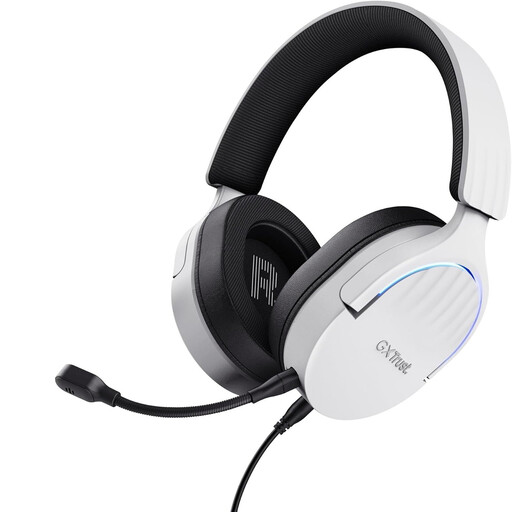
Trust GXT 490 FAYZO USB Type-A White
A wired USB option if you want to control the microphone and mute function on the ear cup.
USB Type-A; the description lists a detachable microphone and over-ear cushions.
Joybuy
 No image available
Jabra Evolve2 30 SE
A stereo version for listening to online attendees through both ear cups; check that USB-A is compatible with your computer.
The product description lists USB-A, two integrated microphones, and in-line mute and volume controls.
Joybuy
 No image available
Logitech PC 960 USB Headset
A wired stereo option if you’re looking for an adjustable microphone boom and easy-to-reach in-line controls.
The product description lists in-line volume and mute controls.
Joybuy
 No image available
Logitech H340 USB Headset Black
A stereo headset for listening to calls; check that the version described will connect to your computer.
Logitech describes an adjustable microphone and a lightweight, adjustable headband. The manufacturer says it reduces background noise; this isn’t an independent performance test.
Joybuy
 No image available
Trust Ayda USB Type-A Headset Black
A wired option if you want to mute by flipping the microphone up; check that the connection is compatible with your computer.
Trust describes a noise-cancelling microphone and a USB-C adapter for the USB-A connection. The noise-cancelling claim isn’t an independent measurement.
Joybuy
Frequently asked questions
Will a USB headset fix a dark face or glare when you’re beside a bright window?
No. A headset handles audio, but it won’t fix camera image problems. Zoom explains that daylight and reflections can affect your camera view. Check your camera preview and, if needed, adjust your position, window coverings or lighting.
How can I check that the right microphone is active before my presentation?
In Microsoft Teams, select the microphone and speaker you want to use, then make a test call. These steps are for Teams; if you use another meeting app, check its own audio settings.
Which headset should I choose if I also need to hear someone in the room?
Consider a mono version, which leaves one ear free. HP Poly and Jabra list mono and stereo options; check the wearing style of the exact version before you order.
Can I return a headset bought online, and what happens if it’s faulty?
The Dutch government states that distance purchases often come with a 14-day cooling-off period, although there are exceptions. If a product is faulty, the seller must provide a solution; these statutory rights are separate from a manufacturer’s warranty. Before buying, check which returns policy applies to your order.


