If you’re presenting a reading from your computer, a wired USB headset with an adjustable microphone boom and easy-to-reach mute button is a sensible choice. Test the controls in the dimly lit room beforehand, and check that the headset works with your computer and reading app. A personal headset isn’t automatically suitable for amplifying sound throughout the venue or picking up other speakers.
Who is this guide for?
Online reader
You’re reading aloud from a computer and want to keep the microphone close to your mouth while following your text. Logitech describes the H390 as having a microphone boom, while the Jabra guide recommends positioning the microphone close to your mouth.
Presenter in low light
You switch between speaking and listening, and want to mute the microphone or adjust the volume without searching on screen. Logitech, Jabra and HP describe physical controls; practise beforehand so you know where the buttons are and how to check whether the microphone is muted.
Organiser of a hybrid reading
You want to know how the computer audio and voices in the venue will work together. The headsets described are personal computer headsets, so check separately how the venue will connect the computer and any sound equipment.
What should you look for?
| What to consider |
What should you check? |
Who is this important for? |
| Speech clarity |
Check whether the microphone boom is adjustable, and make a test recording at the volume you’ll use for your reading. |
If I read softly, I want to be able to position the microphone close to my mouth and hear how my voice sounds. Around 26% of consumers prioritise speech clarity. |
| Controls in low light |
Practise finding the mute and volume controls, then check on your computer and in the app that mute is active. |
When I want to manage pauses as I read without losing my place, I want to find the buttons without looking at the screen. Around 21% of consumers make ease of use their top priority. |
| Sound for the venue |
Ask what equipment is available and how the computer will connect to it. Also check how other speakers will be picked up. |
If people in the audience or other readers also need to be heard, I want to know in advance whether a personal headset will be enough. Around 21% of consumers prioritise the range of the sound system. |
| Computer and connection |
Check whether the USB-A or USB-C connector matches the available port, and test the audio settings on your computer and in your app. |
I want the version I choose to connect to my computer and work with the app I’ll use for the reading. Around 16% of consumers start by checking compatibility. |
| Wearing style |
If both are available, choose between mono and stereo carefully, and try the fit during a rehearsal. |
If I want to stay connected with the audience while reading, I weigh that against the computer audio and the fit. Around 16% of consumers prioritise wearing style and awareness of their surroundings. |
Common buying mistakes
-
Assuming noise cancellation guarantees clear speech
A product specification or claim about noise reduction won’t tell you how your voice will sound in the room and app you choose.
Make a test recording at your reading volume in the app you plan to use, then listen back to it.
If the recording doesn’t sound usable, you may need an extra rehearsal or to record it again.
-
Assuming every version of a model is the same
The connector, included adapter and presence of a mute-status light can vary between versions.
Before buying, check the full model name, connection, box contents and mute function.
-
Confusing a personal headset with a complete venue sound system
A headset for one presenter using a computer isn’t automatically suitable for amplifying sound throughout the venue or picking up other speakers.
Work out in advance who needs to hear whom, and ask the venue to confirm the connections available on its sound equipment.
-
Confusing the manufacturer’s warranty with your statutory rights
The Dutch government states that there is no fixed statutory warranty period in the Netherlands, and that the retailer is your point of contact if there’s a problem with a product.
Before choosing additional cover, compare any extra warranty terms with your statutory rights.
Brands to compare
Logitech
The H390 is a wired computer headset for anyone looking for a microphone boom and in-line controls.
- Logitech lists volume and mute controls, as well as a microphone boom. For the USB-A version described, the brand specifies a 1.9 m cable.
- USB-A and USB-C are separate connection options. Check which version is right for your computer.
Jabra
The Evolve2 40 SE is described as available in mono and stereo versions, with call controls.
- The Jabra guide describes a microphone boom, mute control and sidetone feature.
- A USB-C-to-USB-A adapter and a mute-status light aren’t available with every version, so check the one you’re considering.
Poly
The Poly Blackwire 3320 version 8X220AA is described as a stereo USB-C headset with a USB-A adapter.
- HP lists call, mute and volume controls for this version.
- These details apply to version 8X220AA and not necessarily to other Blackwire models.
EPOS
The ADAPT 160 USB II is a dual-sided, on-ear USB headset for computer communications.
- EPOS lists a detachable cable with call controls and a USB-A connection for this model.
- Check the features and connections for each version before choosing one.
USB headsets at Joybuy
These USB headsets from Joybuy are wired options for speaking and listening on a computer, with a focus on microphone positioning and easy-to-reach controls.
 No image available
Jabra Evolve2 30 SE USB headset
The mute and volume controls described may come in handy when you want to adjust a setting quickly while reading aloud.
USB-A connection and stereo sound.
The description mentions two microphones and memory foam ear cushions.
According to the product description, you’ll need a suitable adapter for USB-C.
View at Joybuy
 No image available
Logitech PC 960 wired USB headset
The adjustable microphone boom and in-line controls described make it a practical choice for speaking and muting on a computer.
USB connection with mute and volume controls.
The product description mentions a mute indicator.
View at Joybuy
 No image available
Kingston USB Hi-Fi headset with microphone
According to the product description, the flexible microphone boom can be adjusted to position the microphone near the speaker.
USB connection and stereo sound.
The microphone boom rotates 270 degrees.
The description lists compatibility with Windows, Mac and Chromebook.
View at Joybuy
 No image available
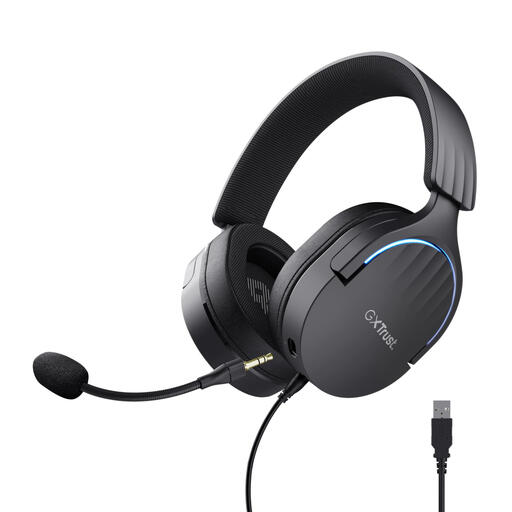
Trust GXT 490 FAYZO over-ear USB headset
The wired USB connection and mute and volume controls are useful if you want to switch settings quickly during your reading.
The description mentions a flexible, detachable microphone.
According to the product description, you can adjust mute and volume on the ear cup.
The product name specifies 7.1 sound.
View at Joybuy
 No image available
Trust Ayda wired USB-A headset
According to the product description, you can flip the microphone up to mute it, which may be useful during pauses or speaker changes.
USB-A connection and volume control on the headset.
The description mentions a USB-C adapter cable, adjustable headband and ear cushions.
View at Joybuy
Frequently asked questions
Is a USB headset enough to let the audience in the venue listen too?
Not without checking the venue’s sound system. The models described are personal computer headsets; that doesn’t automatically mean they can amplify sound throughout the venue or pick up other speakers. Ask in advance how the computer will connect to the venue’s sound equipment.
How should I check the headset before the reading?
Connect the right USB version, select the intended microphone and speaker on your computer and in the app, and test the mute button. Speak at your usual volume and listen back to a test recording. If you run into problems, Logitech also recommends checking the USB connection and the audio settings in the app and operating system.
Can I return a headset ordered online, and should I buy an extended warranty?
According to the Dutch government, most online purchases made by consumers from a business come with a 14-day cooling-off period; check the applicable exceptions and the retailer’s terms. There’s no fixed statutory warranty period in the Netherlands: your statutory rights if there’s a problem with a product are separate from a manufacturer’s warranty, and the retailer is your point of contact.
Can I film a reading with identifiable audience members and publish it?
If you’re filming identifiable audience members as an organisation and publishing the footage, you’ll need to consider the applicable privacy rules. The Dutch Data Protection Authority refers to the need for a legal basis and for informing the people involved. The requirements for audio recordings made solely for personal use or for a specific livestream depend on the circumstances.
How should I look after the headset between events?
Follow the guide for your chosen model, and check the cable, connector, microphone position and selected audio devices before using it again. Jabra refers to its own care instructions for the Evolve2 40 SE; check the instructions for other models separately.


