What should you look for when buying?
First decide who needs to speak during the tutorial. Then compare the headset’s connection, audio options and controls.
| What to consider |
What should you check? |
Who should pay extra attention? |
| How clearly the teacher can be heard |
Check whether the microphone boom is adjustable and compare the stated microphone technology. Test how clearly you can be heard on a trial call. |
If I’m teaching, I want online participants to be able to follow my explanation, even if there’s background noise. Around 31% of consumers rank teacher clarity as their top purchasing priority. |
| Other people speaking in the room |
Decide which microphone will pick up the voices around the table and which audio source the meeting app will use. |
If participants at the table will be asking questions too, I want their contributions to be audible online. Around 25% of consumers rank transmitting voices from the room as their top purchasing priority. |
| Connection and audio source |
Check whether USB-A or USB-C matches the available port, and make sure the right microphone and speaker are selected in the meeting app. |
If I’m teaching from a computer, I want the headset to connect to an available port and work as an audio device. Around 25% of consumers rank connection and audio selection as their top purchasing priority. |
| Fit and controls |
Compare the weight, mono or stereo version, ear cushions, and the position of the mute and volume controls. |
If I’m leading a long tutorial, I want the headset to be comfortable to wear and easy to mute quickly while teaching. Around 19% of consumers rank wearing comfort and easy-to-reach controls as their top purchasing priority. |
Joybuy products
These products are wired USB headsets and USB-C earphones for transmitting your own voice during an online tutorial.
 No image available
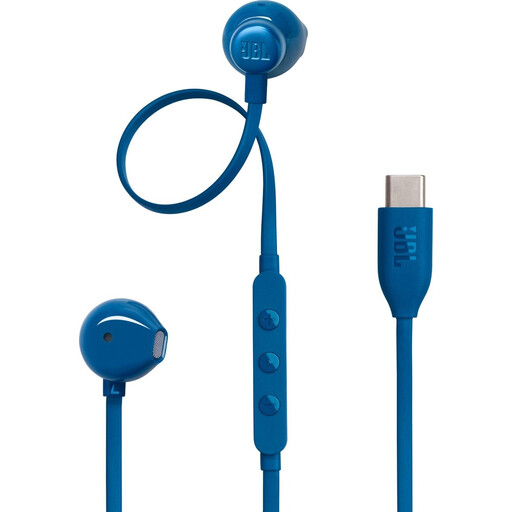
JBL Tune 305C, blue
Wired USB-C earphones for calls; worth considering if the teaching computer supports USB-C audio.
Before the tutorial, check that the meeting app selects the earphones’ microphone.
View at Joybuy
 No image available
Jabra Evolve2 30 SE
A wired headset for computer communications. Jabra offers several versions in this range, with different connections and mono, stereo, UC and Teams options.
Check the full product code and the connection on this version before ordering.
View at Joybuy
 No image available
Logitech PC 960 USB headset
Wired USB headset for anyone who wants to transmit their own voice through a headset.
Check that the microphone and controls suit your needs during the tutorial, then select the headset as the audio source in the meeting app.
View at Joybuy
 No image available
Logitech H340 USB headset, black
Wired USB headset for calls via a computer.
Check the fit and microphone position for your needs, and test before the lesson that the meeting app is using the right microphone.
View at Joybuy
 No image available
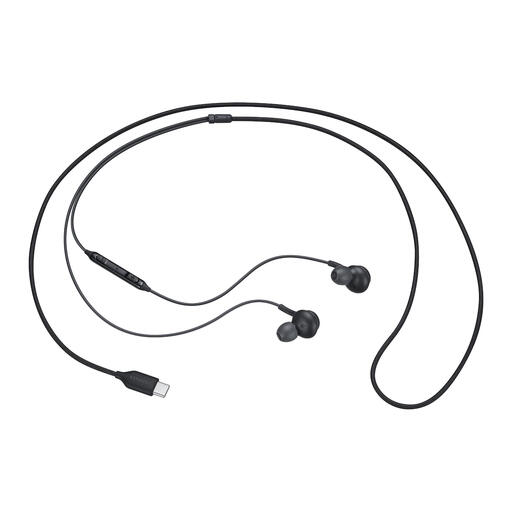
Samsung EO-IC100 USB Type-C headset, black
Wired USB Type-C headset for calls and music; worth considering if the teaching computer supports USB-C audio.
Before the tutorial, check that the meeting app selects the headset’s microphone.
View at Joybuy
Frequently asked questions
Can the teacher’s headset also pick up questions from people at the table?
Don’t assume it will: the headset microphone is designed for the person wearing it. If other people need to speak too, choose and test a separate audio source for their voices. Microsoft describes room audio equipment as an option in Teams.
How can I prevent echo when several laptops are in the same room?
Zoom identifies several computers with active audio in one meeting room as a possible cause of echo. Disconnect computer audio on the other devices; muting their microphones alone isn’t enough while their speakers remain active.
What should I set up just before the tutorial?
In the meeting app, select the connected microphone and speaker explicitly, and make a test call if the app offers that option. Microsoft describes these settings for Teams; check the equivalent settings separately in any other app.
What rights do I have when buying online for personal use in the Netherlands?
According to the Dutch government, when you buy online from a business, you’ll often have a 14-day cooling-off period. The legal guarantee means you’re entitled to a product that works as it should; there’s no fixed legal guarantee period, and the retailer is your point of contact if a product is faulty. Before unpacking it, check whether an exception to the cooling-off period applies.
What should I look out for when buying an electronic product sold from outside the EU?
The Dutch government advises checking, among other things, the seller’s identity, return options and any import charges. It also states that electronic products in the EU must carry a CE mark. Don’t assume from a product title or a Dutch-language webpage alone that you know who the seller is or whether the specific product meets the requirements.


