What should you look for when buying?
For a one-to-one online mentoring session in a classroom, the main things to weigh up are microphone quality, connection, awareness of the room and wearing comfort.
| What to consider |
What to look for |
Who is this important for? |
| How clearly your voice comes across |
Check the microphone’s position and the mute function. Make a short voice recording on the computer you’ll be using while the classroom is in normal use. |
If classmates are talking, I want my voice to come through clearly to the mentor and I want to be able to mute quickly. Around 33% of consumers give voice clarity top priority. |
| Connection to your computer |
Check whether your computer has USB-A or USB-C, and confirm that any adapter you need is included with the exact version. |
If I’m using a shared or different computer, I want to avoid finding that the connection doesn’t fit. Around 27% of consumers give device compatibility top priority. |
| Focus or awareness of the room |
Choose mono if you want to keep one ear free, or compare stereo if the online conversation is your main focus. Yealink and Jabra list mono and stereo versions of selected models. |
If I also need to hear people in the room during the conversation, I want to choose how aware of my surroundings I need to be. Around 20% of consumers give this consideration top priority. |
| Wearing comfort and freedom to move |
Consider the fit, where the USB port is and whether the cable can reach around your chair and table. A stated weight alone doesn’t predict how comfortable a headset will feel. |
If I’m wearing the headset for a longer session, I want the fit and cable length to suit my workspace. Around 20% of consumers give wearing comfort top priority. |
USB headsets at Joybuy
This selection includes wired stereo USB headsets for one-to-one online conversations. Compare the connection, mute controls and fit with your computer and workspace.
 No image available
Jabra Evolve2 30 SE USB headset
The USB headset described is designed for communication and has an on-cable mute control.
The description lists two built-in microphones and stereo audio.
If your computer only has USB-C, the description recommends a suitable adapter if needed.
View at Joybuy
 No image available
Logitech PC 960 USB headset
The description lists an adjustable microphone boom and on-cable controls for computer calls.
USB connection, stereo audio and a mute indicator are listed.
View at Joybuy
 No image available
Logitech H340 USB headset, black
According to the description, this wired stereo headset is designed for internet calls from a computer.
The description lists an adjustable microphone and a 180 cm cable.
View at Joybuy
 No image available
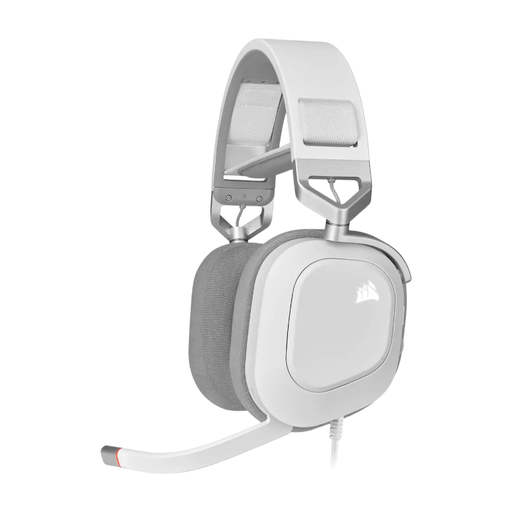
CORSAIR HS80 RGB USB headset, white
The description lists a wired USB headset with a microphone for online conversations.
You can flip the microphone up to mute it; on-headset volume controls are also listed.
The description lists an adjustable headband and memory foam ear cushions.
View at Joybuy
 No image available
Trust Ayda USB headset, USB Type-A
The description lists a wired headset for video calls and online meetings.
USB-A, an included USB-C-to-A adapter and on-ear volume control are listed.
According to the description, you can flip the microphone up to mute it.
View at Joybuy
Frequently asked questions
How can I check that the microphone works before the mentoring session?
In Windows, select the connected microphone under Sound and input, start a test, speak normally and play back the recording. Microsoft Support also recommends checking whether the meeting app has access to the microphone if it isn’t working there.
Should I choose noise reduction for my ears or for my microphone?
If your mentor mainly needs to hear your voice clearly, focus on the microphone and test it in the classroom. If you want to hear less background noise yourself, consider the fit and sound isolation of the earcups; a claim about the microphone doesn’t prove how well they block sound.
What can I do if the headset is uncomfortable or breaks soon after buying it?
For an online consumer purchase, you generally have a 14-day cancellation period after delivery; check in advance which exceptions apply. ACM ConsuWijzer also states that if a product doesn’t meet reasonable expectations when used normally, you can ask the seller to honour your statutory warranty rights.
What does CE marking mean when buying a headset?
The Dutch government explains that CE marking indicates that a product meets the legal requirements that apply to it. The applicable requirements depend on the product, so check the documentation for the specific version.
How can I listen safely during a long session?
Keep the volume low enough to hear your mentor clearly and take listening breaks if needed. The World Health Organization emphasises that both sound level and exposure time matter; a stated speaker sensitivity doesn’t measure the volume at your ears.


