What should you look for when buying?
First decide whether the main priority is for other people to hear you clearly or for you to be less distracted by voices around the office. Then check the fit, connection and any controls for your meeting app.
| What to consider |
What should you check? |
Who is this important to? |
| How clearly people hear your voice |
Check the microphone features of the exact model, position the microphone correctly and test it with background chatter. |
When I lead the planning meeting, I want people to follow what I’m saying despite colleagues talking nearby. Around 33% of consumers say clear speech is their top priority. |
| Being able to follow the conversation yourself |
Compare the fit and any ANC for what you hear; this is different from microphone noise reduction. |
When I need to follow suggestions while colleagues are talking nearby, I want to be less distracted by their conversations. Around 27% of consumers prioritise being able to hear clearly themselves. |
| Comfort during long meetings |
Compare the headband and ear cushions of the exact mono or stereo version, and consider how it feels over a typical meeting. |
When my planning sessions run long, I want a headset that stays comfortable. Around 20% of consumers say long-wear comfort is their top priority. |
| Connection and controls |
Check whether it uses USB-A or USB-C, whether an adapter is included, and whether the features of the exact model work with your meeting app. |
When I want to start a meeting quickly and use the buttons, the connection needs to work with my computer. Around 20% of consumers prioritise connection and controls. |
Joybuy product picks
These Joybuy picks are wired headsets for calls. For each model, check that the connection, style and controls suit your computer and the way you use it for meetings.
 Image unavailable
Trust GXT 490 FAYZO, wired USB Type-A, white
A wired option for calls. Check in advance that the connection is compatible with your computer.
The product name specifies USB Type-A; check that your computer has a suitable port.
View at Joybuy
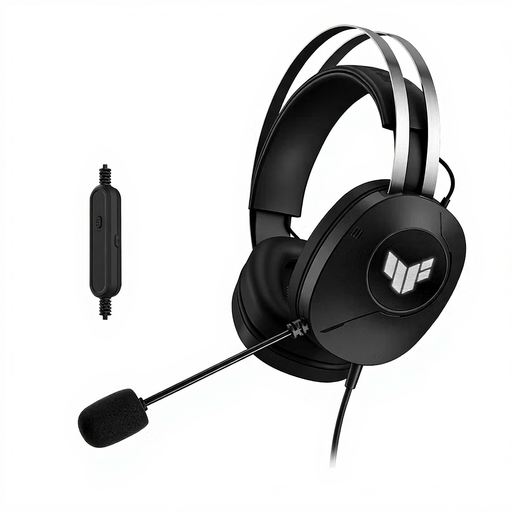 Image unavailable
ASUS TUF Gaming H1 Gen II, wired USB Type-A, black
A wired USB headset for calls. Check in advance that the connection is compatible with the computer you use for meetings.
The product name specifies USB Type-A.
View at Joybuy
 Image unavailable
Logitech H340, wired USB headset, black
A wired option for online calls. Check which type of USB connection the version on offer uses.
The product name specifies USB and wired.
View at Joybuy
 Image unavailable
Samsung EO-IC100, wired in-ear headset, USB Type-C, black
The in-ear style is an alternative to a headset with ear cups; check that it will feel comfortable for the length of your meetings.
The product name specifies USB Type-C.
View at Joybuy
 Image unavailable
Trust Ayda, wired headset, USB Type-A, black
A wired option for meetings. Check the connection and controls in advance.
The product name specifies USB Type-A; before buying, check that the version on offer is compatible with your computer.
View at Joybuy
Frequently asked questions
Is ANC enough to make sure other people can hear me clearly?
No. ANC and microphone noise reduction are different features. Consider separately what you hear and what other people receive through the microphone, and test the headset with background noise in your workplace.
How do I get my headset ready for a meeting?
First, check that the headset connection is compatible with your computer. Then select the headset as the input and output device in your meeting app, and test the sound, microphone and mute function. According to Microsoft Learn, integrated Teams controls depend on certification and the supported environment.
What can I do if a headset bought in the Netherlands is faulty?
When you buy as a consumer, you’re entitled to a product that works properly, and the retailer is your point of contact. According to the Dutch government, the Netherlands has no fixed statutory warranty period; what you can expect depends, among other things, on the product, its price and the information provided at the time of sale.
Do I need a Teams logo or CE marking for the headset I choose?
Teams certification is a selection criterion for supported integrated controls, not a general requirement for joining meetings. According to the Dutch government, CE marking is required for product groups covered by the relevant EU rules; don’t assume this general rule means that every headset model needs the marking.


