
Presenter reading their own work
You want online listeners to hear you clearly, even during quieter passages. HP, Jabra and Yealink describe microphone features that are worth checking on each specific model.


For an online poetry reading in a noisy office, a wired USB headset with a boom arm and noise-cancelling microphone is a good starting point for making your own voice heard. Choose stereo or ANC if you also want to hear less background noise yourself, and test quieter lines in your meeting app beforehand. If someone else is reading further across the room, don’t assume your headset will pick up their voice clearly.
You want online listeners to hear you clearly, even during quieter passages. HP, Jabra and Yealink describe microphone features that are worth checking on each specific model.
You need to follow responses and other online readings while people are talking around you. Information from HP, EPOS and Jabra can help you distinguish between passive noise isolation and ANC on specific models.
You switch between presenting and listening, or other people read in the same room. Check the controls and separately work out how their voices will be picked up; Jabra, Yealink and Microsoft describe relevant headset and app features.
First, distinguish between what your microphone transmits and what you hear yourself. Then check the connection, controls and fit.
| What to consider | What should you check? | Who is this important for? |
|---|---|---|
| How clearly your voice comes through | Check whether the exact model has a boom arm and a noise-cancelling microphone. Make a test recording in the app you use, with both quiet and loud lines in your usual office environment. | If I’m reading aloud, I want listeners to hear quiet lines too, without office chatter drowning out my voice; around 36% of consumers prioritise how clearly their own voice comes through. |
| Hearing participants | Compare mono and stereo, and check whether the exact model has ANC. Also decide whether you want to keep hearing sounds in the room while presenting. | If you need to follow online participants while colleagues are talking, you may want to hear less noise through your headset; around 29% of consumers prioritise listening in peace. |
| Connection and controls | Check whether your computer has USB-A or USB-C, whether you need an adapter, and whether the app is using the right microphone and speakers. | If I want to be sure my headset connects to my computer and the meeting controls work, I check in advance; around 21% of consumers prioritise connection and controls. |
| Comfort | Check the fit, adjustability and cable clearance. Try it on if possible, and decide whether you want to keep one ear free. | For a longer reading, I want a headset that doesn’t get in the way and a style that suits my workspace; around 14% of consumers prioritise comfort. |
Microphone noise cancellation is designed to reduce background noise in the audio you transmit; passive isolation and ANC affect what you hear. HP, Logitech and Jabra describe these features separately for specific models.
Check the microphone, ear cushions and any ANC separately for the exact model.
Meeting app settings can reduce background noise. So also test whether quiet passages and pauses come through clearly. Microsoft and Zoom describe different settings for noise cancellation and original sound.
Beforehand, listen to quiet lines, pauses and emphasis in the app you’ll use, with the office sounding as it will during the reading.
ANC, USB connection, mono or stereo and meeting controls can vary between models. Jabra also distinguishes between the older Evolve2 40 and the Evolve2 40 SE; HP and EPOS likewise describe different models within their ranges.
Before buying, compare the full model name, connection and version.
Poly’s wired Blackwire range includes different fits and features, including models with ANC.
The wired IMPACT 400 series includes different models; connections and features depend on the exact model.
Logitech positions the wired Zone Wired for open-plan workspaces.
According to Jabra, the Evolve2 40 SE is available with USB-A or USB-C connectivity and passively isolating ear cushions.
According to Yealink, the wired UH37 is available in mono and dual versions.
This selection features wired USB headsets for reading aloud from a computer, with microphone features for speech. It also includes a mono model; check the connection for each model and whether leaving one ear free suits the way you’ll use it.
 No image available
A wired stereo headset for reading aloud from a computer with USB-A.
The product description lists a noise-cancelling microphone and on-ear controls for volume and muting the microphone.
 No image available
A good fit for reading aloud from a computer if you’re looking for a wired stereo headset.
The product description lists USB, volume control and mute. The microphone is described as adjustable and noise-cancelling.
 No image available
A wired stereo headset for online readings via USB.
The product description lists an adjustable noise-cancelling microphone. Check that the USB connection is compatible with your computer before buying.
 No image available
A wired headset for readings and online meetings from a computer.
The product description lists USB-A with a USB-C adapter cable and a noise-cancelling microphone. Check the connection on the exact model.
 No image available
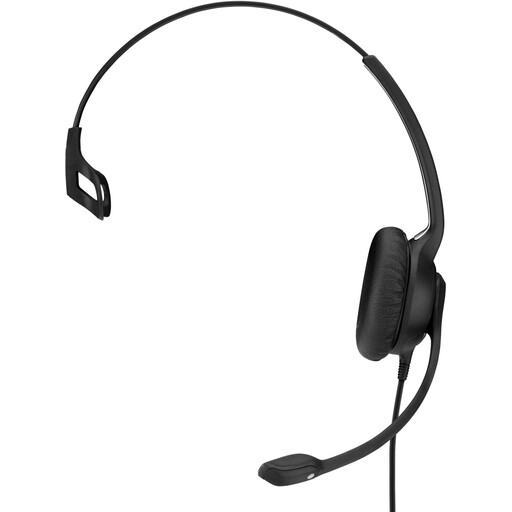
The mono version may suit you if you want to keep one ear free while reading aloud.
The product description lists a USB connection, flexible boom arm and in-line controls. As it sits on one ear, it leaves the other ear less shielded from sound.
Select your USB headset as the microphone and speaker in your meeting app. Microsoft explains how to test your selected input in Windows; you can also make a test recording in the app you’re using, with both quiet and loud lines.
Not necessarily: noise cancellation can help in a noisy office. Compare the available settings using a test recording in your meeting app. Zoom says that Original Sound for Musicians turns off noise cancellation, so first check how much office noise you can hear with it enabled.
Don’t assume it can. The headset microphones described here are designed to pick up the wearer’s voice and reduce background noise. For other people speaking in the room, decide on and test a separate microphone or room set-up.
No. Don’t automatically treat an office headset as personal hearing protection. According to the Dutch Arboportaal, employers must assess the risks of harmful workplace noise and take measures to address them. The assessment of the workplace is what matters, not just whether ANC is listed.
A headset alone doesn’t give anyone permission to record conversations. The Dutch Data Protection Authority sets conditions for monitoring and recording employee conversations, including the requirement that it be necessary. Assess any planned recording and inform those involved in line with the applicable rules.