Choose a wired USB headset with a connector that fits your computer, then match the microphone and mono or stereo design to the way you meet. A headset won’t solve glare on your screen: Arboportaal recommends, among other things, positioning your line of sight parallel to the window. You may also need to adjust the blinds.
Who is this buying guide for?
Meeting participant in a noisy environment
You regularly speak online, and sounds from outside or your workspace may be picked up. Consider separately what your microphone transmits to others and what you can hear from the room through the earcups. Manufacturer specifications can’t predict exactly how your room will sound.
Participant who moves between workspaces
You connect your headset to different computers or USB ports. The exact connector and any adapter included determine whether the version you choose is compatible with your equipment.
Long or mixed-format meetings
You wear your headset for long periods, or want to be able to hear people in the room during an online conversation. Compare the fit and choose carefully between mono and stereo.
What should you prioritise?
First, choose stereo if you want to hear remote participants through both earcups, or mono if you want to keep one ear free. Treat the connection, microphone and Teams controls as separate checks.
| What to consider |
What should you look for? |
Who is this most relevant to? |
| Clear speech |
Check the microphone type and noise-reduction features. If possible, make a test call in your usual environment. |
If I meet in a room with background noise, I want my voice to come across clearly. Around 31% of consumers put clear speech first. |
| USB connection |
Compare the available port with the connector, and check whether the required adapter is included with the exact version. |
If I connect my headset to different computers, I want to be sure the connector will fit. Around 31% of consumers prioritise the right connection. |
| Comfort and awareness of your surroundings |
Choose mono or stereo deliberately, and compare the fit and adjustability of the specific version. |
If I have long meetings or want to hear someone next to me, I take the design and awareness of my surroundings into account. Around 23% of consumers put this first. |
| Controls during calls |
Check the mute and volume controls. If Teams controls matter to you, see whether the exact version is certified for Teams. |
If I want to mute myself quickly or adjust the volume during meetings, I want to know where the controls are. Around 15% of consumers make this their top priority. |
Common buying mistakes
-
Expecting a headset to fix screen glare
A headset won’t change the sunlight falling on your screen. Arboportaal recommends positioning your line of sight parallel to the window and using suitable blinds to help reduce discomfort caused by light.
Address the light separately by reviewing your screen position and blinds.
-
Confusing microphone noise reduction with silence for yourself
Microphone noise reduction focuses on the sounds your conversation partners hear. Passive isolation from the ear cushions affects how much of your surroundings you can hear.
Decide which problem you want to address, then compare the microphone features and earcups separately.
-
Relying only on the product range or a USB label
A USB-A connector won’t plug directly into a computer with USB-C ports only. Connections and adapters can vary between versions.
Check the full model variant, the port on your computer and what’s included with that version.
If the chosen version doesn’t include a compatible adapter, you may need to buy one separately.
Brands to consider
Logitech
The H340 is a wired option for a USB-A connection; the H390 is a different model with in-line controls.
- Logitech lists a noise-cancelling microphone and a 180 cm cable for the H340.
- You’ll need a suitable adapter for a computer without a USB-A port. Don’t assume the H340 has the same controls as the H390.
Trust
The Ayda USB-ENC is a wired on-ear headset with on-ear controls.
- Trust lists on-ear volume controls and a microphone that mutes when you flip it up.
- The claim about reducing background noise comes from the manufacturer and doesn’t tell you exactly how the headset will perform in your workspace.
HP Poly
The Blackwire 5220 8X231AA is a documented version for anyone looking for multiple connection options and in-line controls.
- For this version, HP lists USB-C, a USB-A adapter, 3.5 mm and a noise-cancelling microphone.
- Check the product code and what’s in the box: features of this version don’t automatically apply to every Blackwire 5220.
EPOS
According to EPOS, the IMPACT 100 series offers mono and stereo versions for anyone considering a wired USB headset.
- EPOS lists USB-C with a USB-A adapter and weights of 76 g for stereo and 51 g for mono.
- These are manufacturer specifications for the stated series, not an independent assessment of wearing comfort.
Jabra
The Evolve2 40 SE is a wired office headset, and there’s also a version designed for Teams.
- Jabra describes a busy light and microphone boom for this product range, as well as a Teams-certified version.
- Claims about noise isolation and call quality come from Jabra. Check that the mono or stereo version and USB connector on offer are right for you.
USB headsets at Joybuy
These models are wired USB stereo headsets for calls on your computer. Check each model’s features and connection to make sure they suit the way you meet.
 No image available
Logitech PC 960 USB
An option to compare if you’re looking for a wired USB headset for meetings on your computer.
View at Joybuy
 No image available
Logitech H340, black
An option if you’re looking for a wired USB headset for calls; check that the connection fits your computer.
View at Joybuy
 No image available
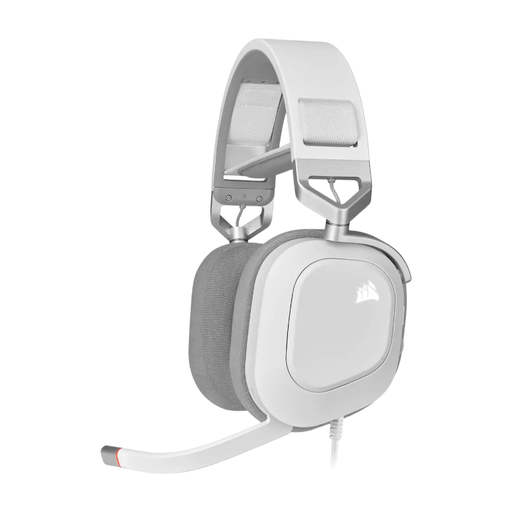
CORSAIR HS80 RGB USB, white, Dolby Audio 7.1 Surround Sound
A wired USB headset to compare if you’re looking for a stereo version; assess the product variant based on how you plan to use it.
View at Joybuy
 No image available
Jabra Evolve 30 II MS Stereo
An option if you’re comparing stereo headsets for online calls; check which connection this version uses.
View at Joybuy
 No image available
Kingston USB Hi-Fi headphones with microphone
A wired USB stereo option to compare for meetings; check that the design and connection suit your workspace.
View at Joybuy
Frequently asked questions
Will a USB headset help with bright sunlight on my screen?
No. Bright sunlight can make your screen harder to read. Arboportaal recommends, among other things, positioning your line of sight parallel to the window and using suitable blinds. This is separate from choosing a headset.
How do I set up my headset for a Teams meeting?
Connect your headset, then select the connected speaker and microphone in Teams. Microsoft Support explains these settings in its guidance on meeting audio settings. If you have problems, also check that Teams has access to your microphone and speaker.
Does a USB headset need to be Teams-certified?
Not as a general buying requirement. Microsoft describes certification as a programme that includes support for controls within Teams. Choose a certified version if that integration matters to you, and check that the exact model is certified.
What if my headset bought online doesn’t fit well or breaks soon after?
For a distance purchase made by a consumer in the Netherlands, you generally have 14 days from delivery to change your mind, subject to legal exceptions. You’re also covered by the statutory guarantee if the product doesn’t perform as you could reasonably expect under normal use; a shorter manufacturer’s warranty doesn’t remove this right. ACM ConsuWijzer explains these rights. Check the applicable returns policy and any exceptions too.


