
Remote meeting host
You’re leading the meeting from your computer and don’t want to worry about managing a battery while speaking or muting.


If you’re leading the meeting as the only speaker, a wired USB headset with an adjustable microphone and easy-to-reach mute control could be a good fit; check the connection and fit first. If several people around the table need to speak online, consider a solution for the whole room rather than assuming a personal headset will pick everyone up. The bright window mainly affects the camera image: Zoom recommends paying attention to lighting and reducing incoming light.
You’re leading the meeting from your computer and don’t want to worry about managing a battery while speaking or muting.
You’re sitting in a room with colleagues and need to decide whether only your voice, or everyone’s, should be heard by online participants.
You wear your headset for extended periods, so you’ll want to consider the fit and whether it connects to your work computer.
Choose this if: you’re leading the meeting and mainly need your voice to reach remote participants.
Trade-off: you won’t need a battery, but the cable will restrict how far you can move.
Choose this if: several people around the table are taking part directly in the online conversation.
Trade-off: whether a conference speakerphone is suitable depends on the room and where it’s placed.
| What to consider | What should you check? | Who is this important for? |
|---|---|---|
| Clear voice and quick muting | Check the microphone position, the physical mute control and which microphone is active in your meeting app. | If I’m leading the meeting, I want my voice to come across clearly and be able to mute quickly. Around 33% of consumers say clear voice transmission and quick muting are their top buying priorities. |
| Colleagues’ voices around the table | Decide who needs to speak online; if several people will be speaking, assess room audio from their seats. | If colleagues are joining in from the same table, I want online participants to hear them too. Around 27% of consumers say making sure people around the table can be heard is their top priority. |
| Comfort during long meetings | Look for adjustability and a good fit; consider pressure and warmth during a session that reflects how you’ll use it. | If I have long or back-to-back meetings, I want my headset to feel comfortable and be easy to adjust. Around 20% of consumers prioritise wearing comfort. |
| Connection and freedom to move | Check which USB port is available, the exact model variant, the cable length you need and whether an adapter is required. | If I want to connect the headset to my computer or move around during a meeting, the connector and cable length need to suit my workspace. Around 20% of consumers say connection and cable reach are their top buying priorities. |
A headset handles audio, but it won’t fix backlighting. Zoom notes that daylight can affect the camera image, so check a camera preview too and, if needed, adjust where you sit, window coverings or lighting.
A headset is for audio; light coming in through the window affects the camera image.
Check a camera preview before the meeting and, if needed, adjust where you sit, window coverings or lighting.
A personal microphone is positioned by one wearer. That doesn’t mean it will pick up other people speaking around the table clearly.
First decide who needs to be able to speak online. If several people will be speaking, consider a suitable room-wide solution.
USB-A, USB-C, mono and stereo are some of the differences between versions, and can affect whether a headset suits your computer and how you plan to use it.
Compare the full model variant with the port available and the style of headset you want.
You may need a different connector version or an adapter.
The H390 is a personal USB headset for meeting audio. Logitech also positions the Zone Wired for busy open-plan workspaces.
The Ayda USB-ENC is a personal on-ear headset for online meetings, with USB or USB-C connectivity according to Trust.
The Blackwire 3200 series includes wired business USB headsets with different wearing styles and connection options.
The Evolve2 30 SE is a range of wired business headsets. Jabra also offers speakerphones for meetings with several people in a room.
This selection features personal wired headsets for calls, with a USB connection or USB connectivity via a controller. For several people speaking around the table, room audio is a different solution to consider.
 No image available
A good fit if you want an adjustable microphone and an in-line mute control while chairing a meeting.
USB connection; adjustable microphone boom; volume and mute controls with mute indicator.
 No image available
Worth considering if you’re looking for a wired USB headset with an adjustable microphone for online calls.
The product description lists an adjustable microphone and a lightweight, adjustable headband.
 No image available
A good fit if you want a wired stereo headset for calls and can use the USB controller.
The listed connection consists of a 3.5 mm plug with a LINK MS controller for USB.
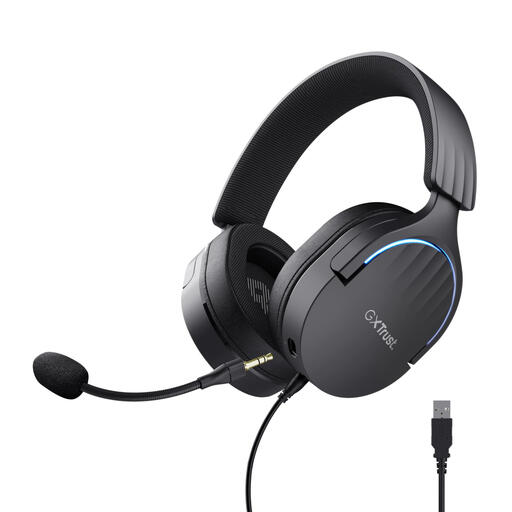 No image available
The wired USB version has a microphone and a mute control on the earcup.
The product description lists a detachable microphone, soft ear cushions and adjustable earcups.
 No image available
A good fit if you want to be able to flip the microphone up to mute during a call.
The product description lists USB-A with a USB-C adapter cable, on-ear volume controls and an adjustable headband.
No, a headset won’t change the lighting in your camera image. Zoom notes that daylight can affect the camera image and recommends even, indirect lighting in meeting rooms; also check whether you can reduce the incoming light.
Connect a version that matches your USB port and select the headset microphone and preferred speaker in your meeting app. Microsoft Support explains these audio settings for Teams; also check that the microphone isn’t muted.
The legal guarantee is separate from any manufacturer’s warranty; there isn’t one fixed legal guarantee period of two years for every headset. ACM ConsuWijzer advises consumers to assess the information provided based on the product and circumstances.
For a consumer buying online, the cooling-off period is generally up to 14 days after delivery, but there are exceptions. ACM ConsuWijzer advises checking the terms for the specific product; don’t assume without checking that an opened headset is covered by a hygiene exception.