Choose a wired USB headset with a connector that fits your computer, then test both the microphone and sound in your quiz software before you start. If people are chatting around the table, pay particular attention to the microphone and make a test recording: a manufacturer's claim about noise cancellation doesn't guarantee that it will block out kitchen sounds. For a longer quiz, comfort and easy-to-use mute controls matter too.
Who is this choice relevant to?
Quiz host in a busy kitchen
You're hosting while people may be talking nearby, and you want participants to hear you clearly. A microphone with manufacturer-stated noise cancellation may be worth considering; check how well it works with a test recording.
Quiz host who wants to get started quickly
You want to get going straight away. Choose a USB connector that fits your computer, then select the correct microphone and speaker in your quiz software. Microsoft Support explains how to select audio devices in Teams.
Quiz host running a longer round
You'll be wearing the headset throughout the quiz, so you want a headband and ear cushions that suit you, as well as mute controls that are easy to find. Logitech and HP Poly list an adjustable headband on certain headsets or series; check the specific version you're considering.
What should you look for?
When choosing a USB headset for a quiz around the kitchen table, the main considerations are clear speech, connectivity, comfort and controls. The indicative percentages show which concern may be most important to consumers.
| Consideration |
What to look for |
Who should pay particular attention? |
| Clear speech despite sounds around the table |
Check whether the manufacturer mentions noise cancellation for the microphone, then test a recording with sounds similar to those in your kitchen. |
I want participants to follow my questions, even if there's noise nearby. Around 33% of consumers give clear speech their top priority. |
| A compatible USB connector and audio settings |
Check that the connector on the exact version you're considering fits an available port on your computer. Then select the headset as both the microphone and speaker. Microsoft Support explains the audio settings in Teams, and Zoom Support offers a microphone and speaker test. |
I want to connect the headset directly and make sure both audio channels work before the quiz. Around 27% of consumers prioritise connectivity and working audio settings. |
| Comfort during the quiz |
Check the wearing style, adjustability and ear cushion material of the specific version. |
I'll be wearing the headset for a longer round and want it to fit comfortably. Around 20% of consumers give comfort their top priority. |
| Quick mute and volume controls |
Check where the controls are and try muting the microphone in your quiz software. Some versions have buttons on the cable; others may have a mute function on the microphone boom. |
I want to mute my microphone and adjust the volume quickly while hosting. Around 20% of consumers prioritise these controls. |
Common buying mistakes
-
Assuming noise cancellation will block out kitchen sounds
Logitech and Trust describe noise cancellation on certain microphones, but that doesn't tell you how much noise from your kitchen participants will hear.
Before the quiz, make a test recording in a similar sound environment and listen back to check how clearly your voice comes through.
-
Assuming every version has the same connector
A headset range may include different USB versions. A USB-A connector won't plug directly into a computer that only has a compatible USB-C port.
Check the full product name and make sure the connector on the version you're considering fits an available port on your computer.
-
Confusing a stated guarantee with your full statutory protection
According to the Dutch Government, the Netherlands has no fixed statutory guarantee period. Any commercial guarantee is separate from your legal right to receive a product that is in good condition.
If there's a problem, consider the circumstances and distinguish between a commercial guarantee and your statutory rights.
Brands to consider
Logitech
The H390 is a wired computer headset with controls on the cable; Logitech describes USB-A and USB-C versions.
- Logitech lists a noise-cancelling microphone, adjustable headband and in-line controls for the H390.
- Check which connector the version has. The manufacturer's claim isn't an independent measurement of how it handles kitchen noise.
Trust
The Ayda USB-ENC is an on-ear headset for video calls, with on-ear controls.
- Trust describes a noise-cancelling microphone and a flip-to-mute function.
- Check that the version on offer connects to your computer. Its performance against kitchen noise hasn't been independently assessed.
HP Poly
The wired Blackwire 3200 series includes different connectivity and wearing-style options.
- HP lists an adjustable headband and swivel-mounted ear cushions for the series.
- The series name doesn't tell you which connector or wearing style a particular version has.
Yealink
The UH34 family includes wired USB headsets in mono and stereo versions.
- The Yealink datasheet distinguishes between UH34 and UH34 Lite versions, which use different ear cushion materials.
- Check the full model name to confirm the wearing style and ear cushions included with the version.
Jabra
The Evolve2 30 SE is a wired headset range for calls, with separate versions for different communications platforms.
- Jabra describes a two-microphone system and soft ear cushions for the range.
- These are manufacturer specifications, not the results of a comparison test for a quiz around the kitchen table. Check the full USB and UC or Teams version.
Headsets at Joybuy
These Joybuy products are wired headsets for computer-based quizzes; check the USB connection and controls on the specific version.
 No image available
Trust GXT 490 FAYZO, wired USB Type-A headset, white
The USB Type-A connection and controls on the ear cup make this worth considering if you want to operate the headset during the quiz.
The description lists volume and mute controls, a detachable microphone, and adjustable ear cups with over-ear cushions. The wired connection limits how far you can move from the computer.
View at Joybuy
 No image available
Jabra Evolve2 30 SE
This USB-A version is worth considering if you're looking for a wired headset with integrated microphones for a computer-based quiz.
The product description lists two integrated microphones, stereo ear cups, memory foam ear cushions, an adjustable headband, and in-line volume and mute controls. The wired connection limits how far you can move from the computer.
View at Joybuy
 No image available
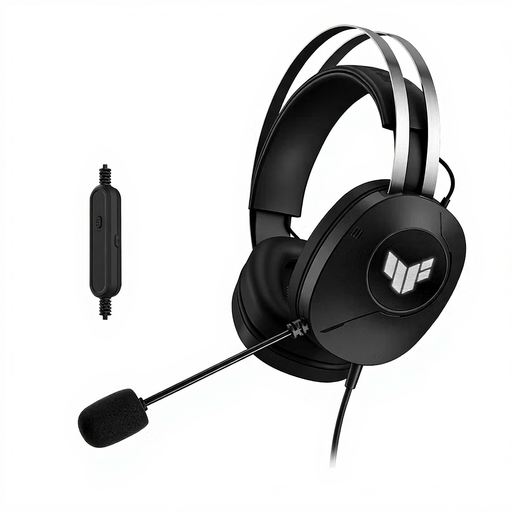
ASUS TUF Gaming H1 Gen II, wired USB Type-A headset, black
The USB Type-A connection and boom microphone make this version worth considering for a quiz on a computer with a compatible port.
The description lists a foldable microphone, adjustable headband and circumaural ear cushions. The wired connection limits how far you can move from the computer.
View at Joybuy
 No image available
Logitech PC 960 USB headset
The adjustable microphone boom and in-line controls are useful if you want to adjust the volume and mute the microphone while hosting.
The description lists soft ear cushions, an adjustable design and a mute indicator. The wired connection limits how far you can move from the computer.
View at Joybuy
 No image available
Trust Ayda, wired USB Type-A headset, black
Trust describes the microphone as noise-cancelling; make a test recording to hear how your voice sounds in your kitchen.
The product description lists an on-ear design, on-ear volume controls and a flip-up microphone boom for muting. The wired connection limits how far you can move from the computer.
View at Joybuy
Frequently asked questions
Do you need to change any settings after connecting the headset?
Yes. In Teams, select the headset as both the speaker and microphone, or use Zoom's speaker and microphone test. Try this before participants join.
How can you adjust the headset for comfortable use?
Adjust the headband and microphone boom, and keep the listening volume as low as is comfortable. According to the World Health Organization, hearing risks depend on both sound level and listening duration; a product specification alone can't determine a safe listening volume for you.
What are your rights when buying a headset online?
For distance purchases, the Dutch Government says you usually have a 14-day cooling-off period, although there are exceptions. In the Netherlands, you also have the right to receive a product that is in good condition, but there is no fixed statutory guarantee period. Assess any problem in light of the product's condition and how it has been used.


