Choose a wired USB headset with a connector that fits the computer you’ll use for the interview, and check that the microphone and mute controls are easy for you to use. A manufacturer’s claim about noise cancellation doesn’t guarantee how your voice will sound in your kitchen. Test the headset beforehand by making a recording and listening back to it.
Who is a USB headset for a job interview for?
Applicant with a busy kitchen
You want the interviewer to hear you clearly when there’s noise at home. Check the result with a test recording. Logitech and Trust describe their microphone features, but that alone doesn’t tell you how the headset will sound in your room. Microsoft Support explains how to test a microphone.
Applicant unsure about their laptop’s connection
You want to avoid finding that the connector doesn’t fit your computer’s port. Check whether you need USB-A or USB-C, and look at the exact model variant. Logitech and HP describe connection options that can vary between variants.
Applicant looking for peace and easy controls
You want to listen comfortably and be able to mute the microphone quickly. Check the fit, adjustability and location of the controls on the variant you choose. Logitech, Trust and HP offer different options across their product ranges.
What should you look for in a USB headset?
| What to consider |
What to look for when buying |
Who is this important for? |
| Being heard clearly over kitchen noise |
Check the microphone and mute function. Make a test recording with the kitchen sounding as it will during the interview. |
If there’s background noise, you’ll want the interviewer to be able to follow what you’re saying clearly. Around 36% of consumers put clear sound at the top of their list. |
| A compatible connection |
Check which computer port is available and the connector on the exact headset variant. |
If you’re not sure which port you use, you’ll want a headset that connects straight away. Around 29% of consumers prioritise connectivity. |
| Comfort and controls |
Check the fit and where the mute and volume controls are. Try the headset before your interview. |
If you want to listen comfortably and mute quickly during the interview, fit and controls matter. Around 21% of consumers make this their top buying priority. |
| Purchase price and your rights |
Compare offers for the same variant and read the applicable returns policy. |
If you don’t want to pay for features you don’t need, compare the right variant and check who to contact if it develops a fault. Around 14% of consumers prioritise the purchase price. |
Common pitfalls when buying a USB headset
-
Looking only for the word ‘USB’
USB-A and USB-C are different types of connector. If the connector doesn’t fit and you don’t have a suitable adapter, you won’t be able to plug the headset straight in.
Check your computer’s port and the connector on the complete model variant before you order.
-
Confusing microphone noise cancellation with silence for yourself
A description of microphone noise cancellation doesn’t mean you won’t hear background noise or that every kitchen sound will disappear for the interviewer.
Make a recording while wearing the headset and listen back to hear how your voice sounds in the room where you’ll have the interview.
-
Assuming the manufacturer’s warranty is the same as your full statutory guarantee
According to ACM ConsuWijzer, the Dutch statutory guarantee doesn’t have a fixed term of exactly two years. The manufacturer’s warranty is separate from your statutory rights against the seller.
Keep your proof of purchase and contact the seller if the product develops a fault.
Brands to consider
Logitech
The H390 is a wired USB computer headset with an adjustable microphone boom and in-line controls.
- Logitech lists USB-A and USB-C variants on its Dutch product page.
- For the USB-A variant described, Logitech specifies a 1.9 m cable and a noise-cancelling microphone. Check the variant: these manufacturer specifications don’t predict how clearly your voice will come through in your kitchen.
Trust
The Ayda USB-ENC is an on-ear headset for PC calls, with USB or USB-C connectivity according to Trust.
- Trust says you can mute the microphone by lifting it and adjust the volume on the earcup.
- Trust’s claim about reducing distracting noise doesn’t confirm how the headset will perform in your kitchen.
HP Poly
The wired Blackwire 3200 and 3300 series include a range of fit and connectivity options.
- HP describes mono and stereo options in the 3200 series, and a USB-C cable with a USB-A adapter included for the 3300 series.
- Don’t assume a feature listed for a series applies to every variant; check the full model number.
Jabra
The wired Evolve 20 range is designed for easy control during calls.
- Jabra provides information about an in-line control unit and separate mono, stereo, USB-A and USB-C variants.
- Check the full product number to confirm the connection and fit of the variant.
USB headsets at Joybuy
These wired USB headsets are worth considering for a job interview at the kitchen table. Before choosing, check that the connection, fit and controls suit your computer and preferences.
 Image unavailable
Logitech PC 960 USB headset
A wired USB headset to consider if you’re looking for one for computer calls. Check that the connection fits the computer you’ll use for your job interview.
View at Joybuy
 Image unavailable
Kingston USB Hi-Fi headset with microphone
An option if you’re looking for a wired USB headset with a microphone. Check that the fit suits you and that your computer recognises the headset.
View at Joybuy
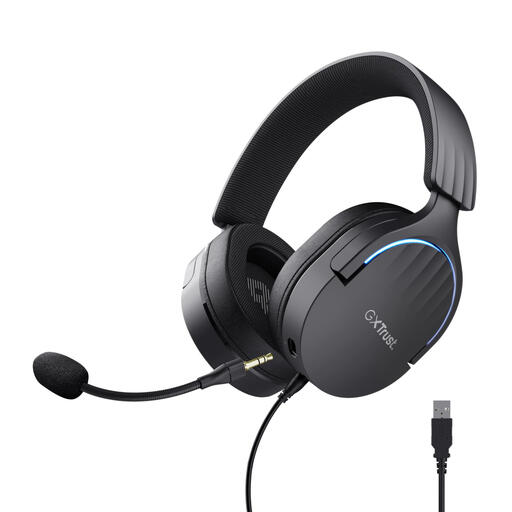 Image unavailable
Trust GXT 490 FAYZO Over-Ear 7.1 USB Gaming Headset
This USB gaming headset is described as over-ear in the product name. Check whether this fit will be comfortable for your interview and make sure it connects to your computer.
View at Joybuy
 Image unavailable
Trust Ayda USB Type-A headset, black
A wired USB headset for calls. Check that the USB Type-A connector fits the computer you’ll use for your job interview.
View at Joybuy
 Image unavailable
Edifier G2II 7.1 USB gaming headset, black
A wired USB gaming headset with a microphone. Before your interview, check that your computer recognises it as an audio device and that the fit suits you.
View at Joybuy
Frequently asked questions
How can I check the sound before my job interview?
In your calling app, select the connected headset as both your speaker and microphone, then make a test recording. Microsoft Support explains how to choose devices in Teams before joining a call, and how to test your microphone in Windows and listen back to a recording. Use your normal speaking voice when you test it.
What should I do if the other person can’t hear me?
First check that the physical or software mute function is switched off and that the calling app is using the microphone you intend to use. Microsoft Support recommends both checks for Teams.
Can I return a headset bought online if it doesn’t fit well?
For online purchases in the Netherlands, you usually have a 14-day cooling-off period from delivery, according to ACM ConsuWijzer. There are exceptions, including certain hygiene products that have been removed from their packaging. So check the terms that apply to your purchase.
Is the statutory guarantee in the Netherlands always exactly two years?
No. According to ACM ConsuWijzer, the law doesn’t set a fixed length for the statutory guarantee. It depends on how long you could reasonably expect the product to last with normal use. A manufacturer’s warranty doesn’t replace your statutory rights against the seller.


