What should you look for?
First check that the USB plug fits your calling device. Then consider the microphone position, wearing style and how easy it is to reach the mute control.
| What to consider |
What to look for |
Who is this important for? |
| Clarity |
Check whether the microphone boom is adjustable, and test your voice with normal background noise. |
If people are talking around the table, I want my voice to come through clearly and to be able to position the microphone. Around 36% of consumers say clarity is their main concern when buying. |
| USB connection |
Compare the port on your calling device with the plug on the exact version, and check whether an adapter is included. |
If my device has USB-C, I want to know in advance whether the headset will fit or comes with a suitable adapter. Around 29% of consumers prioritise the right connection. |
| Comfort |
Compare mono and stereo, and check that the fit feels comfortable for you. |
For a longer call, I want to listen comfortably and still hear people sitting next to me; keeping one ear free may be a factor. Around 21% of consumers put wearing style and fit first. |
| Call controls |
Check where the mute and volume controls are, and test muting in your calling app. |
If I want to say something at the table without others on the call hearing me, I want to be able to find the mute button quickly. Around 14% of consumers prioritise quick access to call controls. |
USB headsets for calls
This selection features wired USB headsets with microphones for calls. Check that the connection on each model is compatible with the device you’ll use for calling.
 No image available
Logitech PC 960 USB headset
Suitable for USB calls if you want to position the microphone and use the in-line controls.
The product description lists an adjustable microphone boom and mute and volume controls. The stated cable length is 240 cm, so your movement is limited by the cable’s reach.
View at Joybuy
 No image available
Kingston USB Hi-Fi headphones with microphone
Suitable for USB calls if you want to position the microphone boom close to your mouth.
The microphone boom rotates through 270 degrees. The stated USB cable length is 1.8 m, so you’re limited by the cable’s reach.
View at Joybuy
 No image available
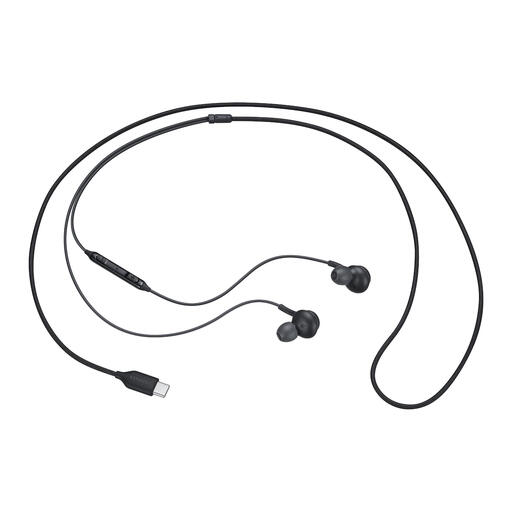
Samsung EO-IC100 wired in-ear headset, USB Type-C
Suitable for a calling device with USB Type-C if you’re looking for a wired in-ear headset with in-line controls.
The description lists a built-in microphone and microphone mute via the in-line controls. The USB Type-C plug won’t connect directly to a device without a compatible USB-C port.
View at Joybuy
 No image available
Trust Ayda wired headset, USB Type-A
Suitable for calls if you want to be able to flip the microphone up to mute it during a conversation.
The product description lists USB Type-A with a USB-C adapter cable, volume control on the ear cup and a stated cable length of 180 cm.
View at Joybuy
 No image available
Edifier G2II USB gaming headset
May suit USB calls if you’re looking for a detachable microphone and mute and volume controls.
The product description lists a wired USB connection, a detachable microphone and an adjustable headband.
View at Joybuy
Frequently asked questions
How can you check that the right microphone is active before a call?
Connect the headset and, in Windows, select the intended microphone under Sound > Input. Microsoft also describes a microphone test for Windows 10 and 11. If you have problems, check the mute button and microphone permissions for apps too. These steps don’t necessarily apply to other operating systems.
Do you need to charge a USB headset before a family call?
The models described here are wired; Jabra lists the Evolve 20 as powered via USB from a computer, with no battery. Check this separately if a headset also has a wireless mode.
What can you do if a headset bought online doesn’t work properly?
When you buy as a consumer in the Netherlands, you’re entitled to a product that works properly. According to the Dutch government, there is no fixed statutory warranty period; contact the seller if the product is faulty. A manufacturer’s warranty is in addition to your statutory rights.
Can you return a headset bought online?
According to the Dutch government, when you buy remotely from a business, you’ll often have a 14-day cooling-off period. Before buying, check the returns information that applies to your order; a seller’s longer returns policy is separate from the statutory cooling-off period.


