A different USB headset is worth considering if people struggle to hear you clearly or you want easier access to the microphone controls during a call. Choose one with a connector that works with your device. A headset can improve the sound, but not the camera image: if the picture is too dark, check the lighting and video settings first. Manufacturers describe microphone features, but these aren’t independent measurements of call quality in your room.
Who is this guide for?
The caller who’s hard to hear
You want your family to hear you clearly, even when there are other sounds in the room. Compare the microphones and test the recording; a manufacturer’s claim about noise cancellation doesn’t guarantee the same results in your room.
The caller in dim light
You want to be visible during the call and work out whether the problem is with the picture or the sound. If the picture is simply too dark, a new headset won’t solve the problem.
The caller who wants a simple set-up
You want to connect your headset without any fuss before the family call, select the right audio device and mute yourself quickly if needed. So check the USB connector and the controls.
What should you look for when buying?
First decide whether you mainly want to improve the sound, the controls or the camera image. Then check the connection and test your chosen microphone in the calling app before the call starts.
| What to consider |
What should you look for? |
Who is this important for? |
| Clear calls |
Check the microphone’s position and, once connected, test whether the calling app is using the right microphone. Descriptions of noise cancellation don’t guarantee results in every room. |
If I’m calling from a noisy room, I want my voice to come through clearly and to be able to position the microphone where I’m sitting. Around 33% of consumers prioritise call clarity. |
| Visibility in dim light |
First check the camera preview, the lighting and any exposure settings in your calling app. Assess the headset separately for sound quality. |
If people can’t see me clearly but can hear me, I want to check the camera image and lighting first rather than replace my audio equipment. Around 27% of consumers prioritise visibility. |
| USB connection |
Check your device’s port and the exact version of the headset. A product family may include versions with different connectors. |
If I want to make sure the headset will work with my computer before the call, I’ll check the plug and whether I need an adapter. Around 20% of consumers prioritise the right connection. |
| Quick muting |
Compare an in-line mute button with muting by flipping up the microphone, and test the controls in the calling app too. |
If I need to mute myself quickly during the family call, I want controls that are easy to recognise and reach. Around 13% of consumers prioritise easy muting. |
| Comfort |
Check the wearing style and any adjustment options. A specification doesn’t prove that the fit will be comfortable for everyone. |
If I’m wearing the headset for a long time, I want to consider the fit and whether I prefer one or two earcups. Around 7% of consumers prioritise comfort. |
Common buying pitfalls
-
Buying a headset to fix a dark camera image
A headset is for audio; you adjust video lighting separately. A new headset won’t change the lighting in your room.
Check your camera preview and lighting first. Only compare headsets if you also need to improve the sound or controls.
-
Choosing based only on the product family or model name
A product family may include different connectors or versions. For example, Trust has an Ayda version with a 3.5mm connector as well as a USB version; the Logitech H390 is also available with different USB connectors.
Before buying, compare the full version name with your device’s port and the connector on the version you’ve chosen. This helps you avoid needing an adapter or finding that you can’t connect the headset directly.
-
Assuming the stated warranty period covers all your legal rights
An additional manufacturer’s warranty and your legal rights are not the same thing. The Dutch Government says there is no fixed statutory warranty period in the Netherlands.
Keep your proof of purchase and contact the seller if the product is faulty. Check any additional warranty terms separately.
Brands to consider
Logitech
The H390 is a USB computer headset with a microphone boom and in-line controls. The Dutch product information lists USB-A and USB-C versions.
- Logitech lists an adjustable headband, swivel ear cushions and a noise-cancelling microphone for the H390.
- Check which connector comes with the version you choose. The noise-cancellation claim isn’t an independent test for a family call at home.
Trust
The Ayda USB-ENC is a USB headset with on-ear controls and a microphone that flips up to mute.
- Trust describes USB and USB-C use, soft ear cushions and a noise-cancelling microphone for the USB-ENC version.
- Ayda is also the name of a 3.5mm version. Check the full product name and connector; claims about effectiveness and comfort come from Trust.
HP Poly
According to HP, the Blackwire 3200 series consists of wired USB headsets with mono and stereo wearing options.
- HP describes an adjustable headband and various connection options within the series.
- Don’t assume the connector or wearing style from the series name alone; check the specific model version.
EPOS
The PC 8 USB is a wired stereo headset for computer use, with in-line controls.
- For this model, EPOS specifies a unidirectional microphone, mute and volume controls, and a 2 m cable.
- Claims about clarity and comfort haven’t been independently verified for a family call in a dimly lit room.
Jabra
The Biz 1100 EDU is a USB-A version from a range aimed at education. That makes it an option to compare, rather than a model specifically assessed for family calls.
- Jabra describes the headset as lightweight and lists microphone noise cancellation and PeakStop.
- These are manufacturer claims. Check the exact version and fit rather than assuming features apply to every model in the range.
USB headsets at Joybuy
These wired headsets are designed for calls and offer different connectors and ways to control the microphone. Check that the version matches your device’s port; none of these headsets will fix a dark camera image.
 No image available
Jabra Evolve2 30 SE USB headset
A wired stereo headset for calls, with in-line controls.
The product information lists a USB-A connection and a USB-C adapter, two integrated microphones and an in-line mute control.
View at Joybuy
 No image available
Logitech PC 960 USB headset
A USB headset for calls, with an adjustable microphone boom and quick mute controls.
The product information lists an adjustable microphone boom, a noise-cancelling microphone, and in-line mute and volume controls.
View at Joybuy
 No image available
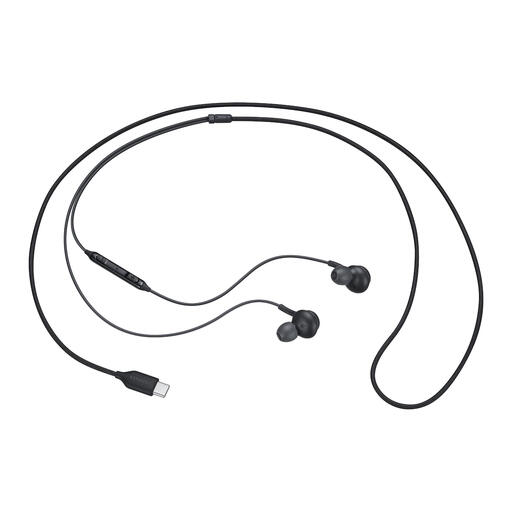
Samsung EO-IC100 USB-C in-ear headset
A wired in-ear headset for calls, if your device has a USB-C connection.
The product information lists in-line controls and microphone mute, plus several sizes of ear tips.
View at Joybuy
 No image available
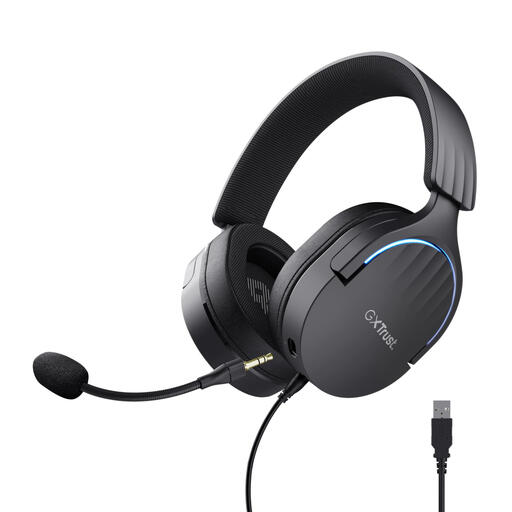
Trust GXT 490 FAYZO USB headset
A USB headset with a microphone for calls and controls on the earcup.
The product information lists a detachable microphone, mute and volume controls on the earcup, and adjustable, swivelling earcups.
View at Joybuy
 No image available
Trust Ayda USB headset
A USB headset for anyone who wants to mute the microphone by flipping it up.
The product information lists USB-A and a USB-C adapter cable, on-ear volume controls and an adjustable headband.
View at Joybuy
Frequently asked questions
Will a USB headset make me more visible in a dark room?
No. A headset is for audio; check your camera preview and lighting settings separately. Google Meet Help describes a feature for supported devices that can brighten an underexposed video image. Check whether it’s available on your device and in your app.
How can I check that everyone can hear me before the family call?
Select the connected headset as the microphone in your calling app and run a microphone test. Microsoft Support also recommends checking in Windows that the microphone has permission to be used, isn’t muted and is selected as the correct input device.
What should I do if I’m unhappy with a headset bought online or it breaks?
For eligible distance purchases from a business, you’ll often have a 14-day cooling-off period, according to the Dutch Government. If the product is faulty, you can contact the seller about your legal rights; according to the Dutch Government, the Netherlands has no fixed statutory warranty period. Check the terms that apply to your purchase.


