Start by checking your computer’s USB port and whether the controls work with your meeting app. A wired headset means you won’t need to charge a battery during the meeting, while a wireless model with a USB receiver can give you more freedom to move around. Also consider whether you want to keep one ear free, and test how your microphone sounds in your own home.
Who are these headsets for?
Meeting chairs in a noisy home
If you speak a lot during an online meeting, compare headsets with an adjustable microphone and easy-to-reach mute controls. Test how your voice comes across alongside the sounds you hear at home; specifications can’t predict this for every household.
Meeting chairs who want to stay aware of housemates
If you want to keep one ear free during the conversation, look for a mono model. A stereo headset plays sound through both ears, so check which style suits your situation. HP Poly and Jabra describe mono and stereo models in their product information.
Meeting chairs who need to move around
If you need to get up or fetch something, compare the limited freedom of movement you get with a cable against a wireless headset and its USB receiver. Also check that the receiver is compatible with the computer you use.
What should you look for when choosing?
First, check the connection and compatibility with your meeting app. Then choose between mono and stereo, and between wired and wireless, based on how you chair the meeting.
| Priority |
What to look for |
Who is this important for? |
| Being easy to understand |
Check the microphone’s position and whether mute works in your meeting app. Make a test recording or call. |
When I chair a meeting in a shared home, I want my voice to remain clear and easy to understand. Around 31% of consumers say clarity is their top concern when buying. |
| Connection and controls |
Check whether the USB-A or USB-C connection on the specific model matches your computer’s port. Make sure the buttons work with your app and the way you use it. |
If I want to connect without any hassle and mute the microphone from the headset, I check both the port and the app. Around 25% of consumers prioritise connectivity and call controls. |
| Keeping in touch with housemates |
Choose between mono, which leaves one ear free, and stereo, which plays sound through both ears. Mono leaves your free ear open to sounds around you. |
If I want to stay aware of what’s happening at home while chairing a meeting, I compare mono with stereo. Around 19% of consumers prioritise staying aware of their surroundings. |
| Freedom to move |
Compare the cable length with where you sit. For wireless models, check which USB receiver is included and remember that you’ll need to charge the headset. |
If I regularly need to get up during a meeting, I don’t want to be restricted by a headset cable. Around 13% of consumers prioritise freedom to move. |
| Wearing comfort |
Compare the fit and ear-cushion material of the exact model. Check whether you can try the headset on if that’s important to you. |
If I wear a headset for long periods, fit and ear cushions are my main considerations. Around 12% of consumers say long-lasting comfort is their top concern when buying. |
What to watch out for when buying
-
Confusing microphone noise reduction with silence for you
A microphone’s noise reduction is about how sound is picked up for the person you’re speaking to. It doesn’t prove that household noise will be reduced for you as the wearer.
Make a test call in the room where you plan to chair the meeting. Assess separately what you can hear and how your voice sounds to the person on the other end.
-
Choosing based on the model name alone
A product range may include USB-A and USB-C connections, as well as mono and stereo models. The name alone doesn’t always tell you which version you’re ordering.
Compare the full product name and what’s in the box with your computer’s port and the style of headset you want.
-
Assuming every generation has the same connection
JLab describes the GO Work Gen 2 as having a USB-C dongle. The older GO Work model on the Dutch-language product page is described, among other things, as coming with a USB-C to 3.5mm cable.
Before buying, check the generation, the actual audio connection and which parts are included with the model you’ve chosen.
-
Confusing a manufacturer’s warranty with your statutory rights
The Dutch government says there is no fixed statutory warranty period in the Netherlands. Your rights if a product doesn’t meet expectations are separate from any additional manufacturer’s warranty.
Keep your proof of purchase and contact the seller if there’s a fault.
Brands to consider
Logitech
The H390 is a wired computer headset for anyone who wants a USB connection and cable-mounted volume and mute controls.
- For the USB-A version reviewed, Logitech lists an adjustable microphone and a 1,9 m cable.
- The Dutch product page also offers USB-C as an option. Check the connection on the version you’re ordering; the product description doesn’t tell you how the microphone will perform in your home.
HP Poly
The Blackwire 3200 series includes mono and stereo styles; the Blackwire 3220 USB-A reviewed here is a stereo model.
- HP specifies a noise-cancelling microphone and mute and volume controls for the Blackwire 3220 USB-A.
- Features listed for other connections or models in the series don’t automatically apply to this USB-A model.
Jabra
The Evolve 20 is a wired range with mono, stereo and USB variants. The Evolve2 65 is a separate wireless range.
- Jabra describes call controls and a choice of connectors and ear cushions for the Evolve 20. For the Evolve2 65 USB-A MS Teams Stereo, Jabra lists a Bluetooth adapter.
- Check the full range, model and included parts. Manufacturer claims about sound quality aren’t an independent comparison.
JLab
According to JLab, the GO Work Gen 2 can be used wirelessly or wired and comes with a USB-C dongle.
- JLab lists a mute indicator and USB-C dongle for Gen 2.
- The older GO Work model has different connection options listed, so check the generation and audio connection.
EPOS
The IMPACT SC 60 USB ML from the IMPACT 100 series is a wired, dual-ear headset for computer communications.
- EPOS specifies cable-mounted mute and volume controls, foam ear cushions and a noise-cancelling microphone.
- These are manufacturer specifications, not proof of a relative advantage over other models.
Joybuy products
This selection includes wired USB headsets for computer meetings and a Jabra headset listed as supporting Bluetooth and wired use with a USB-C cable. For each model, check the connection and features of the specific version.
 No image available
Trust GXT 490 FAYZO USB Type-A, white
A wired USB-A headset with controls for anyone who wants to be able to mute quickly during a computer meeting.
The product description lists a flexible, detachable microphone, mute and volume controls, soft over-ear cushions and adjustable ear cups. A USB-A port is required for a direct connection.
View at Joybuy
 No image available
Logitech H540 USB headset
A wired stereo headset for anyone who wants to connect to a computer via USB-A and use controls on the ear cups.
The product description lists a noise-cancelling microphone and mute and volume controls. A USB-A port is required for a direct connection.
View at Joybuy
 No image available
Razer Kraken V3 X, black
A wired USB headset with a microphone for anyone who wants to listen through both ears during a computer meeting.
The product description lists stereo sound, a 180 cm cable and a cardioid microphone for speech. The stated microphone features aren’t based on an independent test in a shared home.
View at Joybuy
 No image available
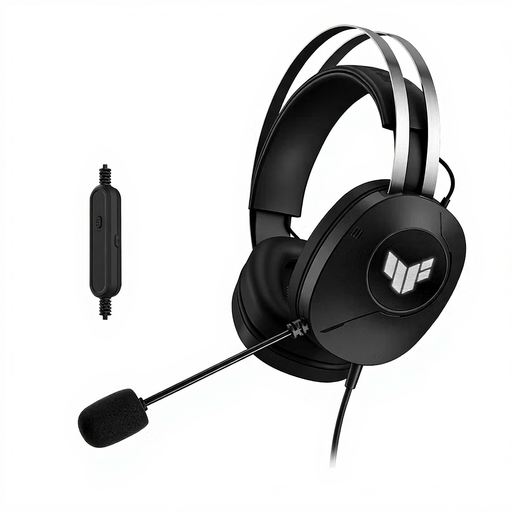
ASUS TUF Gaming H1 Gen II USB Type-A, black
A wired USB headset with a microphone for computer meetings where you want to listen through both ears.
The product description lists stereo sound, a 200 cm cable, a boom microphone, an adjustable headband and circumaural ear cushions. A USB-A port is required for a direct connection.
View at Joybuy
 No image available
Jabra Evolve2 75
A headset for anyone who wants to move around while chairing a meeting without a headset cable, but also wants the option of a wired connection.
The product description lists Bluetooth and wired use with a USB-C cable. This cable is required for the wired connection described. The stated microphone features are product information, not an independent test of speech clarity.
View at Joybuy
Frequently asked questions
How do I set up my headset for a meeting?
Connect the suitable USB version and select the headset as your speaker and microphone in your operating system and meeting app. Then test the volume and mute controls. If you have connection problems, the Logitech H390 manual also recommends trying another USB port and connecting the headset directly, without a hub.
Do headset buttons for Teams work in a browser too?
Not always. Microsoft says that answering calls, muting and adjusting the volume using the headset buttons aren’t available for Teams calls and meetings in a web browser when using the Modern USB Headset. For other headset models, check separately whether the headset, app and way you’re using it support the buttons.
Am I always entitled to exactly two years’ statutory warranty in the Netherlands?
No. The Dutch government says there’s no fixed statutory warranty period in the Netherlands; what you can expect from a product depends on the circumstances. If a product doesn’t meet expectations, contact the seller.
Can I return a headset bought online if it doesn’t fit well?
For a qualifying distance purchase, you generally have 14 days to change your mind, according to the Dutch government. There are exceptions, and the seller must inform you of the terms, so check them for the specific offer. The cooling-off period for changing your mind is separate from your rights if a product is faulty or doesn’t meet the terms of the agreement.


