A USB headset may be suitable if you’re leading the discussion and remote participants mainly need to hear your voice. Choose a model with a microphone, connection and controls that work with your computer and meeting app. If there’s also a group in the room with you, your headset microphone won’t automatically pick up their voices, so you’ll also need to consider the room audio. A mono headset leaves one ear free, while stereo sound comes through both earcups.
Who is this advice for?
Leading a hybrid group
You’re discussing a book with people in the same room as well as remote participants. First, work out how the other people in the room will be heard. Microsoft Support recommends testing the audio setup for the room and for online participants separately.
Leading an online discussion
Everyone is joining from a different location. You’re looking for a microphone that sits close to your mouth and a mute control that’s easy to reach during the discussion.
Leading long discussions
You’ll be listening for an extended period, so it’s worth considering the fit, connection and choice between mono and stereo. Logitech and Jabra describe different wearing styles and options; the best way to judge how comfortable a headset feels is to try it yourself.
What should you look for when choosing?
Everyone is online
Choose this approach: if you’re the only speaker at your computer and your voice will be transmitted through the headset.
Bear in mind: a microphone positioned by your mouth isn’t designed to pick up other people in the room.
A group is in the same room
Choose this approach: assess the audio setup for the whole room if remote participants also need to hear everyone else there.
Bear in mind: several devices with active audio in one room can cause echo; Zoom lists this as a possible cause.
| What to consider |
What should you check? |
Who should consider this most? |
| Voices in the room |
Work out who will be in the same room and which microphone needs to pick up each speaker. |
If people are sitting at the table with you, you’ll want to know whether remote participants will be able to hear their voices too. Around 33% of consumers prioritise group pick-up. |
| How clearly the discussion leader can be heard |
Check whether the microphone is adjustable, then test your voice against background noise in the meeting app. |
If you’re asking questions or taking turns, you’ll want online participants to be able to follow what you’re saying. Around 27% of consumers prioritise picking up their own voice. |
| Listening and wearing comfort |
Check whether the model is mono or stereo, and assess the headband, ear cushions and fit. |
For a long discussion, you’ll want a style that suits you and lets you hear as much of the room as you prefer. Around 20% of consumers prioritise long listening sessions. |
| Connection and controls |
Compare the USB connector on the exact model with your computer, then test the microphone, speaker and mute button in the meeting app. |
If you want to connect without hassle and mute yourself during the discussion, also check which audio source the app is using. Around 20% of consumers prioritise connection and controls. |
Common mistakes when choosing
-
Mistaking a headset microphone for a group microphone
A boom microphone close to your mouth picks up the wearer, but it won’t automatically solve the problem of how to make other people in the same room audible.
Before the discussion, work out who will be speaking and where, then test whether every voice can be heard remotely.
-
Assuming every version of a model is the same
The connector, mono or stereo option and controls can vary between versions.
Check the full product specification and compare the connection with the ports on your computer before ordering.
-
Muting only the microphone when there’s echo
According to Zoom, several computers with active audio in the same meeting room can cause echo.
Check the audio connection on every device in the room and follow the meeting app’s guidance for any additional devices.
Recommended brands
Logitech
The H390 is a wired USB headset for anyone looking for an adjustable boom microphone and in-line controls. Check the USB connector and colour of the version you choose.
- Logitech lists an adjustable headband, a rotating boom microphone, and volume and mute controls.
- For the USB-A version described, Logitech specifies a 1.9 m cable, which limits how far you can sit from your computer. These are manufacturer specifications, not an independent assessment of microphone quality.
HP Poly
The Blackwire 5200 series is worth considering if you want to compare mono and stereo options or different connection types. HP distinguishes between the mono 5210 and stereo 5220.
- HP lists a USB-C cable with an attached USB-A adapter, control buttons and a noise-cancelling microphone for the series.
- Check the exact version. The manufacturer’s description isn’t an independent assessment of comfort or how clearly you’ll be heard.
Jabra
The Evolve 20 is a wired headset for calls, available in mono and stereo versions.
- Jabra describes different USB connection options and an in-line control unit with features including a mute function.
- The connection and features vary, so check which version you’re choosing before comparing products.
Headsets at Joybuy
These product suggestions are aimed at a discussion leader who speaks to online participants through their own headset. Check the connection for each version; a personal headset doesn’t replace room audio if other people in the room also need to be heard.
 No image available
Jabra Evolve2 30 SE
A stereo version for discussion leaders who speak online and want controls for calls and muting.
The product description lists USB-A, integrated microphones, and controls for volume, muting and calls.
View at Joybuy
 No image available
Razer Kraken V3 X
A headset for anyone looking for a microphone for voice chat and stereo sound during online discussions.
The product description lists a cardioid microphone, stereo audio and controls on the earcup.
View at Joybuy
 No image available
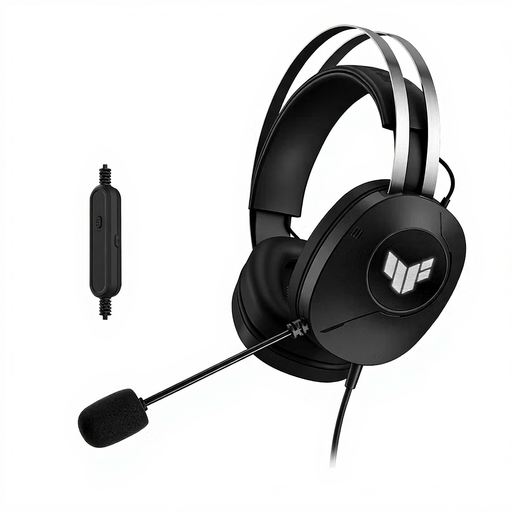
ASUS TUF Gaming H1 Gen II
A headset with a boom microphone for discussion leaders who speak online themselves.
The product title lists USB Type-A, while the product description mentions an adjustable headband and circumaural ear cushions.
View at Joybuy
 No image available
Logitech PC 960
A USB headset for anyone who wants to position the microphone and mute calls while leading a discussion.
The description lists an adjustable boom microphone, mute control and in-line volume control.
View at Joybuy
 No image available
Logitech H340 USB headset, black, wired
A wired headset for discussion leaders who speak online and want an adjustable microphone.
The product description lists USB, digital stereo audio and an adjustable headband.
View at Joybuy
Frequently asked questions
Can one headset pick up everyone’s voice around the table?
Don’t assume it can. A boom microphone by your mouth picks up your voice. If other people also need to be heard remotely, assess the audio setup for the whole room or use separate microphones. This follows from the microphone’s position and Microsoft Support’s guidance on hybrid meetings.
What should you check before your first online call?
Connect the right USB version and select the intended microphone and speaker in your meeting app. Test the audio and mute button before the discussion starts; Microsoft Support explains how to manage audio sources in Teams.
Why can echo occur when several participants join from the same room?
Zoom lists several computers with active audio in the same meeting room as a possible cause. Check the audio connection on the additional devices and follow the meeting app’s instructions; muting only the microphone may not be enough.
What are your rights in the Netherlands if the headset disappoints or breaks too soon?
For an online consumer purchase, you generally have a statutory cooling-off period of up to 14 days after delivery; check whether an exception applies to your purchase. Separately, you’re entitled to a legal guarantee if the product doesn’t meet what you could reasonably expect under normal use. ACM ConsuWijzer points out that the seller is responsible for resolving this kind of problem; a fixed two-year guarantee for every headset isn’t a general rule.


