Who is this for?

Discussion leader with online guests

You’ll be speaking to people joining remotely and want to hear them clearly while leading the book discussion. A personal headset is designed for this; Logitech and EPOS describe their wired USB headsets as being for personal use.

Host with people round the table

You want others at the kitchen table to be able to talk to online guests too. In that case, compare a device designed for group calls; HP Poly positions the Sync 40 for small meeting rooms. You’ll still need to test how it works in your kitchen.

Leader of a long discussion

You’ll be wearing the headset throughout the discussion and may also want to keep hearing people sitting next to you. Compare mono and stereo options, and check the fit. HP Poly describes mono and stereo wearing options for the Blackwire 3200 series; Jabra describes the ear cushions on the Evolve2 30 SE.

What should you look for when choosing?

Wired USB headset, mono

Choose this if: you want to hear online participants while still keeping an ear out for people sitting next to you; with mono, one ear remains uncovered.

The trade-off: there’s no proof that the microphone on a personal headset will pick up everyone round the table clearly. Also check the connection on the exact model you’re considering.

Wired USB headset, stereo

Choose this if: you’re leading the discussion and want to focus mainly on the voices of online participants. The Logitech H390 and EPOS PC 8 USB are examples of personal wired headsets.

The trade-off: two ear cups can make it less practical to follow conversations round the table. A claim about microphone noise reduction doesn’t prove that people at the table will be picked up clearly.

USB speakerphone for a group

Choose this if: several people need to be able to speak to and listen to remote participants. HP Poly positions the Sync 40 for small meeting rooms.

The trade-off: the call’s audio plays out into the room. Test where you place it; Microsoft warns in its Teams Rooms instructions that echo and feedback can occur if more than one device microphone is active in this setup.

What to consider What to look for when buying Who it matters most to
Everyone round the table being heard Decide who will speak directly to online guests. If several people locally will be speaking, compare a speakerphone for a small meeting room and test where you place it. If several people at the table want to join in, you’ll want their voices to reach the online participants. Around 25% of consumers put participation from everyone at the table first.
The discussion leader being heard clearly Check whether the microphone boom is included and adjustable, and test the microphone in the calling app you use. If you’ll mainly be asking questions or reading passages aloud, you’ll want your own voice to come through clearly. Around 25% of consumers prioritise the discussion leader being heard clearly.
USB connection Compare the port on your computer with the connection on the exact model. Logitech offers the H390 with USB-A and USB-C connections. If you want to connect the headset directly to your device, its USB version needs to match the port available. Around 19% of consumers put this connection first.
Wearing style and staying in touch with people at the table Compare mono and stereo options, the headband adjustment and the ear cushions. A product description can’t predict how comfortable a headset will feel to you. During a long discussion, you’ll want to follow online voices while still hearing the people next to you. Around 19% of consumers prioritise this combination of comfort and staying in touch with people at the table.
Muting and adjusting the volume Check whether the exact model has mute and volume controls, and where they’re positioned. If you need to check something with someone at the table during the call, you’ll want to be able to mute the microphone or adjust the volume quickly. Around 12% of consumers make quick controls their top priority.

Common buying mistakes

  • Confusing microphone noise reduction with picking up everyone at the table

    A personal headset is designed for the person wearing it. A claim that it reduces background noise doesn’t prove that people further away round the table will be picked up clearly.

    Decide in advance how many people will be joining in locally, then test the microphone from their usual seats.

  • Looking only at the model name

    The Logitech H390 is available with USB-A and USB-C connections, so the model name alone doesn’t tell you which plug you need.

    Before ordering, compare your device’s port with the connection on the exact model.

  • Using multiple devices for meeting audio at the same time without testing

    Microsoft warns in its Teams Rooms instructions that echo and feedback can occur if more than one device microphone is active in this setup.

    In Teams Rooms, deliberately select the active microphone and speaker, then test the setup with remote participants.

Brands to consider

Logitech

The Logitech H390 is a wired personal USB headset. The manufacturer offers different USB connections, so check which version you need.

  • Logitech lists a rotating microphone boom and in-line volume and mute controls for the H390.
  • Its personal design doesn’t prove that everyone round the table will be picked up clearly.

HP Poly

The Blackwire 3200 series includes personal headsets; the separate Sync series includes speakerphones. The manufacturer positions the Sync 40 for small meeting rooms.

  • HP Poly describes mono and stereo wearing options for the Blackwire 3200 series.
  • Connections vary by model. The manufacturer’s positioning of a speakerphone isn’t a test of how it will work at your kitchen table.

EPOS

EPOS describes the PC 8 USB as a wired stereo headset for personal use with a PC or Mac.

  • EPOS lists a unidirectional microphone and in-line volume and mute controls.
  • With stereo, both ears are covered. If you want to follow conversations nearby, consider how that fits with the way you’ll be taking part.

Jabra

The Evolve2 30 SE is a personal office headset. When buying, check the exact USB and platform version.

  • According to Jabra, the Evolve2 30 SE has a two-microphone system and soft ear cushions.
  • This information from the manufacturer doesn’t prove that other people at the table will be picked up clearly.

Products at Joybuy

This selection includes wired USB headsets for people who’ll be doing most of the talking, plus a speakerphone option for discussions where several people at the table will be taking part.

Logitech PC 960 USB Wired Headset

Logitech PC 960 USB Wired Headset

A wired USB headset for people who’ll be doing most of the talking to online guests.

View at Joybuy

Logitech H340 USB Wired Headset, Black

Logitech H340 USB Wired Headset, Black

A wired USB headset for discussion leaders who’ll be speaking to online participants themselves.

View at Joybuy

Jabra Speak2 55 MS Teams, Dark Grey

Jabra Speak2 55 MS Teams, Dark Grey

The speakerphone option in this selection for calls where several people at the table want to talk to online guests; it isn’t a headset you wear.

View at Joybuy

Trust Ayda Wired Headset, USB Type-A, Black

Trust Ayda Wired Headset, USB Type-A, Black

A wired USB Type-A headset for people who’ll be speaking themselves and want quick access to mute and volume controls.

View at Joybuy
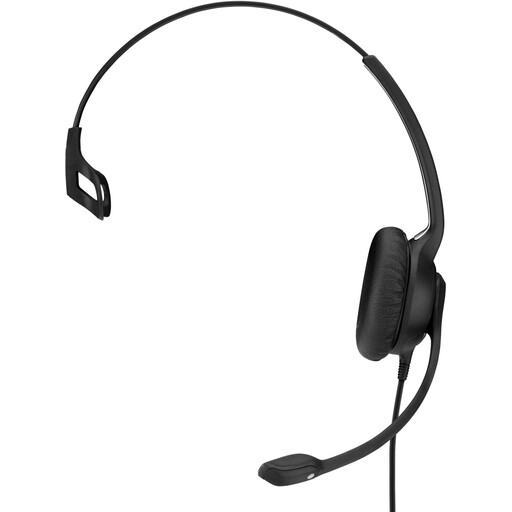
EPOS Sennheiser Impact SC 230 USB MS II Wired OE Headset, Black

EPOS Sennheiser Impact SC 230 USB MS II Wired OE Headset, Black

The mono version may suit you if you want to hear online participants while staying in touch with people at the table.

View at Joybuy

Frequently asked questions

Can one USB headset let everyone at the table talk to online guests?

Don’t count on it without testing first. Personal headsets are designed for the person wearing them; HP Poly positions the Sync 40 as a speakerphone for small meeting rooms. Choose based on who needs to speak directly, and test the setup.

How can you test your headset before the book discussion?

Connect the right USB version, select the intended microphone and speaker in your calling app, then check that other people can hear you. Check the mute button too; Zoom recommends checking the connection and audio settings if you have audio problems.

What are your rights when buying a headset online?

For online consumer purchases in the Netherlands, you generally have a 14-day cooling-off period after delivery; legal exceptions may apply. Separately, the seller remains responsible under the legal guarantee if, under normal use, the product doesn’t meet your reasonable expectations. ACM ConsuWijzer explains these consumer rights.

What can you do with your old headset?

Take discarded electrical equipment to an appropriate collection point. When buying a similar new device, you can also use the take-back scheme; the Dutch government explains the available return options.
