First, choose a USB headset that fits your computer’s port and lets you position the microphone close to your mouth and mute it quickly. Then measure the cable route with the desk both sitting and standing height. For longer conversations, also consider the fit and whether you want to keep one ear free. A noise-cancelling microphone does not automatically mean it will pick up other people in the room clearly.
Who is this for?
Discussion host who wants to be heard clearly
You lead the online discussion and switch frequently between speaking and listening. Consider the microphone position and how easy it is to mute. A description of the microphone from Logitech or Trust is no substitute for a test call.
Host who alternates between sitting and standing
You adjust the desk during the discussion. Check that the cable, USB port and controls remain easy to use in both positions without pulling on the headset. Arboportaal recommends varying your working posture.
Host of a longer group conversation
You wear the headset for longer and may also want to hear people in the room. Compare the adjustability and mono or stereo version of the exact model.
What should you look for?
Start with the microphone and mute control, then check the connection and cable route. Finally, consider the fit and how much you want to hear from the room.
| Consideration |
What should you check? |
Who should prioritise this? |
| Your voice and muting |
Check whether the microphone is adjustable and where the mute control is. Test your voice in the calling app and room you’ll be using. |
If I’m leading the discussion, I want to position the microphone near my mouth and mute it quickly. Around 31% of consumers say speaking clearly and muting are their top priorities. |
| The right USB connection |
Check which ports are available on your computer and the connection on the exact version you’re considering. Don’t assume compatibility based on the model range alone. |
If I want a straightforward connection, I’ll check the port and any adapter before buying. Around 25% of consumers prioritise having the right USB connection. |
| Cable and freedom of movement |
Measure the route from the USB port to your head at both desk heights, leaving enough slack for movement. |
If I switch between sitting and standing during the discussion, I want to avoid the cable becoming taut. Around 25% of consumers prioritise the cable route and freedom of movement. |
| Fit and awareness of the room |
Compare adjustability and mono or stereo versions. Try the fit yourself if possible, rather than choosing based only on the stated weight. |
If I want to hear people sitting beside me during a long conversation, I’ll consider the fit and version. Around 19% of consumers prioritise wearing comfort and awareness of the room. |
Common pitfalls
-
Confusing microphone noise cancellation with picking up the whole group
The microphone boom is designed to sit near the wearer’s mouth. A claim about reducing background noise doesn’t mean it will pick up other people around the desk clearly.
Test a call beforehand with someone else speaking in the room. Assess how well the group is picked up separately from the headset microphone.
-
Assuming a model range represents a single, complete version
Trust distinguishes between the Ayda USB and Ayda USB-ENC; Blackwire models come with different connections and configurations. A product listing may also have a different connection from the one you expect.
Before buying, compare the full model name and connection with the manufacturer’s product information.
-
Checking the cable length only while sitting
Raising the desk changes the cable route you need. Logitech specifies a cable length of 1.9 m for the H390 USB-A.
Measure from the USB port to your head at both desk heights, leaving enough slack for normal movement.
Brands to consider
Logitech
The H390 is a personal USB headset for computer calls; Zone Wired is a different, business-focused wired range.
- Logitech says the H390 USB-A has a microphone boom, a mute control and a 1.9 m cable.
- Check the USB version you’re choosing and the cable route. The specifications are not an independent test of the microphone.
Trust
The Ayda USB 25088 and Ayda USB-ENC 25089 are different versions for PC calls.
- Trust describes the USB-ENC 25089 as having a noise-cancelling microphone that mutes when you flip the microphone boom up.
- The stated 1.8 m cable belongs to the separate Ayda USB 25088. Don’t assume the USB-ENC has the same cable length without checking.
HP Poly
Blackwire includes business headsets with different connections and mono and stereo models.
- HP describes the Blackwire 3320, part number 8X220AA, as a stereo version with USB-C and an included USB-A adapter.
- Check the full model number and connection. Specifications for one Blackwire version don’t automatically apply to another.
Jabra
The Evolve2 40 SE is a range to consider if passive noise isolation and calls through a UC platform are important to you.
- Jabra describes the headset as having ear cushions with passive noise isolation and a microphone boom.
- Choose the exact mono or stereo version, connection and platform version. The manufacturer’s description can’t tell you how well it will fit your needs.
EPOS
The IMPACT 100 is available in mono and stereo versions with a wired USB connection.
- EPOS specifies USB-C with a USB-A adapter included. The stated weight of 76 g applies to the stereo versions.
- The weight and the manufacturer’s claims about call quality don’t prove that the fit or microphone will be better in your room.
Products at Joybuy
These product choices are intended for personal calls at a desk. They include wired USB headsets and a wireless headset with a USB-A Bluetooth adapter.
 No image available
Logitech PC 960 USB headset
A wired USB headset to consider if you want to position the microphone and mute it quickly during the discussion.
The stated cable length is 240 cm. The in-line controls include volume and mute functions, and the microphone boom is adjustable.
View at Joybuy
 No image available
Jabra Evolve2 30 SE
A wired USB-A headset to consider if you want to control the headset from your workstation.
The product description lists in-line controls for mute, volume and calls, an adjustable headband and memory foam ear cushions.
View at Joybuy
 No image available
Logitech H340 USB headset
A wired USB headset to consider if you’re looking for an adjustable microphone for computer calls.
The stated cable length is 180 cm. This version has stereo sound and in-line controls.
View at Joybuy
 No image available
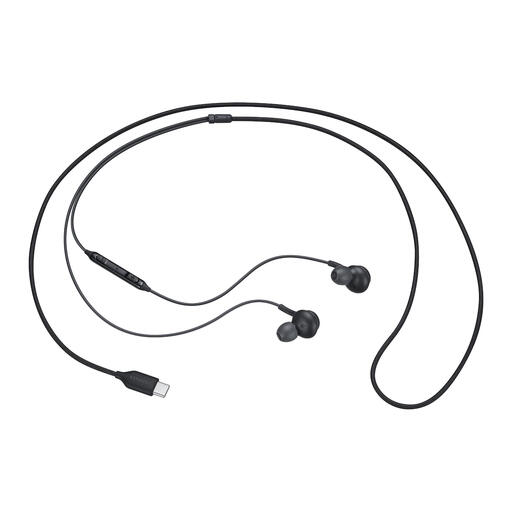
Samsung EO-IC100 USB Type-C in-ear headset
A wired in-ear option to consider if your computer has a compatible USB Type-C connection.
The product title mentions a microphone for calls; the specifications list in-line controls and microphone muting. The description mentions several sizes of ear tips.
View at Joybuy
 No image available
Jabra Evolve2 65 USB-A Black MS Mono
A mono version to consider if you want to keep hearing people in the room during calls.
The product description lists a USB-A Bluetooth adapter for the computer. This is a wireless Bluetooth headset, so charge it before use.
View at Joybuy
Frequently asked questions
How do you set up your headset before the book discussion starts?
Select the headset as your microphone and speaker on your computer and in the calling app. Position the microphone boom near your mouth, check the mute function and make a short test call. For the Evolve2 40 SE, Jabra recommends keeping the microphone close to your mouth.
How should you use a headset during a longer conversation?
Start with the listening volume low and avoid prolonged exposure to loud sounds. Vary your posture while working at the computer; according to Arboportaal, there is no single healthiest working posture.
What can you do if the headset breaks quickly or you’re unhappy with it after buying online?
If a product doesn’t meet expectations during normal use, the seller is responsible for the statutory guarantee, according to ACM ConsuWijzer. Online consumer purchases generally come with a 14-day cooling-off period after delivery, although exceptions apply. The cooling-off period for changing your mind is separate from your rights if a product is faulty.
Can you record the book discussion without telling the participants?
Don’t assume that your choice of headset determines whether you’re allowed to record a conversation. If an organisation records identifiable participants and processes their personal data, the Dutch Data Protection Authority says they must be told what will happen to their data and why; the processing must also have an appropriate GDPR legal basis. The rules for a purely private conversation depend on the circumstances.


