What should you look for when choosing?
First, check your hand warmer’s charging requirements. Then decide whether you need extra ports and where you want to put the charger while it’s in use.
| What to consider |
What to look for |
Who is this important for? |
| Connection and power supply |
Compare the manual and supplied cable with the connections and output of the port you plan to use. For a specific hand warmer model, Silvergear specifies 5 V / 1 A and a USB-A-to-USB-C cable. |
I want to avoid choosing a charger that isn’t compatible with my hand warmer’s cable or requirements. Around 33% of consumers prioritise a suitable connection and power supply. |
| Charging several devices at once |
Count the devices you’ll connect at the same time and check how power is shared between them. Xtorm states that the SlimLine 33W has a combined output of 15 W when both ports are in use. |
I want to charge my hand warmer alongside other work devices and know how much power will be available at each port. Around 27% of consumers prioritise having enough ports and power for simultaneous charging. |
| Desk space |
Check the distance to the wall socket, the cable length and the space around the charger. The Fire Service advises placing chargers in an open space so heat can escape. |
I want to reach the charging points on my desk without creating an awkward setup. Around 20% of consumers prioritise easy access and desk placement. |
| Safe use |
Follow your hand warmer’s manual, don’t use damaged cables and keep the charger uncovered. Also check whether the product provides the usage and safety information you need. |
I want to check the requirements and use the charger in a suitable place. Around 20% of consumers consider safe charging and product information their most important buying criteria. |
Charging stations and chargers at Joybuy
These product options are designed for USB charging on or around a home-office desk. Before buying, check that the ports and output are suitable for your hand warmer’s cable and charging requirements.
 No image available
7-in-1 Cube Power Strip, 1.5 m cable
A desk-friendly option if you want to combine USB ports and wall sockets at a single connection point.
The product name lists USB-A and Type-C ports, several AC sockets, a switch and a maximum of 2500 W. The cable is 1.5 m long. Don’t plug this extension lead into another extension lead, and keep it away from water and damp.
View at Joybuy
 No image available
6-in-1 Charging Station 320W
A multi-port option if you want to connect a hand warmer and other USB devices to a single charging point.
The product name lists 320 W and two retractable USB-C cables. Check the power distribution per port and whether the cables meet your hand warmer’s requirements.
View at Joybuy
 No image available
Lenovo Dual USB-C 65W GaN Charger
A wall charger to consider if your hand warmer, or a suitable cable for it, can connect via USB-C.
The product name lists two USB-C ports, an EU plug and a 1.5 m USB-C cable included. If your hand warmer has a different connection, use only a suitable cable.
View at Joybuy
 No image available
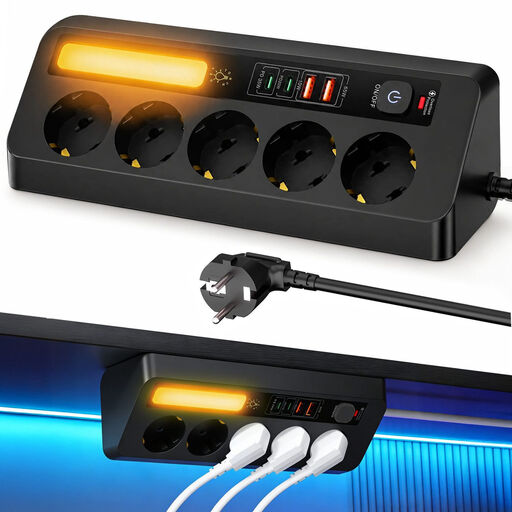
Corner Power Strip 9-in-1, 2 m cable
A desk-friendly option if you want USB connections and standard wall sockets in one place.
The product name lists five sockets, four USB ports, PD 35 W and a 2 m cable. Check what output is available when you use several ports at once.
View at Joybuy
 No image available
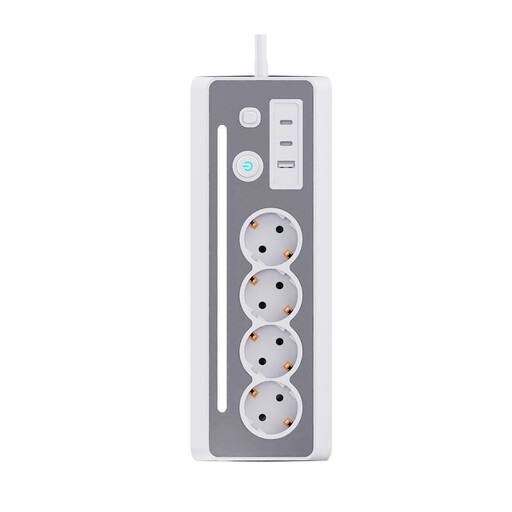
7-in-1 Desk Power Strip
A desk-friendly option if you want to combine USB charging ports and wall sockets at your workstation.
The product name lists three Schuko sockets, three USB ports and a 1.5 m cable. Check that the USB connections are suitable for your hand warmer’s cable.
View at Joybuy
Frequently asked questions
Can you charge your USB hand warmer with any USB-C charger?
You can only tell by checking the requirements for your model. For the hand warmer it reviewed, Silvergear specifies a USB-A-to-USB-C cable and a suitable 5 V / 1 A power source. So check the manual and cable that came with your own hand warmer.
Can you use your hand warmer while it’s charging?
Follow the instructions for your model. Silvergear says the hand warmers it reviewed must not be used while charging; that doesn’t automatically apply to every other model.
Where’s the best place to put the charger while it’s charging?
Follow the manual and leave the charger uncovered so heat can escape. The Fire Service also advises against using damaged cables and recommends charging battery-powered devices in a room with a working smoke alarm.
What can you do if a new charger breaks quickly during normal use?
In the Netherlands, you can claim under the legal guarantee if a product doesn’t perform as you could reasonably expect during normal use. ACM ConsuWijzer explains that the seller is then responsible for providing an appropriate solution at no cost; what’s appropriate depends on the circumstances.
Does a mains-powered charging station have to meet electrical product safety requirements?
Yes. Dutch government guidance treats chargers as electrical equipment subject to the relevant European safety requirements. Business.gov.nl states that manufacturers must apply a CE mark to equipment that meets the technical and administrative requirements. A CE mark is not an independent practical test of a specific product.


