
Owner of a single hand warmer
You want a suitable connection at a shared desk without choosing a larger charging station than you need. Start with your hand warmer’s manual; Ocoopa’s manual also shows that charging behaviour can vary by model.


Choose a charger based on your hand warmer’s charging instructions and connector; a higher total power rating doesn’t necessarily mean it will charge faster. A multi-port desk charger is most useful if you want to connect other devices at the same time. If so, also check the output per port, the layout and whether the exact model meets the relevant requirements.
You want a suitable connection at a shared desk without choosing a larger charging station than you need. Start with your hand warmer’s manual; Ocoopa’s manual also shows that charging behaviour can vary by model.
You want to connect other USB devices as well as your hand warmer. Compare the number of USB-A and USB-C ports, and check what the ports you choose can deliver when used at the same time.
You want to keep the charging area clear, cables undamaged and equipment uncovered while charging. Brandweer Nederland recommends placing chargers in an open space and not using damaged cables or chargers.
First, check that the charging port is compatible with your hand warmer’s cable and instructions. Then consider whether you need extra ports for other devices at your desk.
| What to consider | What should you check? | Who is this important for? |
|---|---|---|
| Connector and charging compatibility | Check the manual to see which cable and adapter are permitted, then compare them with the output of the port you want to use. | If I only want to connect my hand warmer, I start with the connector and instructions for that specific model. Around 36% of consumers prioritise connector and charging compatibility. |
| Safe charging at your workspace | Check the CE marking and exact model of a mains-powered charger. Make sure you also have a clear, stable place to use it. | If I share charging equipment with others, I check that the cables are in good condition and that there is enough space around the charging area. Around 29% of consumers prioritise safe charging. |
| Ports for simultaneous use | Count the devices that will be connected at the same time, then compare the USB-A and USB-C ports and the output per port. | If several people want to charge devices at the same desk, I want to know whether there are enough of the right types of connection. Around 21% of consumers mainly choose based on simultaneous use. |
| Accessible charging area | Measure the available space and check that the cable and ports are accessible without covering the charging area. | If I share a charging point with others, I want to position cables and devices so they remain accessible and uncovered. Around 14% of consumers focus mainly on the layout of the charging area. |
A charging station may state its total power for multiple devices. That doesn’t automatically tell you which output is suitable for your hand warmer or how quickly it will charge.
Read the hand warmer’s manual first, then check the output of the port you’ll actually use.
A USB hub isn’t automatically the same as a desk charger. For example, the ACT USB hub specifies a maximum total of 2 A; compare its power specifications with the requirements of the connected devices.
Check that the hub and its power supply are suitable for the hand warmer and any other devices connected at the same time.
Depending on the hub, you may still need a suitable power supply or a different charger.
Covering it can prevent heat from escaping. Brandweer Nederland also warns against using damaged cables and chargers.
Charge it in a clear space and stop charging if you notice damage, deformation, smoke or a chemical smell.
Belkin offers charging stations with different port combinations for desks with several USB devices.
The Nexode Desktop GaN charger is worth comparing if you need to connect lots of devices at one desk.
Model 00201977 has a port configuration with mostly USB-C, making it suited to a desk where this type of connection is most common.
This selection features extension leads with USB-A and USB-C ports, giving you more connection options at a shared desk. Before use, check that the exact model meets the applicable product requirements and that the USB port you choose is compatible with your hand warmer’s manual.
 No image available
Worth considering if you want both USB-A and USB-C connections at your desk; check your hand warmer’s manual to find the suitable port.
Lists USB-A and USB-C charging ports and multiple mains sockets. Check the CE marking on the exact model.
 No image available
A good fit if you want multiple connections in one shared space; check that the output of the port you choose is suitable for your hand warmer.
Lists four AC outlets, three USB-A ports, two USB-C ports and a 3 m cable. Check the CE marking on the exact model.
No image available
Could suit a desk where several people need USB and AC connections; the number of ports alone doesn’t tell you which output is suitable for a hand warmer.
Lists eight AC outlets, four USB-A ports, two USB-C ports and a 3 m cable. Check the CE marking on the exact model.
 No image available
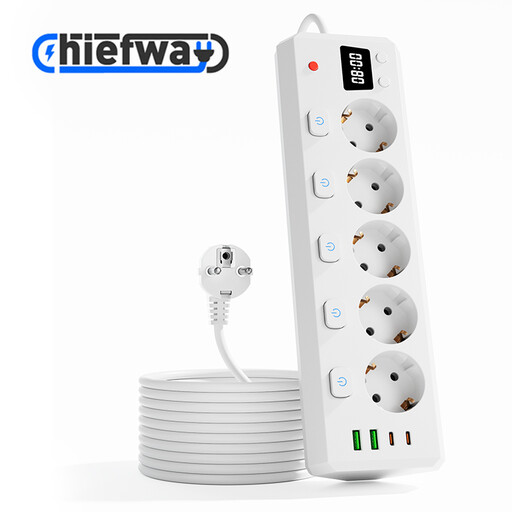
An option if you want several mains sockets as well as USB connections in the same place; follow the instructions for your specific hand warmer model.
Lists five AC outlets, two USB-A ports, two USB-C ports, individual switches and a 3 m cable. Check the CE marking on the exact model.
 No image available
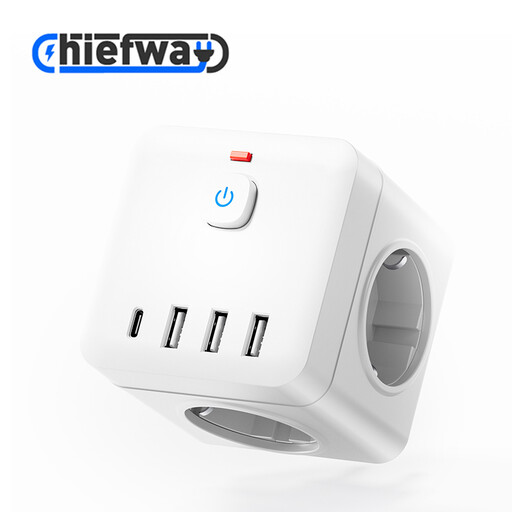
Could be a good fit if you’re looking for a compact cube with different USB connections for a shared space; first check which connection your hand warmer needs.
Lists three USB-A ports, one USB-C port, three AC outlets and a 1.5 m cable. Check the CE marking on the exact model.
It depends on the exact model. Ocoopa says that the heating button on its hand warmers doesn’t respond while they’re charging; this doesn’t necessarily apply to other brands. Follow your hand warmer’s manual.
Place the charger and hand warmer in an open, stable space, don’t cover them and don’t use a damaged cable. Brandweer Nederland recommends charging battery-powered devices in a room with a working smoke alarm and following the instructions for use. Agree on the location with whoever manages the workspace, too.
The European Commission lists specific categories of device covered by EU rules on a common charger; hand warmers aren’t on that list. So check the connection on the model you want to use.
No. According to the Dutch government, there’s no fixed period for the statutory warranty in the Netherlands; what you can expect from a product depends on the product and the circumstances. If a product is faulty, contact the seller.
No. CE marking is compulsory for electrical consumer products, but the Netherlands Food and Consumer Product Safety Authority states that testing isn’t compulsory for this product group. A CE marking is therefore not the same as an independent test result.