Start with your trimmer’s cable and specified input: seeing ‘USB’ alone doesn’t tell you which port or power supply is suitable. If you’re only charging the trimmer, a suitable single-port charger may be enough. A multi-port charging station is more useful if you also want to charge other devices in the same place. Check the output of the port you’ll use, as well as the applicable CE marking on the mains charger.
Who is this buying guide for?
Trimmer owner looking for the right way to charge
You want to check that the cable and power supply are suitable for your trimmer. For the MG5940/15, Philips specifies charging via USB-A at 5 V and at least 1 A. Other trimmer models may have different charging requirements.
Home worker with several devices to charge
You want to charge your trimmer and other devices in one place. Check how many USB-A and USB-C ports there are, and how much power is available when charging several devices at once.
Home worker with limited desk space
You want a tidy charging spot without taking up space with a large station if you’re only charging your trimmer. Think about where the station and cable will go, and how much room you have.
What should you look for when buying?
First, check what your trimmer needs. Then consider whether extra devices, your desk layout or safe charging should influence your choice.
| What to consider |
What to look for when buying |
Who is this important for? |
| Connection and power supply |
Check the exact trimmer model, plug, specified voltage and current, and the output of the port you’ve chosen. |
If I want to make sure my existing cable or power supply is suitable for my trimmer, I’ll check the manual for that model first. Around 42% of consumers put compatibility first. |
| Charging multiple devices at once |
Count the devices you want to connect at the same time, then check the port types and power output per port and when used simultaneously. |
If I want to charge my trimmer and, for example, my phone at the same desk, having enough suitable connections matters. Around 25% of consumers prioritise charging multiple devices. |
| Space and placement |
Measure the available desk space and the distance to the socket. Also check the model’s dimensions and cable length. |
If I have limited desk space, I want a charging spot that’s easy to reach without taking up more room than necessary. Around 17% of consumers prioritise their desk layout. |
| Safe charging |
Check the applicable CE marking and follow the instructions for your trimmer and charger. Use a hard surface and, if possible, stay nearby while charging. |
If I’m choosing a mains charger, I want to check both the required marking and where I’ll charge my device. Around 16% of consumers make safe charging their top priority. |
Common buying mistakes
-
Assuming every USB port or cable is suitable
The connection and specified power supply depend on the trimmer model. For example, Philips specifies USB-A for the MG5940/15; this doesn’t confirm the requirements for other trimmers.
Read the instructions for your exact model and compare the cable plug and port output before choosing a charger.
-
Confusing total power with power per port
A charging station’s total power output doesn’t tell you how much power each port supplies. When several devices are connected, the power available at each connection may also matter.
Check the specification for the port you’ll use and how power is divided when charging several devices at once.
-
Buying a large charging station just for your trimmer
Extra ports and higher total power aren’t automatically useful if you’re only charging a trimmer. A larger station may also take up more desk space.
Choose extra capacity only if you’ll also need it for other devices at your workstation.
Brands and product ranges for reference
TRONIC
The TUCSAC A1 is a desk charging station with USB-A and USB-C connections and a stand.
- The combination of port types may suit a workstation where you use several types of cable.
- Check that the output and cable match your trimmer’s instructions. The number of ports doesn’t confirm compatibility.
Belkin
The BoostCharge WCB009vfWH is a wall charger with USB-C and USB-A connections.
- The two port types give you a choice when you know which cable is suitable for your device.
- A two-port wall charger offers fewer connections than a desk setup with several ports. The ports listed don’t prove that it’s compatible with an unspecified trimmer model.
Hama
Hama describes the 00201977 as a desktop charging station for a workstation with devices that may need more power.
- Hama lists four USB-C ports, one USB-A port and 240 W total power for this model.
- The high total power output isn’t a proven benefit if you’re only charging a hair trimmer. Check what each of your devices needs from its port.
Chargers and charging stations at Joybuy
This selection of Joybuy products includes single-port chargers and multi-port charging solutions for your workstation. Before buying, check that the port and power supply are suitable for your trimmer and that the mains charger carries the applicable CE marking.
 No image available
30 W wall charger with USB-A and USB-C
A possible choice if you want to use one wall charger for devices with compatible USB-A and USB-C cables.
The product name lists USB-A, USB-C and 30 W; the description gives a combined output of up to 30 W. Check the output of the port you’ll use for your trimmer.
View at Joybuy
 No image available
10-port USB charging station
This model may suit you if you want to charge your trimmer and several other USB devices in one place.
The product name lists 10 ports, with USB-A and USB-C. The description specifies up to 2.4 A per port; the available charging speed also depends on the port you choose, your device and the total power available.
View at Joybuy
 No image available
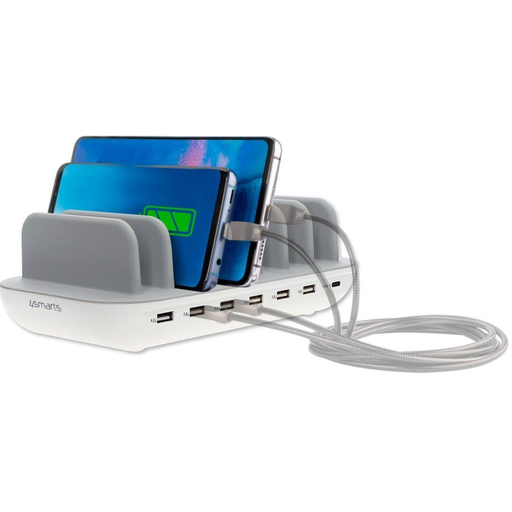
4smarts Charging Station Office 60W White
The stand and multiple ports may suit a permanent desk setup where you connect different USB devices.
The product information lists six USB-A ports, one USB-C port, up to 60 W total power and a 1.5 m power cable. Don’t cover the station while it’s in use, and keep it away from water and excessive moisture.
View at Joybuy
 No image available
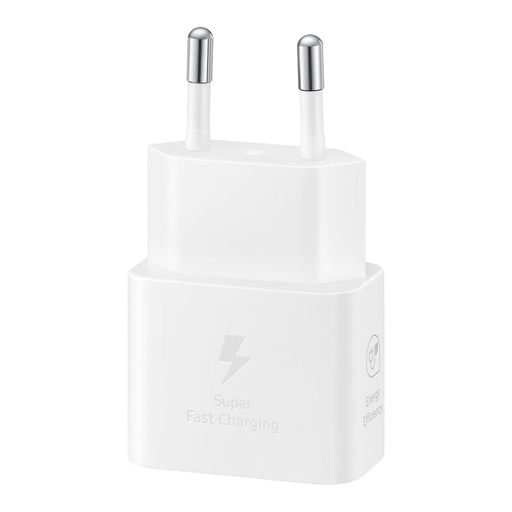
Samsung EP-T2510 USB-C charger 25 W
This single-port wall charger may suit your trimmer if its instructions say it can charge with a USB-C cable and this output.
The product information lists one USB-C output and 25 W. Check that the connection and power supply match your trimmer’s requirements.
View at Joybuy
 No image available
Neomounts DS22-840BL6 desk socket
This desk socket may suit you if you want to combine USB charging with other connections in a permanent desk setup.
The product information lists two 20 W USB-C ports, one 18 W USB-A port, three Schuko sockets and a 1.4 m power cable. The model is secured with a clamp; follow the installation instructions and fit it to a stable, flat surface.
View at Joybuy
Frequently asked questions
Do I automatically need a USB-C charging station for a USB hair trimmer?
No. Check the cable and instructions for your exact trimmer. For example, Philips specifies USB-A, 5 V and at least 1 A for the MG5940/15; this tells you nothing about the requirements of other trimmers. Don’t assume that every hair trimmer uses USB-C based on the rules for certain categories of newly sold devices.
How can you set up a safe charging spot in your home office?
The Dutch Fire Service recommends, among other things, using the original charger, charging when you’re nearby if possible, and placing the device on a hard surface. Also follow the instructions for your trimmer and charging station.
What happens if your charging station develops a fault?
According to the Dutch Government, if a product doesn’t meet the terms of the agreement, the seller in the Netherlands must offer a solution. There’s no set statutory guarantee period that applies to every product; the assessment depends on the product and the circumstances.
Is CE marking required for a mains-powered USB charging station in the Netherlands?
Yes. According to the Netherlands Food and Consumer Product Safety Authority, CE marking is required for electrical products covered by the applicable Electrical Equipment Decree under the Commodities Act. The manufacturer uses it to declare that the product meets European requirements; CE marking alone isn’t proof of an independent assessment.


