
Notes sharer
You move documents between computers in the studio and want plugging in and copying files to be straightforward.


For copying notes between computers, a USB flash drive is a good choice if the connection and file system work with both devices. If you regularly copy larger project files, an external SSD is a better option; a portable HDD is best suited to a sizeable archive or a separate back-up. Check the ports and file system beforehand, keep an up-to-date copy elsewhere and protect confidential files in a shared studio.
You move documents between computers in the studio and want plugging in and copying files to be straightforward.
You work in a shared space and want to prevent others from opening personal or confidential files.
You keep several versions of your notes or larger project files and want a separate copy alongside your everyday working files.
| Consideration | What should you check? | Who is this important to? |
|---|---|---|
| Connecting and sharing files | Check whether both devices have USB-A or USB-C ports, whether you need a cable and which file system is supported. Apple lists ExFAT as an option compatible with Windows. | If I regularly copy notes between different computers, I want the drive to be readable and writable on both. Around 36% of consumers therefore prioritise compatibility between devices. |
| Confidentiality | Check how encryption is enabled on the specific model and which devices can unlock it. | In a shared workspace, I want to prevent others from opening personal or confidential files. Around 29% of consumers put confidentiality first. |
| Keeping a second copy | Choose enough storage for the files you want to copy, and consider how you’ll update and check the back-up. | If I lose the notes on my main device, I want a separate, up-to-date copy to fall back on. Around 21% of consumers prioritise keeping a second copy. |
| Space for a study archive | Check how much space your documents, scans and project files take up before choosing a capacity. | If I keep larger project files as well as notes, I want enough space and don’t want to base my choice only on the amount of note files. Around 14% of consumers make archive storage their top priority. |
A connector that fits doesn’t guarantee you’ll be able to save files on both computers. Apple warns that a Mac may be able to read NTFS drives but not write to them.
Check in advance which systems you plan to use the drive with. Apple lists ExFAT as a compatible option for sharing files with Windows. Make sure your files are safe before reformatting a drive.
Reformatting can take extra time because you’ll need to save your files somewhere else first.
Moving files to a separate drive isn’t the same as making a back-up. If that’s your only copy and it’s lost, you could lose your notes.
Keep the original or another usable copy, and check that you can restore your files.
Manufacturers’ speed figures for specific models are maximum sequential speeds. They don’t predict how quickly your collection of small files will copy between your devices.
Choose based on connection, storage space and how you’ll use the drive. If you only copy documents occasionally, don’t let a higher speed figure make the decision for you.
The DataTraveler Exodia range is worth considering if you mainly want to carry documents on a USB flash drive.
The Portable SSD T7 range is an option if you want to carry larger files regularly as well as notes.
The 1 TB Portable SSD reviewed is a portable SSD option for a larger file archive.
The External SSD Premium range includes, among other options, a 128 GB anthracite version for a smaller portable archive.
The My Passport range is worth considering if you want to keep larger local copies on a portable HDD.
This selection includes USB flash drives for sharing documents, plus portable SSDs and HDDs for larger files or separate copies.
 No image available
A USB flash drive for carrying and sharing documents. Check that your devices have a suitable USB-A port.
128 GB; USB 3.2 Gen 1 Type-A.
 No image available
A portable SSD for carrying larger files as well as notes.
1 TB; USB Type-C 3.2 Gen 2 (3.1 Gen 2).
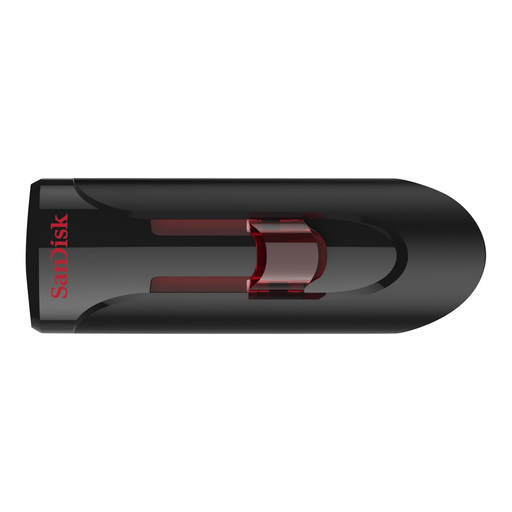 No image available
A USB flash drive for carrying documents. Check that the connector is compatible with your computers.
64 GB; USB 3.0.
 No image available
A portable external hard drive for keeping a larger copy or archive.
2 TB; the product information states that an NTFS compatibility driver may be needed to read and write on macOS.
 No image available
A portable external hard drive for keeping a separate copy or archive.
1 TB; Micro-USB B; USB 3.2 Gen 1 (3.1 Gen 1). According to the product information, the drive needs to be reformatted for use with a Mac.
Yes, as long as the connection and file system are compatible with both devices. Apple lists ExFAT as a formatting option that works with Windows, and warns that a Mac may not be able to write to an NTFS drive. Check the files on the drive before reformatting it.
Only if you keep another usable copy as well. VeiligInternetten defines a back-up as a copy of files on another device. Keep that copy up to date so you can fall back on it if files are lost from your main device.
Wait until the copying is complete, then use the safe removal or eject function. Microsoft recommends doing this with USB flash drives and external hard drives to help prevent data loss.
In the Netherlands, consumers have a legal guarantee from the seller if a product doesn’t meet the expectations they were entitled to have. According to ACM ConsuWijzer, there’s no fixed period that applies to all products; any manufacturer’s warranty is separate.
The Dutch Data Protection Authority doesn’t set a universal encryption requirement for every personal USB flash drive containing study notes. However, losing a drive containing unencrypted personal data could constitute a data breach. Consider who should have access to files containing personal data or other confidential information, and what protection is appropriate. Rules set by an educational institution may depend on the circumstances.