For an archive of research notes, choose a USB flash drive with a connector that fits your workstation and enough space for your files. Also keep a separate copy that you can restore from: one drive is not a reliable backup plan. Encryption may be relevant if losing the drive could expose confidential data; if so, consider how you’ll manage access and recovery too.
Who should consider this choice?
Anyone who wants to be able to restore research notes
You want to be able to restore files after they’ve been lost, damaged or changed by mistake. Treat the drive as part of a backup plan and keep a separate copy. VeiligInternetten and the Consumentenbond explain how a separate copy can help you restore files.
Anyone who opens their notes on more than one computer
You want to be able to open files on your home workstation and a second computer. So check the connectors and the file system that works on both devices. Kingston describes the USB-A connector on the DataTraveler Exodia M; Apple Support covers formatting for use with Mac and Windows.
Anyone who stores confidential research notes
If your notes contain personal data or other sensitive information, weigh the protection you’d have if the drive were lost against password management and access to a recovery copy. The Dutch Data Protection Authority identifies the loss of an unencrypted USB flash drive containing personal data as a possible data breach.
What should you look for?
| Factor |
What should you look for? |
Who should pay particular attention? |
| Recoverability |
Plan to keep a separate copy and check that you can restore a file. |
If I want to be able to retrieve my notes after they’ve been lost or damaged, I keep a separate copy. Around 36% of consumers put recoverability first. |
| Connector and readability |
Check the ports on your computers and which file systems they support. |
If I want to open the same files on my workstation and a second computer, I check both devices before buying. Around 29% of consumers make compatibility their top priority. |
| Confidentiality |
Decide whether your notes need protection and how you’ll manage access and recovery. |
If losing my drive could expose sensitive notes, I want to know how to protect its contents and access them again later. Around 21% of consumers put confidentiality first. |
| Storage space and copying time |
Check how large your archive is, allow for future growth and compare write speeds where available. |
If I often copy large files, I want enough space and a suitable write speed. Around 14% of consumers put ease of copying first. |
Common pitfalls
-
Calling your only copy a backup
If the drive is damaged or lost, you’ll have nothing to restore from unless you have another copy.
Keep the original files or a separate copy, and test that you can restore a file.
-
Confusing read speed with write speed
A stated maximum read speed doesn’t tell you how quickly your files will be written to the drive. Verbatim lists separate maximum read and write speeds for the 128 GB Store 'n' Go V3; actual speeds also depend on the files and computer.
If you regularly copy large files, compare the stated write speed for the exact model.
-
Assuming every USB flash drive is encrypted
Security features vary by model. Hardware encryption on a particular drive is no substitute for a recovery copy.
Decide whether your notes need protection and make a plan for access and recovery, including what to do if you lose a password.
Brands to compare
Kingston
The DataTraveler Exodia M is a standard USB-A drive; the IronKey Locker+ 50 G2 is a separate option with hardware encryption.
- Kingston lists a sliding cap, USB-A and 64, 128 and 256 GB versions for the Exodia M.
- The encryption and password features mentioned for the IronKey don’t automatically apply to the Exodia M. Kingston doesn’t list a write speed on the Exodia M product page consulted.
Verbatim
The Store 'n' Go V3 is a USB-A model with a retractable connector.
- For the 128 GB V3, Verbatim lists maximum speeds of 80 MB/s for reading and 25 MB/s for writing when used with a USB 3.2 Gen 1 host.
- The manufacturer says actual speeds depend on factors including the files and computer. The stated maximums aren’t the result of an independent performance test.
Transcend
The JetFlash 790 has a retractable USB-A connector and is designed for anyone who’d rather not have a separate cap.
- Transcend lists a 128 GB version, among others.
- Usable capacity may vary; no specific, comparable write speed is listed for the 128 GB version.
SanDisk
The Ultra Flair is a compact USB-A drive with a metal casing.
- For a 128 GB Ultra Flair, SanDisk lists speeds of up to 150 MB/s and mentions an optional password protection solution.
- That maximum speed isn’t a stated write speed for your archive. Check the exact model and how the security software works; optional password protection isn’t the same as built-in hardware encryption.
USB flash drives at Joybuy
This selection includes USB flash drives for keeping a portable copy of your research notes. Before buying, check that the connector and capacity suit your devices and archive.
 No image available
Kingston DataTraveler Exodia 128 GB USB 3.2 Gen 1 Type-A
The stated capacity may be suitable if it meets your archive’s needs and leaves enough room for growth.
128 GB storage; USB Type-A connector.
Joybuy
 No image available
SanDisk Ultra Flair 64 GB USB 3.0
An option to compare if 64 GB is enough for your archive and your computer has a suitable USB-A connector.
64 GB storage; USB 3.0. The product description mentions software-based password protection.
Joybuy
 No image available
Kingston DataTraveler SE9 G3 64 GB USB 3.2 Gen 1
The product description lists a USB Type-A connector for use with a computer that has a compatible port.
64 GB storage; metal casing. The description states a write speed of up to 100 MB/s; this is a product specification, not an independent measurement.
Joybuy
 No image available
Kingston DataTraveler Exodia M 64 GB USB 3.2 Gen 1
A possible choice if 64 GB suits the size of your archive and your workstation has a USB-A port.
64 GB storage; USB Type-A; sliding cap. The listed version is black and blue.
Joybuy
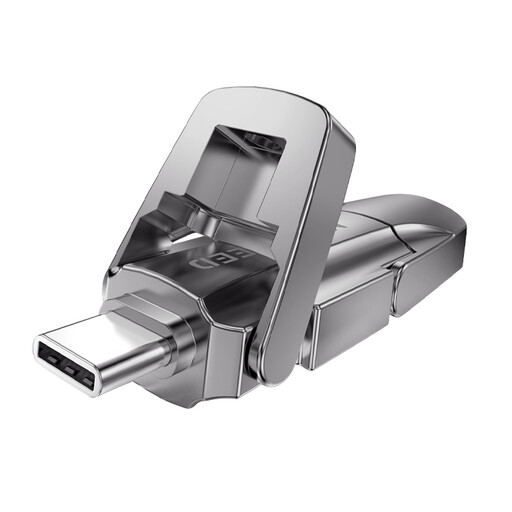 No image available
MOVESPEED YSUYVP10-256GSR 256 GB USB 3.2 Gen 1 + Type-C
The product description lists both USB and Type-C; check that the connectors suit the devices you want to use to open your notes.
256 GB storage; metal cap.
Joybuy
Frequently asked questions
Is one USB flash drive enough for your research notes archive?
Not if it’s your only copy: a drive can be damaged or lost. Keep the original files or a separate copy, and regularly check that you can restore a file. VeiligInternetten describes a backup as a copy of files.
How can you avoid problems when disconnecting the drive?
Wait until copying is complete, then eject the drive through your operating system before unplugging it. Microsoft recommends safely removing hardware in Windows to help prevent data loss.
Which file system should you choose if you also use a Mac?
First check which computers the drive needs to work with. Apple Support lists ExFAT as an option for a drive larger than 32 GB that you format for use with Windows and Mac. Formatting erases the files already on the drive, so make a copy first.
What are your warranty rights for a USB flash drive in the Netherlands?
As well as any manufacturer’s warranty, you have a legal guarantee from the seller if a product used normally doesn’t meet what you could reasonably expect from it. According to ACM ConsuWijzer, there’s no fixed term of exactly two years.
Should you use an encrypted USB flash drive at home for your notes?
Not simply because you keep notes at home: according to the Dutch Data Protection Authority, the GDPR doesn’t apply to processing carried out solely for personal or household use. If you process personal data on behalf of an organisation or outside that private use, the organisation must decide on appropriate security measures based on the risks; the official guidance doesn’t prescribe one specific USB flash drive model.


