
Student using devices with different USB ports
You transfer recordings between, for example, a device with USB-C and a computer with USB-A, and would rather not need a separate adapter.


First, check which USB ports the source device and the computer for your school project have, and how much space your recording files need in total. A flash drive with USB-A and USB-C can be useful if you have different ports. For large files, write speed and the file system also matter. Keep a second copy, and separately check whether you’re allowed to use or share the recordings for this project.
You transfer recordings between, for example, a device with USB-C and a computer with USB-A, and would rather not need a separate adapter.
You’re collecting several or large concert files and want enough space, including for files that won’t fit on every file system.
You’re taking the flash drive to school and want to reduce the risk of losing files. If people can be recognised in the recordings, access and sharing also matter.
First check the connections and total file size. Then consider the file system and write speed if you’re transferring lots of large recordings.
| What to consider | What should you check? | Who is this important for? |
|---|---|---|
| Storage capacity | Add up your recordings and project files, and allow for the usable capacity. For large individual files, also check the file system: FAT32 has a 4 GiB per-file limit, according to Microsoft. | If you’re collecting several recordings, you’ll want them all to fit on the flash drive. Around 31% of consumers prioritise having enough storage. |
| Connections | Check whether both the source device and computer have USB-A or USB-C. If you’re using a phone or tablet, also check that it supports external storage. | If you’re using devices with different ports, you’ll want to transfer files without a separate adapter. Around 31% of consumers prioritise having suitable connections on both devices. |
| Copying time | If listed, check the write speed for the exact model. A maximum read speed doesn’t directly tell you how quickly files are written to the flash drive. | When you have lots of recordings or large files, the time it takes to write them may influence your choice. Around 19% of consumers prioritise copying time. |
| Keeping files safe and secure | Keep a separate copy, test that a file opens from the flash drive, and follow your school’s rules on access and sharing. Recognisable voices may be personal data, according to the Dutch Data Protection Authority. | If you’re taking the flash drive to school or the recordings include people who can be recognised, you’ll want to reduce the risk of loss and unnecessary access. Around 19% of consumers prioritise keeping files safe and ensuring appropriate access. |
A high read speed doesn’t mean recordings will be written to the flash drive just as quickly. Lexar states that the write speed of the JumpDrive Dual Drive D400 is lower than its specified maximum read speed.
For large files, compare the write speed for the exact model, if it’s listed, and bear in mind the conditions under which speeds were measured.
Filling the flash drive may take longer than its read speed might suggest.
An individual file larger than 4 GiB won’t fit on a FAT32-formatted flash drive, even if there seems to be enough free space. Microsoft specifies this maximum file size for FAT32.
Check the size of your largest file and make sure the file system works on both devices. First make a copy of any files you want to keep: formatting erases the data on the flash drive.
If the flash drive goes missing or files turn out to be unreadable, you could lose your project work. The Digital Trust Center advises against relying on a single storage location and recommends testing your backups.
Keep a separate copy in an approved location and check that you can open a recording from the flash drive.
The rules for a private copy differ from those for sharing, and educational use is subject to conditions. People who can be recognised in audio recordings may also be identifiable from their personal data.
Before handing out copies or publishing a recording, check with your school how it will be used and who will have access.
The DataTraveler Exodia M is a USB-A range, while the microDuo 3C combines USB-A and USB-C.
The JumpDrive Dual Drive D400 is an option for transferring files between USB-A and USB-C devices.
Samsung offers a 128 GB USB Type-C Flash Drive for devices with a compatible port.
The Ultra Flair 128GB is a USB-A range for transferring project files between devices with a compatible port.
These product options are aimed at USB-A transfers, with one dual-interface model for transferring files between devices with different ports. Before buying, check that the stated capacity and connections suit your files and devices.
 No image available
A USB-A option if both devices have a compatible USB-A port.
The product name lists 128 GB and USB 3.2 Gen 1 Type-A; this model is black and blue.
 No image available
A USB-A option for transferring project files between devices with a compatible port.
The product name lists 64 GB and USB 3.0. Check that the USB-A connection suits both devices.
 No image available
A USB-A option for project files if both devices have a compatible port.
The product name lists 64 GB, USB 3.2 Gen 1 and a metal design.
 No image available
A USB-A option for transferring files between devices with compatible USB-A ports.
The product name lists 64 GB and USB 3.2 Gen 1; this model is black and blue.
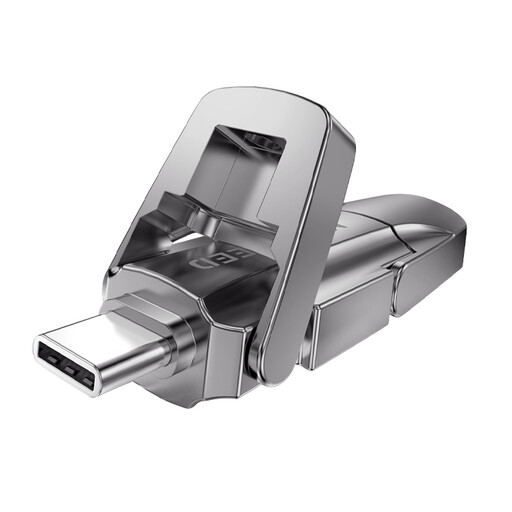 No image available
An option to consider when transferring files between devices with different ports; check that both connectors suit your devices.
The product name lists 256 GB and a dual interface with USB 3.2 Gen 1 and Type-C.
Check the flash drive’s format and the devices you want to use it with. Microsoft lists a maximum file size of 4 GiB for FAT32; exFAT has no such limit. Apple lists exFAT as a format that’s compatible with Windows. Formatting erases existing files, so make a copy first.
Wait for the transfer to finish, then eject the flash drive through the operating system before disconnecting it. Kingston warns that data being written may be temporarily held in the computer’s memory.
Alongside any manufacturer’s warranty, statutory consumer rights apply: with normal use, you can expect the product to be of satisfactory quality. If it develops a fault sooner than you could reasonably expect, contact the seller for an appropriate solution. For distance purchases, you’ll often also have a 14-day cooling-off period; check the terms that apply to your purchase.
According to the Dutch Government, a private copy for personal use must not be distributed or made public. There are exceptions for educational use, subject to certain conditions; this doesn’t mean every recording can be freely shared or published. Ask your teacher how the recording will be used and what permission or arrangement applies. Recognisable voices may also be personal data.