Choose based on how confidential the recordings are and the ports on both computers: a hardware-encrypted drive may be suitable for confidential files, while a USB-A/USB-C model can make it easier to connect to different devices. Test whether the client can open the files and keep a separate, recoverable copy; a transfer drive alone is not a complete archive. If the recordings contain personal data, also assess whether sharing them is appropriate for the intended purpose, and what security measures and retention period are needed.
Who is this guide for?
People handing over confidential recordings
If you give files to a client on a physical drive, you’ll want to know how they can unlock them and whether the chosen security measures are appropriate for the risks. The Dutch Data Protection Authority stresses that organisations must determine appropriate security measures; sharing personal data should be assessed separately.
People managing recording archives
If you want to keep a recoverable copy after the handover, you can match the storage space you need to the files and retention period. The National Cyber Security Centre advises keeping important business data in multiple versions and on different media.
People transferring files between different computers
If you’re transferring recordings between your computer and the client’s, check the ports on both devices and test whether the files actually open on them. Having the right connection alone doesn’t guarantee that the files or any security software will work.
What should you look for?
First, check the size of the files and find out which ports and access procedure the client can use. Then decide which purchase priority matters most for this transfer.
| What to consider |
What to check |
Who this matters to |
| Confidentiality and access |
Check whether the exact model is encrypted, which computer is needed to unlock it and how the client will access it without storing the password with the drive. |
If I’m handing over confidential recordings, I want to know how the client can open them securely. Around 36% of consumers put confidentiality ahead of other purchase concerns. |
| Recoverability |
Decide where a separate backup will be kept and test whether a file can be opened from it. |
I want to be able to recover the recordings if the transfer drive is lost or damaged. Around 29% of consumers give recoverability their top priority. |
| Connection and file access |
Ask which ports the client uses and test the entire transfer with a representative file, including any unlocking steps. |
If my computer and the client’s have different ports, I want to be able to open files on both devices. Around 21% of consumers prioritise connection and access on both devices. |
| Storage space and transfer time |
Check the size of the recording folder, allow for any planned additions and, if time is tight, pay particular attention to write specifications under the right usage conditions. |
For large files, I want enough space and an idea of how long copying will take. Around 14% of consumers give capacity and transfer time their top priority. |
Common pitfalls
-
Using the USB flash drive as your only long-term copy
If the drive is lost or damaged, the archive could be lost too if there’s no other recoverable copy.
Keep the client’s copy separate from the archive and check regularly that you can restore files from the backup.
Keeping a separate copy requires extra storage space and management.
-
Assuming two USB connections also protect your files
USB-A and USB-C describe the connection, not who can read the files.
Assess the connection and access security as separate requirements.
-
Mistaking the highest read speed for the transfer speed
Writing speed also matters when you’re copying files to the drive; actual performance also depends on the device being used.
Compare the write specification for the exact model and test your own files if transfer time matters.
-
Buying extra storage without deciding how long to keep files
If recordings contain personal data, the necessary retention period depends on the purpose, not just the drive’s capacity.
Check the size of the files and, where applicable, set and document the retention period before archiving.
Brands to consider
Kingston
The IronKey Vault Privacy 50 range is worth looking into if you’re after hardware encryption; DataTraveler Exodia M is a separate USB-A storage range.
- Kingston says Vault Privacy 50 has hardware encryption and is available in USB-A and USB-C versions.
- Kingston describes Exodia M as having a sliding cap and a USB-A connection.
- Check the exact model: IronKey features don’t automatically apply to Exodia M. If you choose encryption, agree the unlocking process with the client too.
Verbatim
The Store 'n' Go Secure Pro USB-A version we looked at is worth considering if you want a drive with built-in access security.
- Verbatim lists 256-bit AES hardware encryption and password protection for this version.
- Check in advance that the client can use the required unlocking process on the receiving device.
SanDisk
The Ultra Dual Drive Go is an option for transferring files between devices with USB-A and USB-C ports.
- SanDisk confirms that the 128 GB Ultra Dual Drive Go we looked at has both connections.
- The quoted high read and write speeds apply to the separate Extreme PRO USB-A range, not the Ultra Dual Drive Go.
Samsung
The MUF-256DA/APC is a USB-C option if you know which port the receiving device has.
- Samsung lists read speeds of up to 400 MB/s for this version under test conditions.
- The quoted read speed isn’t a write speed and doesn’t, by itself, tell you whether the drive has built-in file encryption.
Joybuy products for transferring and storing files
These product picks are suited to storing and transferring meeting recordings, with a focus on capacity, connections and access control.
 No image available
32 GB USB flash drive for USB 3.0, Lightning, USB-C and Micro-USB
The title says it works with computers, smartphones and tablets; check that the listed connections are suitable for both devices.
32 GB; the title lists USB 3.0, Lightning, USB-C and Micro-USB.
View at Joybuy
 No image available
Kingston DataTraveler SE9 G3 64 GB, 220 MB/s
A USB-A option for transferring files from a computer with a USB-A port.
64 GB; USB 3.2 Gen 1; metal design. Check the receiving device’s connection.
View at Joybuy
 No image available
Samsung MUF-512DA 512 GB USB-C (grey)
Worth considering if the client’s computer has a USB-C port and you’ve established how much space you need for the recordings.
512 GB; USB Type-C; USB 3.2 Gen 1 (3.1 Gen 1). A device with USB-A only can’t connect directly.
View at Joybuy
 No image available
MOVESPEED YSUYVP10-256GSR 256 GB
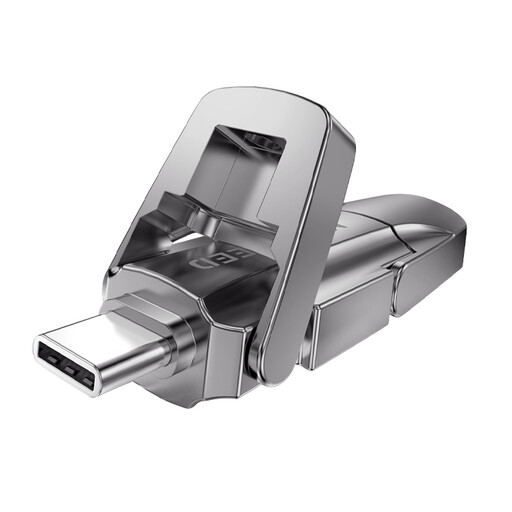
A dual-interface model to consider if you’re transferring between USB-A and USB-C devices.
256 GB; USB 3.2 Gen 1 and Type-C; zinc alloy casing. Test that files open on both devices.
View at Joybuy
 No image available
MOVESPEED YSUYC-256GSN 256 GB (silver)
Worth a look if you need both different port types and file access control; test the access method with the client.
256 GB; USB-A and USB-C. The product description lists AES-256 and fingerprint access.
View at Joybuy
Frequently asked questions
Is an encrypted USB flash drive required for every client handover?
Not as a general product choice. If the recordings contain personal data, the organisation must, according to the Dutch Data Protection Authority, match security measures to the risks of processing; an encrypted drive may be suitable.
Can I simply give a client meeting recordings containing personal data?
No. First assess whether sharing the data is compatible with the purpose for which it was collected or is based on another applicable legal basis. The Dutch Data Protection Authority lists consent as one possible legal basis, but whether a specific transfer is permitted depends on the content, the original purpose and the people concerned.
How long can transferred recordings be kept?
If the recordings contain personal data, the Dutch Data Protection Authority says they must not be kept for longer than necessary. The GDPR doesn’t set a general, specific time limit for this; determine and document the period for the actual purpose, and take account of any other applicable legal retention periods.
How can I check whether the client can open the recordings?
Check the port on the receiving device and test a representative file, including opening any secure environment. A USB-A/USB-C drive can connect to devices with different ports, but that doesn’t prove that the files or security software will work on them.
Can the transfer drive be my only archive copy?
Not if you need to recover files after loss or damage. The National Cyber Security Centre advises keeping important business data in multiple versions, on different media and with a copy at another location; set up your archive accordingly and test that you can restore files.
What should an organisation do if a drive containing personal data goes missing?
Assess the incident and the risk to the people concerned. According to the Dutch Data Protection Authority, a data breach must be reported unless it’s unlikely to pose a risk to their rights and freedoms; whether to inform the people concerned depends on whether there’s likely to be a high risk. How a specific lost drive should be assessed depends on the circumstances.


