
Handing over files between devices with different ports
You want to know before your appointment whether the flash drive will work with both your device and the client’s. SanDisk and Verbatim offer models with USB-A and USB-C.


First, check the ports on your device and the client’s, then compare the total folder size with the available storage. For large files, choose based on the stated write speed. If the files contain confidential information, match the security measures to the level of risk and your organisation’s policy. Open the copied files before handing them over, and keep a separate copy as well.
You want to know before your appointment whether the flash drive will work with both your device and the client’s. SanDisk and Verbatim offer models with USB-A and USB-C.
You’re carrying personal data or other confidential content and want to guard against loss and unauthorised access. The Dutch Data Protection Authority identifies the loss of a flash drive containing unencrypted personal data as a potential data breach.
You regularly copy large presentation or video folders and want to know in advance how much write speed matters. Manufacturers state speeds for individual models, but actual transfer speeds may vary.
Start by checking the ports at both ends and the size of the entire folder. Then consider whether speed or security is a particular priority.
| What to consider | What should you check? | Who should consider this? |
|---|---|---|
| Connection to both devices | Check whether both devices support USB-A, USB-C or the connectors on a flash drive with two plugs. | If I don’t want to use a separate adapter on site, I check both devices in advance. Around 33% of consumers say connection type is their main priority. |
| Confidentiality | Consider what data you’re taking and which security policies apply. If the drive is encrypted, agree how the recipient will access it. | When I’m carrying confidential files, I want to know in advance how the risk of loss or unauthorised access will be reduced. Around 27% of consumers put data protection first. |
| Write speed | Compare the stated write speed for the exact model and check that the port is suitable. | If I regularly copy large folders shortly before an appointment, the time it takes to write the files matters. This is the main concern for around 20% of consumers. |
| Storage space and checking the copied files | Compare the size of the entire folder with the available storage, then open files from the flash drive after copying them. | I want to take the entire handover with me and make sure the files open. Storage space and the ability to check the files are the main priority for around 20% of consumers. |
A stated read speed doesn’t tell you how quickly files can be written to the flash drive. This can matter if you’re copying a large folder shortly before the handover.
Check the write speed for the exact model, and bear in mind the port and the files you’re transferring.
A longer copying time can be inconvenient just before an appointment.
Models may have USB-A, USB-C or both types of connection. A USB-C-only flash drive won’t plug directly into a device with only USB-A, and vice versa.
Check the ports on both devices before buying and before your appointment.
You may need a suitable adapter if the ports don’t match.
If the flash drive goes missing or the files won’t open, you may not be able to access the files you need for the handover. The National Cyber Security Centre advises testing backups by opening files and keeping copies in different locations.
Open important files from the flash drive and keep a separate, up-to-date copy as well.
If the flash drive is encrypted, the recipient needs to be able to access it. Apple also notes that a Mac may be able to read an NTFS drive but not write to it.
Agree how access will work in advance, and test the file system and files on the relevant devices.
The Ultra Dual Drive Luxe 128GB is an example of a model with USB-A and USB-C for devices with different ports.
According to Verbatim, the MyDual Pro 128GB combines USB-A and USB-C.
The USB-C DataTraveler Max and USB-A IronKey Locker+ 50 G2 are different product ranges for different transfer needs.
The Type-C 128GB MUF-128DA/APC and USB-A BAR Plus 128GB MUF-128BE3/APC illustrate different connection options.
This selection of Joybuy products includes USB-A and USB-C flash drives, as well as a model with two types of connection. Check that the connection and storage capacity suit both devices and the entire folder you’re transferring.
 No image available
An option if both devices have a USB-A port.
128 GB storage; USB 3.2 Gen 1; USB Type-A.
 No image available
Suitable for transferring files between devices with USB-A. A direct connection isn’t possible if a device has USB-C only.
64 GB storage; USB 3.0.
 No image available
An option for transferring files between devices with USB-A. Check the ports on both devices in advance.
64 GB storage; USB 3.2 Gen 1.
 No image available
Suitable if both devices have USB-C. A direct connection isn’t possible if a device has USB-A only.
512 GB storage; USB Type-C. For this capacity, Samsung states a maximum read speed of 400 MB/s; no write speed is specified.
 No image available
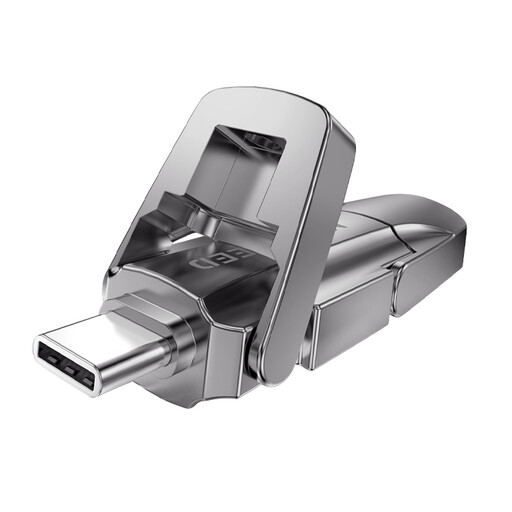
An option to consider if the devices have different ports. Check in advance that both types of connector will fit.
256 GB storage; the product title lists USB 3.2 Gen 1 and Type-C, with a maximum read speed of 1090 MB/s. This doesn’t indicate the write speed.
That depends on the connections and formatting. Apple lists exFAT and MS-DOS (FAT) as Windows-compatible formats, and notes that macOS may be able to read an NTFS drive but not write to it. Check both devices and test the transfer in advance.
Open a few files directly from the flash drive, including the presentation and any important attachments. The National Cyber Security Centre recommends opening files to test a backup. If you’re using Windows, safely eject the flash drive before unplugging it.
No, there isn’t a universal requirement for every presentation. If your organisation processes personal data, it must assess the risks and be able to justify the security measures it uses. The Dutch Data Protection Authority identifies the loss of a flash drive containing unencrypted personal data as a potential data breach. You should also follow your organisation’s applicable policies.
Not automatically. The Dutch Data Protection Authority says the organisation must assess the risk to the people concerned. It must notify the regulator unless a risk to their rights and freedoms is unlikely. Whether the people concerned also need to be informed depends on whether there is a potentially high risk.
For consumer purchases, the Dutch government states that you’re entitled to a product that works as it should under the statutory guarantee; the seller is your point of contact if there’s a problem. For distance purchases, you usually have a 14-day cooling-off period. Check what applies to your specific purchase, especially if you’re buying on behalf of a business.