
Creators with a large delivery folder
You’re handing over source files and final exports, and want to check that the whole folder will fit on the drive. Keep a separate recovery copy for yourself too.


Choose a USB flash drive with enough capacity for the complete delivery folder, which your client can connect to their computer and read. For larger projects, compare the stated write speed too. If the handover includes personal data or confidential work, consider what access protection is appropriate and whether your client will be able to unlock the drive. Always keep a separate, up-to-date copy of your files as well.
You’re handing over source files and final exports, and want to check that the whole folder will fit on the drive. Keep a separate recovery copy for yourself too.
You may not know which USB port or operating system your client uses. Check the connection and file compatibility with them in advance.
You’re handing over files where loss or unauthorised access could have serious consequences. If they contain personal data, make sure the security measures match the level of risk.
First check that the entire folder will fit and that your client can use the drive. Then consider transfer time and security, depending on the files and how they’ll be handed over.
| What to consider | What to look for when buying | Who is it important for? |
|---|---|---|
| Complete delivery and your own copy | Compare the drive’s capacity with the complete folder and check the files after copying. Keep a separate, up-to-date copy for yourself. | If I want to hand over source files and exports together without giving up my recovery copy, fitting the whole folder is my first concern. Around 29% of consumers prioritise a complete delivery and keeping their own copy. |
| Connection and file system | Ask whether your client uses USB-A or USB-C and which operating system their computer has. If possible, test a sample file. | If I don’t know which computer my client uses, I want to check in advance that the drive can be connected and read. Around 23% of consumers put compatibility first. |
| Transfer time for large projects | Compare the stated write speed with the computer port’s capabilities. A maximum speed isn’t a guaranteed real-world speed. | If I regularly transfer large files, I want to know how quickly they’ll be written to the drive. Around 18% of consumers say transfer time is their top priority. |
| Access to confidential files | Consider the contents and the level of risk. If the drive is encrypted, also check that your client can unlock it. | If my delivery includes confidential work or personal data, I want to consider the risk of unauthorised access and agree the handover arrangements with my client. Around 18% of consumers prioritise protecting the contents. |
| Purchase cost and aftercare | Only compare prices once you’ve established the required capacity, connection and any security needs. Check the seller’s warranty terms. | If I only want to pay for features needed for this folder and client, I start with the practical requirements and compare costs afterwards. Around 12% of consumers put purchase cost first. |
Once you’ve handed it over, you can’t assume the client’s drive will be available if your files are lost. A backup is there to help you restore files.
Keep a separate, up-to-date copy and check the folder you’re handing over.
A high stated read speed doesn’t tell you how quickly files will be written to the drive. The port and any hub can also affect speed.
For large delivery folders, compare the stated write speed with the computer connection. Don’t treat manufacturers’ maximum speeds as a guaranteed transfer time.
A drive with the right connector may still use a file system that doesn’t work on both computers. Formatting erases existing files.
Agree the file system in advance, save any existing files elsewhere and test a sample file on your client’s equipment.
The Dutch Data Protection Authority cites the loss of a USB flash drive containing unencrypted personal data as an example of a data breach. Organisations should choose appropriate security measures based on the risks.
Consider the contents and the risks before handing over the drive. Where needed, choose a security method your client can also use.
SanDisk offers USB-A and USB-C models, including the Ultra Dual Drive Luxe and Extreme PRO Dual Drive.
The DataTraveler Max is designed for large files and use with a suitable high-speed host. The IronKey Locker+ 50 G2 is a USB-A range with hardware encryption.
The BAR Plus MUF-256BE4/APC is an option if your client has a USB-A port.
According to Verbatim, the Dual QuickStick 256 GB (#32041) combines USB-A and USB-C.
According to Transcend, the JetFlash 930C, including TS256GJF930C, has USB-A and USB-C connectors.
These Joybuy product picks are designed for transfers via USB-A, USB-C or both, with options for different capacities and file access needs.
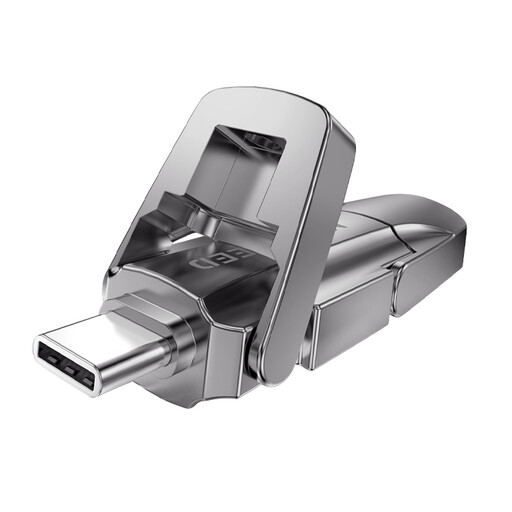 No image available
The dual connector can be useful when transferring between computers with USB-A and USB-C.
256 GB; USB-A and USB-C. The product information lists maximum speeds of 1090 MB/s read and 1030 MB/s write; these aren’t guaranteed real-world speeds.
 No image available
This model may be worth considering if you’re looking for a stated access protection feature for confidential work and your client will be able to unlock the drive.
256 GB; USB-A and USB-C. The product description lists AES-256 encryption and fingerprint access, with maximum speeds of 550 MB/s read and 500 MB/s write.
 No image available
The stated capacity may suit a larger delivery folder. Compare it with the folder you actually want to hand over.
512 GB; USB-A and USB-C. The product information lists maximum speeds of 1090 MB/s read and 1030 MB/s write; these aren’t guaranteed real-world speeds.
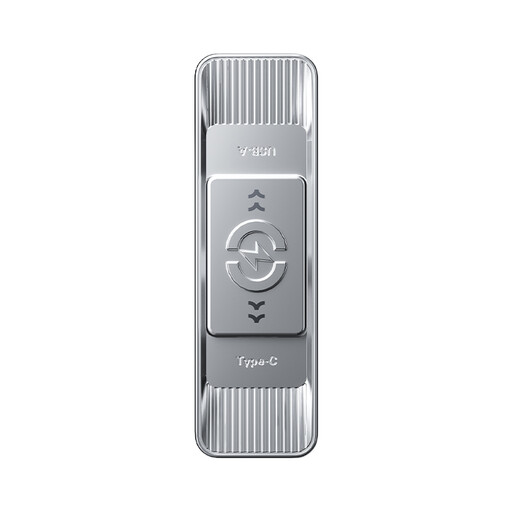 No image available
The dual connector can be useful if your client has either a USB-A or USB-C port. Also check that the files can be read on their computer.
512 GB; USB-A and USB-C. The product information lists maximum speeds of 570 MB/s read and 520 MB/s write; these aren’t guaranteed real-world speeds.
 No image available
This model may be suitable if your client has a USB-A port and the delivery folder fits within the stated capacity.
64 GB; USB-A. The product information lists maximum speeds of 200 MB/s read and 60 MB/s write. The drive won’t plug directly into a device with only USB-C ports.
exFAT is one option for use between Mac and Windows. Apple describes it as suitable for an external drive larger than 32 GB, and Kingston also recommends exFAT for both environments. First, make a copy of the existing contents, as formatting erases the drive, then test the transfer on your client’s equipment.
The maximum file size may differ from the drive’s total capacity. Microsoft lists a maximum file size of 4 GiB for FAT32 and a much higher limit for exFAT. Agree any reformatting with your client and save existing files elsewhere first.
Don’t rely on the drive you’ve handed over as your only way to recover your files. Keep a separate, up-to-date copy for yourself and check the files after copying.
A manufacturer’s or seller’s warranty is separate from the statutory guarantee that applies to consumer purchases. ACM ConsuWijzer explains that if a product proves faulty sooner than could reasonably be expected under normal use, the seller must repair or replace it, or offer a refund under certain conditions. For a business purchase, check the contract terms separately.
No. The Dutch Data Protection Authority’s guidance cited here doesn’t set a universal requirement for one type of USB flash drive. Organisations processing personal data must choose appropriate security based on the specific privacy risks; encryption may be one of the measures used.
Not automatically. The Dutch Data Protection Authority cites losing a drive containing unencrypted personal data as an example of a data breach. Whether it needs to be reported depends on the risk to the people affected. If the breach must be reported to the Dutch Data Protection Authority, the deadline is 72 hours after becoming aware of it.