Who is this adapter for?

Laptop user who works flexibly

You take a laptop without an Ethernet port to different places around the studio and want a standalone adapter that works with its USB port and operating system. TP-Link Netherlands lists the connection type and any driver requirements for each model.

Creative professional using shared storage

You move large files across the local network and want to know whether 2.5 GbE is compatible with your existing cables and network equipment. TP-Link Netherlands and Belkin Netherlands list models that support this network speed.

User with one free USB-C port

You need a wired network connection and charging at the same time, but don’t want to use a dock. Belkin Netherlands lists a gigabit adapter with USB-C power pass-through; check that it works with your device and power supply.

What should you consider when buying?

Consideration What to check Who is this important to?
Connection and operating system Check whether you need USB-A or USB-C, your device’s port, the operating system version listed and any driver requirements. If I use different devices or an older operating system, I want to know whether the plug will fit and whether installation is required. Around 33% of consumers give connection type and operating system support the highest priority.
Gigabit for everyday wired use Check that there’s a suitable Ethernet port and that the adapter and cable connect properly. If I want to use the studio’s existing network connection without a dock, I’m mainly looking for a compatible, straightforward connection. Around 27% of consumers prioritise simple wired gigabit use.
2.5 GbE for files on the local network Check the network ports, switch, destination, host and cable. For peak performance from the TP-Link UE302C, TP-Link recommends Cat5e or higher. If I move large files to shared storage, I want to know whether the entire network route supports the higher speed. Around 20% of consumers prioritise faster local file transfers.
Charging while using Ethernet Check USB-C Power Delivery on your device and power source, as well as the Ethernet specification. If I also need to use my USB-C port to charge my device, I want to combine a wired network connection with charging. Around 20% of consumers prioritise this combination.

Buying pitfalls

  • Looking only for ‘USB-C’ or ‘gigabit’ in the product name

    Connections and driver requirements vary by model and operating system. The right network speed won’t help if the adapter doesn’t work with your device.

    Compare the specifications for the exact model with your device’s port and operating system version.

  • Choosing 2.5 GbE without checking the rest of your network

    An adapter can’t speed up a slower link in the connection. The stated link speed doesn’t guarantee file or internet speeds.

    Check the switch, destination, host and cable before choosing the higher speed as a reason to buy.

  • Assuming a shared wired network is automatically trusted

    An Ethernet cable doesn’t determine whether other devices on the network are trusted or can see your computer.

    Check your network profile, visibility and sharing settings. Discuss any changes with the administrator of a shared studio network.

Brands to compare

TP-Link

The models listed offer USB-A or USB-C connections for gigabit or 2.5 GbE.

  • TP-Link Netherlands lists the connections and supported speeds for each model.
  • For the UE300C, TP-Link lists separate driver requirements for certain older systems. For peak performance from the UE302C, the brand recommends Cat5e or higher.

Belkin

The INC012btBK and INC019btBK are designed for different USB-C needs: 2.5 GbE or gigabit with power pass-through.

  • Belkin Netherlands lists 10/100/1000/2500 Mbps for the INC012 and USB-C Power Delivery up to 100 W alongside gigabit Ethernet for the INC019.
  • Higher network speeds and power pass-through are offered by different models, so check which feature you need.

Plugable

The USBC-E2500 is a USB-C/USB-A option listed for 2.5 GbE.

  • According to Plugable, full performance requires USB 3.0 and a suitable 2.5GbE network route.
  • The stated specifications don’t mean that every computer or network connection supports the higher speed.

UGREEN

The EU USB-C adapter reviewed is an option for a standalone wired connection.

  • UGREEN says that this model can be installed without an additional driver on some of the listed systems.
  • UGREEN lists drivers for Windows 7/XP/Linux. Check the requirements for the exact model and your operating system.

StarTech.com

According to the US product page, the US2GA30 provides a USB-A connection to 2.5 GbE.

  • StarTech.com lists USB-A 3.0/3.1 and 100 Mbps, 1 Gbps and 2.5 Gbps for this model.
  • Check operating system support for your exact computer and version before choosing.

Joybuy adapters for wired use without a dock

These Joybuy product picks are standalone USB-C to Ethernet adapters for gigabit or, where stated, 2.5 GbE.

TP-Link USB-C to RJ45 Gigabit Ethernet adapter

TP-Link USB-C to RJ45 Gigabit Ethernet adapter

A good fit if your device has a USB-C port and you’re looking for a standalone gigabit connection.

USB 3.0; Gigabit Ethernet up to 1000 Mbps; LED status indicator. The product description mentions a foldable, portable design.

View at Joybuy

HP USB-C to RJ45 Adapter G2

HP USB-C to RJ45 Adapter G2

A good fit if your device has USB-C and you want a wired gigabit connection.

USB-C to RJ45; supports Gigabit Ethernet. The product description mentions plug-and-play functionality and a lightweight, portable design.

View at Joybuy

Acer Type-C to Giga LAN dongle

Acer Type-C to Giga LAN dongle

A good fit if you’re looking for a compact USB-C to Ethernet connection for a device with USB-C.

USB-C connection; supports Gigabit Ethernet. The product description mentions a compact, portable design.

View at Joybuy
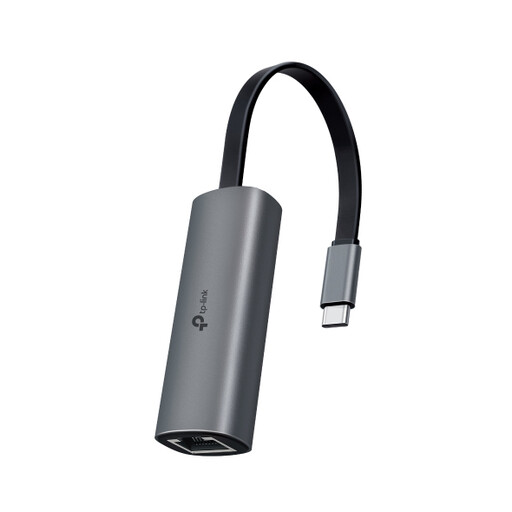
TP-Link UE302C USB-C to RJ45 adapter

TP-Link UE302C USB-C to RJ45 adapter

A good fit if your USB-C device and the rest of your network support connections up to 2.5 GbE.

USB-C; 2.5-Gigabit Ethernet up to 2.5 Gbps. TP-Link recommends Cat5e or higher for peak performance. The adapter alone doesn’t guarantee matching file or internet speeds.

View at Joybuy

Frequently asked questions

What should I check if the adapter won’t connect?

First, check that the USB plug fits and the Ethernet cable is connected securely. Microsoft Support recommends checking the cable and connection when troubleshooting connection problems. Then check the operating system and driver requirements for your adapter. Discuss any changes to the shared network with the administrator.

Should I set a shared wired network to private in Windows?

Not automatically: choose the network profile based on how much you trust the network and how visible you want your computer to be. Microsoft Support explains that security checks are stricter on a public network than on a private one. Make sure any file sharing you need is appropriate for the studio’s set-up.

Will a 2.5GbE adapter automatically give me 2.5 Gbps internet speed?

No. This describes a supported Ethernet link speed, not a guaranteed internet or file transfer speed. Actual speeds also depend on factors such as your network equipment, cable, host and internet service. Check the whole connection before choosing 2.5 GbE.

What are the warranty and cooling-off period rules in the Netherlands?

When you buy as a consumer, the product must be of satisfactory quality. The Dutch government says there is no fixed statutory warranty period. For online purchases from a business, you generally have 14 days to change your mind, although exceptions apply. This cooling-off period is separate from your rights if a product is faulty.
