Who is an Ethernet adapter suitable for?

Student with unreliable Wi-Fi in their room

Wants to bypass Wi-Fi while studying or making video calls, but should first check whether their room has a usable wired connection. Stichting DUWO and SSH Student Housing explain that internet provision can vary between student accommodation blocks.

Student with a laptop that doesn’t have an RJ45 port

Has access to a wired connection and is looking for an adapter that fits an available USB-A or USB-C port. Also check that it supports your operating system and the version you’re using.

Student with a single USB-C charging port

Wants to keep their laptop charging during a wired study session. A USB-C adapter with Power Delivery may be useful if your laptop charges through that port; for example, Belkin lists this feature for the INC019btBK.

What should you look for?

What to consider What should you check? Who is this important for?
Is a wired connection available? Check whether your room has an accessible RJ45 socket or an authorised router port, how to get network access and what cable length you need. If I mainly need an alternative to unreliable Wi-Fi, I want to check first that there’s a usable wired connection in my room. Around 36% of consumers say their top concern is whether wired access will work.
Port and system Check which USB port is available and make sure the exact adapter model supports your operating system and its version. I want to avoid buying an adapter that won’t fit my laptop or work with my system. This compatibility is the top priority for around 29% of consumers.
Charging while connected Check whether your laptop charges through the USB-C port in question and whether the adapter explicitly supports Power Delivery pass-through charging. If my laptop needs to charge through the same USB-C port while I work, I’m looking for an adapter that combines charging and Ethernet. This is the top concern for around 21% of consumers.
Network speed Check the speed of the connection in your room, your local network and your internet connection before making 2.5 Gbit/s a requirement. I’d only consider speeds above gigabit if there’s a specific reason to do so on my network. Around 14% of consumers say a faster wired connection is their main consideration.

Common buying mistakes

  • Buying an adapter without checking the connection in your room

    An RJ45 port on an adapter won’t provide an active network connection or internet service by itself. Connections and providers can vary between student accommodation blocks.

    Ask your accommodation provider or network administrator what connection and access are available in your room.

    Depending on the connection, you may also need a separate network cable or your own internet subscription.

  • Assuming USB-A, USB-C and system support are interchangeable

    An adapter with the wrong connector won’t fit the port you want to use. TP-Link also notes that a driver is required for some older systems.

    Check the physical connection and your operating system version against the information for the exact model.

  • Expecting 2.5 Gbit/s to make your internet faster automatically

    The stated speed is a feature of the network port. Other parts of your connection may determine the speed you can actually use.

    Choose a faster port only if you know that your available network equipment and connection support it.

  • Choosing a standard USB-C Ethernet adapter when you need that port for charging

    A basic adapter won’t automatically free up the USB-C port it uses for charging.

    Check whether your laptop charges through that port, and choose a model with an explicitly stated Power Delivery pass-through feature only if you want to charge and connect at the same time.

Brands to consider

TP-Link

The UE300 has USB-A, while the UE300C has USB-C. TP-Link describes both models as having a 10/100/1000 Mbit/s RJ45 port.

  • These two models give you a choice based on the USB port on your laptop.
  • TP-Link says a driver is needed for the UE300C on certain older systems. Check support for your system version.

UGREEN

UGREEN describes a USB-C to gigabit Ethernet adapter that automatically adjusts to 10/100/1000 Mbit/s.

  • The stated speeds include 10, 100 and 1000 Mbit/s.
  • According to UGREEN, this product requires manual driver installation on Windows 7, Windows XP and Linux.

Belkin

Belkin says the INC019btBK combines USB-C Ethernet with Power Delivery, while the separate INC012btBK is a USB-C adapter with 2.5-Gbit/s Ethernet.

  • The INC019btBK offers Power Delivery up to 100 W and 10/100/1000 Mbit/s Ethernet.
  • Charging is a feature of the INC019btBK, while the 2.5-Gbit/s specification applies to the INC012btBK. Don’t assume they’re features of the same model.

StarTech.com

StarTech.com describes the C22G-USB-ETHERNET as a USB-C adapter for 2.5GbE.

  • For this model, the manufacturer lists USB-C 3.2 Gen 1, an RJ45 port and support for multiple operating systems.
  • The product page mentioned is aimed at the US market. When buying, check that the version and connection suit your needs.

Joybuy products for a wired laptop connection

This selection includes USB-A and USB-C options for a wired RJ45 connection, with stated network speeds ranging from gigabit to 2.5 Gbit/s. Check that the model’s connector fits your laptop and that your room has a working wired connection.

TP-Link USB Type-C to RJ45 Gigabit Ethernet Network Adapter

TP-Link USB Type-C to RJ45 Gigabit Ethernet Network Adapter

An option if you want to add a wired RJ45 connection to a laptop with a compatible USB-C port.

The product description states gigabit Ethernet up to 1000 Mbps.

View product
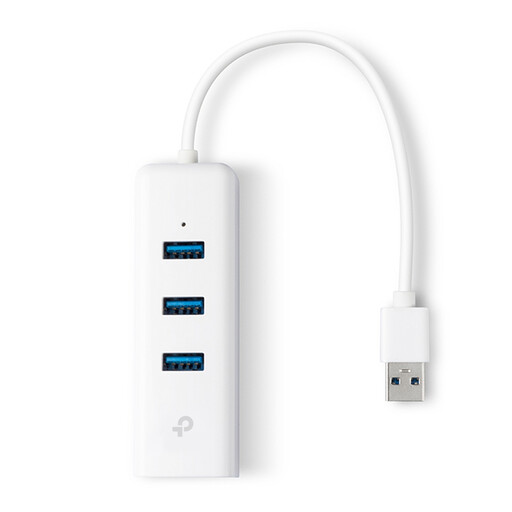
TP-Link UE330 USB Type-A Hub, White

TP-Link UE330 USB Type-A Hub, White

A good fit if you want to add a wired connection via USB-A and need extra USB ports too.

The product description states gigabit Ethernet up to 1000 Mbps and three USB 3.0 ports.

View product

HP USB-C to RJ45 Adapter G2

HP USB-C to RJ45 Adapter G2

An option if you want to add a wired connection via a compatible USB-C port.

The product description states gigabit Ethernet and lists Windows 10 and Windows 11 as supported versions.

View product

acer Type C to Giga LAN Dongle

acer Type C to Giga LAN Dongle

An option for a laptop with a compatible USB-C port and access to a working wired connection.

The product description states USB 3.2 Gen 1 Type-C and 1 Gbps Ethernet.

View product
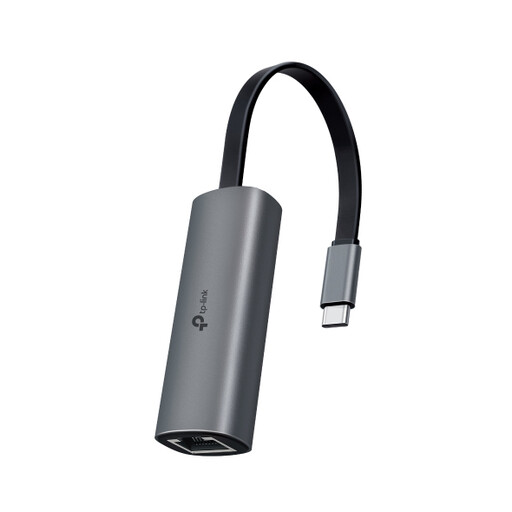
TP-Link UE302C USB-C to RJ45 Adapter

TP-Link UE302C USB-C to RJ45 Adapter

An option if your USB-C laptop and wired network can both support a connection faster than gigabit.

The product description states Ethernet speeds of up to 2.5 Gbps. The adapter’s speed alone doesn’t guarantee a faster internet connection.

View product

Frequently asked questions

Will a USB Ethernet adapter work if the Wi-Fi in my student room drops out?

Yes, if you have access to a working wired connection, the adapter can connect your laptop to it. It won’t fix a problem with the internet service itself. Stichting DUWO and SSH Student Housing describe different connection and subscription arrangements; if you’re unsure, check what applies to your building.

What should I check if the cable is connected but I can’t get online?

Check the cable and both connection points, and try another cable if possible. Microsoft Support also recommends the Windows network troubleshooter. If you’re on a managed student network, you may need to ask the administrator to check your access or investigate a fault.

Will I need to pay separately for an Ethernet cable or internet subscription?

Check what’s included in the chosen pack and how far you are from the connection before buying a cable. An adapter isn’t an internet subscription: Stichting DUWO says that the provider and whether you need your own subscription can vary between accommodation blocks.

What are my rights if an adapter I bought online isn’t suitable or breaks too soon?

ACM ConsuWijzer states that the 14-day cooling-off period ends 14 days after delivery. It also says that if a product breaks sooner than expected during normal use, the seller must resolve the problem free of charge, for example by repairing or replacing it, or issuing a refund.
