First, choose an adapter that fits an available USB port on your laptop and is supported by your operating system. Then match gigabit or 2.5 GbE to your server, cable and any equipment in between: the adapter’s speed alone doesn’t determine the speed of the entire connection. If you’re connecting directly, you may also need to check the IP settings.
Who is this choice relevant to?
Laptop user without an Ethernet port
You want to connect a local server, so first check whether you have a free USB-A or USB-C port and whether the adapter works with your operating system. Microsoft Support describes a USB-to-Ethernet adapter as an option for PCs without a built-in Ethernet port.
User of fast local storage
You transfer large files to a local server and want to know whether 2.5 GbE is compatible with the server port, cable and any other network equipment. An adapter’s stated speed alone doesn’t tell you the speed of the entire connection.
User with limited desk or port space
You want a compact adapter and cable setup, or you also need the same USB-C port for charging. So check both the space available and which connections you want to use at the same time.
What should you look for when buying?
First, check the USB port and operating system support. Then compare the network speed with your server and the rest of the connection. If you have a small desk, consider the adapter’s shape and cable layout too, and check separately whether you want to charge your laptop while using it.
| What to consider |
What to look for |
Who should prioritise this? |
| Connection and system |
Check that your laptop has a free USB-A or USB-C port and that the exact model supports your operating system. |
If you want to be sure the adapter will work with your laptop, check the port and operating system support first. Around 36% of consumers give this their highest purchasing priority. |
| Local connection speed |
Compare the speed of the server port, adapter and any switch, and check the cable too. TP-Link recommends Cat5e or higher for peak performance from the UE302C. |
If you transfer large files to a local server, you’ll want to know whether 2.5 GbE is suitable for the entire connection. Around 29% of consumers prioritise connection speed. |
| Space and cable layout |
Check the dimensions, any fixed cable length, and the position of the USB and RJ45 connections in relation to your desk. |
On a small desk, you’ll want to position the adapter and cables to suit your workspace. Around 21% of consumers consider a compact setup most important. |
| Ethernet and charging at the same time |
Check that your laptop, power supply and adapter support the charging function you need. According to the manufacturer, the Belkin INC019 has gigabit Ethernet; pass-through charging doesn’t make that port a 2.5GbE port. |
If you also need the USB-C port for power, look for an adapter with suitable power pass-through as well as Ethernet. Around 14% of consumers put simultaneous charging at the top of their list. |
Common mistakes when buying and connecting
-
Assuming 2.5 GbE on the adapter guarantees a faster server connection
The adapter’s speed doesn’t determine the speed of the server port, cable and any equipment in between.
Check the entire network connection before choosing 2.5 GbE. TP-Link recommends a Cat5e or higher Ethernet cable for peak performance from the UE302C.
-
Treating USB-A, USB-C and power pass-through as interchangeable
An adapter must fit an available port on your laptop. What’s more, a standard Ethernet adapter doesn’t necessarily include a charging function.
First check which USB port you can use, then decide whether you also want to charge your laptop while connected via Ethernet.
-
Assuming a connected adapter will make the server accessible
Even with an Ethernet cable connected, the IP settings on your laptop and server can prevent the devices from reaching each other.
After connecting, check the Ethernet and IP settings on both devices.
Brands to consider
TP-Link
The models listed vary in USB connection and Ethernet capability, from USB-A or USB-C gigabit to USB-C with 2.5 GbE.
- The official product specifications offer clear options to suit your laptop’s available port and the Ethernet standard you need.
- The stated adapter speed isn’t a measure of the connection to your server. TP-Link recommends Cat5e or higher for peak performance from the UE302C.
StarTech.com
According to StarTech.com, the U2GA-USB-C-ETHERNET is a USB-C adapter with 2.5GbE and a USB-A converter.
- The manufacturer lists a built-in 15 cm cable and support for several operating systems.
- Check support for your specific operating system and the entire network connection; the stated 2.5GbE speed isn’t a measure of your own connection.
Belkin
The INC012 is a USB-C adapter with 2.5GbE and a fixed 90 mm cable. According to Belkin, the INC019 combines USB-C power pass-through with gigabit Ethernet.
- The two models cater to different needs: 2.5GbE or Ethernet alongside charging.
- According to Belkin, the INC019’s Ethernet port supports up to 1000 Mbps; power pass-through doesn’t mean the port supports 2.5GbE.
UGREEN
The EU product page for model 25051-AMZ describes a USB 3.0 to RJ45 adapter with a stated capacity of 2.5GbE.
- UGREEN lists backwards compatibility with 1000, 100 and 10 Mbps.
- These specifications aren’t the result of a speed test, nor do they guarantee that the adapter will work with every laptop and server.
Joybuy products for connecting a laptop to a server
The products below include USB-C and USB-A options for gigabit Ethernet, as well as a USB-C adapter rated at 2.5GbE. Choose one based on your laptop’s available port and the speed of the entire network connection.
 Image unavailable
TP-Link USB Type-C to RJ45 Gigabit Ethernet Network Adapter
An option if your laptop has a free USB-C port and you want a gigabit connection to your server.
The product name lists USB Type-C, RJ45 and gigabit Ethernet.
View at Joybuy
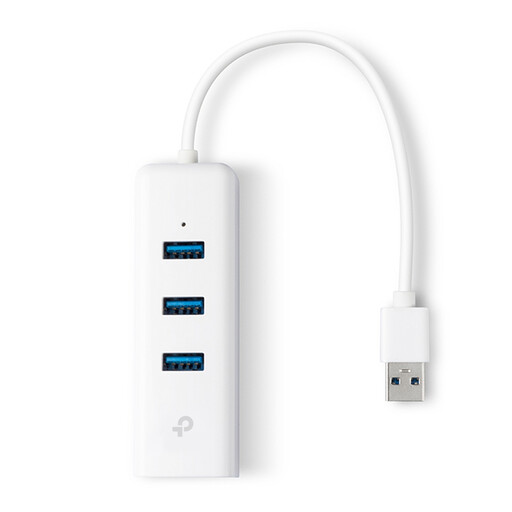 Image unavailable
TP-Link UE330 USB Type-A dock, USB 3.2 Gen 1, white
An option if your laptop has a free USB-A port and you’re looking for a dock-style connection as well as Ethernet.
The product name lists USB Type-A, USB 3.2 Gen 1 (3.1 Gen 1) and a white finish.
View at Joybuy
 Image unavailable
HP USB-C to RJ45 Adapter G2
A wired connection option for a laptop with a free USB-C port.
The product name identifies an HP USB-C to RJ45 adapter, model G2.
View at Joybuy
 Image unavailable
Acer Type-C to Giga LAN Dongle
An option for a laptop with USB-C if a wired gigabit LAN connection suits your server setup.
The product name lists Type-C and Giga LAN.
View at Joybuy
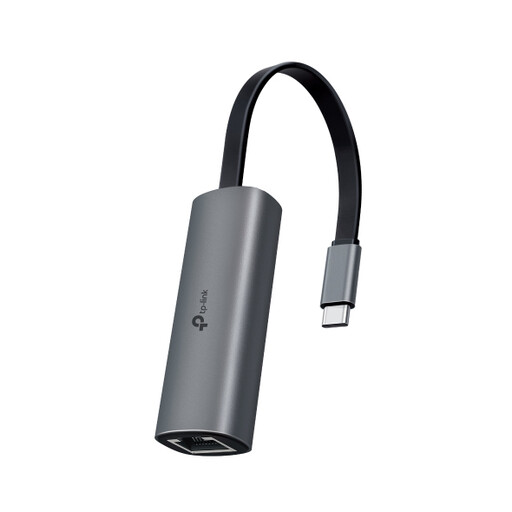 Image unavailable
TP-Link UE302C USB-C to RJ45 adapter
An option if your USB-C laptop and the entire network connection support 2.5 GbE.
TP-Link lists speeds of up to 2.5 Gbps for the UE302C and recommends Cat5e or higher for peak performance. The stated adapter speed doesn’t guarantee faster transfers to your server.
View at Joybuy
Frequently asked questions
Is a USB Ethernet adapter enough to access a directly connected server?
Not always. As well as the adapter, the Ethernet cable and the IP settings on your laptop and server need to be configured correctly. Microsoft Support explains that Windows can assign IP settings automatically via DHCP or let you set them manually; the right option depends on your local network.
What should I check if the Ethernet connection doesn’t work after installation?
First, check that your operating system supports the exact adapter model and that the cable is securely connected at both ends. For Ethernet problems in Windows, Microsoft Support also recommends trying another cable to check whether the cable is faulty.
When is a 2.5GbE adapter useful for a local server?
A 2.5GbE adapter is suitable if the server port and any equipment in between also support that speed. Check the cable requirements for the model you choose too; TP-Link recommends Cat5e or higher for peak performance from the UE302C.
What are my rights if an adapter bought online isn’t suitable?
For a consumer purchase in the Netherlands, the seller must resolve issues with a faulty product in line with the applicable terms; ACM ConsuWijzer explains the statutory guarantee. Online purchases also generally come with a cooling-off period of up to 14 days after delivery, although exceptions may apply depending on the product and circumstances. A manufacturer’s guarantee doesn’t replace your statutory rights.


