Who is a USB Ethernet adapter for?

Home worker looking for a single network connection

Wants to connect a laptop without an RJ45 port to their home router using a cable, and does not necessarily need extra hub features. Microsoft Support describes a USB-to-Ethernet adapter as an option for PCs without an Ethernet port.

Home worker with only a USB-A port free

Needs an adapter that fits a free USB-A port and also checks that it supports the laptop’s operating system. TP-Link offers the UE300, among other options.

Home worker with a NAS or a USB-C setup with no ports to spare

May need a faster local network for large files, or be looking for extra ports or a way to charge their laptop. These are different needs, so check that each model has the network or hub feature you want.

What should you look for when buying?

What to consider What should you check? Who is this important for?
Basic wired connection Check whether you have a free USB-C or USB-A port and whether the exact model supports your operating system. I want to connect my laptop to my home router with a cable and don’t need any extra features. Around 36% of consumers prioritise this basic connection when buying.
USB-A connection Check which type of port is free and whether the adapter is compatible with your operating system. If only USB-A is free, the plug needs to fit directly; a USB-C model will not solve the problem by itself. Around 29% of consumers prioritise a USB-A connection.
2.5-gigabit network Check whether your router, switch or NAS supports this speed, and look out for any cable requirements specified by the manufacturer. 2.5 gigabit may be useful for transferring large files over a compatible, faster local network. Around 21% of consumers prioritise this type of faster network.
Extra ports or charging Decide whether you need USB-A expansion, Power Delivery or both, and check the features of the exact model. If you want to connect peripherals while you work or charge your laptop via USB-C, it’s important to choose the right combination of features. Around 14% of consumers prioritise extra ports or charging.

Common buying mistakes

  • Assuming a 2.5 Gbps adapter will deliver 2.5 Gbps across the entire connection

    Speed also depends on the rest of your network equipment. Sitecom states that connected equipment must support 2500 Mbps to achieve that speed; TP-Link recommends Cat5e or higher for the UE302C to reach peak performance.

    Check your router, switch or NAS, and your cable, before choosing a 2.5-gigabit adapter.

  • Assuming every USB-C Ethernet adapter can also charge your laptop or has extra ports

    Ethernet, USB-A expansion and Power Delivery are not combined in every model. Sitecom says the AD-1008 has extra USB-A ports but no USB-C Power Delivery; the AD-1020’s PD port does not support data or video.

    Compare the ports and features of the exact model with what you want to connect at the same time while working.

    If the adapter does not provide the charging or USB feature you need, you may also need a separate compatible solution.

  • Not checking the plug or driver support

    USB-A and USB-C adapters are not directly interchangeable. Support and driver requirements can also vary by model, operating system or hardware version.

    Before ordering, check which laptop port is free and review the compatibility and driver information for the exact model.

Brands to consider

TP-Link

TP-Link offers USB-A and USB-C adapters for gigabit Ethernet, as well as a USB-C model for 2.5 gigabit.

  • The model specifications distinguish between the connection type and stated network speed; TP-Link recommends Cat5e or higher for the UE302C to reach peak performance.
  • Check system and driver support for the exact model and hardware version. This information comes from the manufacturer and is not based on independent performance tests.

Sitecom

Sitecom offers standalone USB-C gigabit and 2.5-gigabit adapters, as well as models with extra USB-A ports or Power Delivery.

  • Features vary by model; according to Sitecom, the AD-1020 combines gigabit Ethernet with Power Delivery of up to 100 W.
  • The AD-1020’s PD port does not support data or video. According to Sitecom, the AD-1005, AD-1006 and AD-1008 do not support USB-C Power Delivery.

StarTech.com

According to StarTech.com, the US2GC30 is a USB-C adapter for 2.5-gigabit Ethernet.

  • The manufacturer lists speeds of 2.5 Gbps, 1 Gbps and 100 Mbps.
  • Check the stated operating system requirements and whether the rest of your network supports the speed you want.

Anker

The European manufacturer pages for the PowerExpand A8313 and A7613 describe USB-C-to-gigabit and USB-A-to-gigabit adapters respectively.

  • The manufacturer states a maximum speed of 1 Gbps for both models.
  • Check that the connection type and compatibility of the version you choose are right for your laptop.

UGREEN

UGREEN describes a USB-C-to-Ethernet adapter for compatible laptops.

  • The manufacturer describes gigabit Ethernet and driver-free installation on certain systems.
  • For Windows 7/XP and Linux, among other systems, UGREEN says a driver needs to be downloaded; check the requirements for your system.

Joybuy product picks

The options below are USB-C solutions for a wired network connection, from standalone adapters to devices for workspaces that need extra ports.

TP-Link USB Type-C to RJ45 Gigabit Ethernet adapter

TP-Link USB Type-C to RJ45 Gigabit Ethernet adapter

An option if you have a free USB-C port and need a wired RJ45 connection.

USB Type-C connection; RJ45 Ethernet.

Joybuy

HP USB-C to RJ45 Adapter G2

HP USB-C to RJ45 Adapter G2

Suitable for a USB-C workspace where you want a wired Ethernet connection.

Gigabit Ethernet; the stated minimum system requirement is Windows 10 or Windows 11.

Joybuy

Acer Type-C to Giga LAN adapter

Acer Type-C to Giga LAN adapter

A standalone USB-C adapter for connecting a laptop to a wired gigabit network.

USB-C connection; RJ45 gigabit Ethernet.

Joybuy
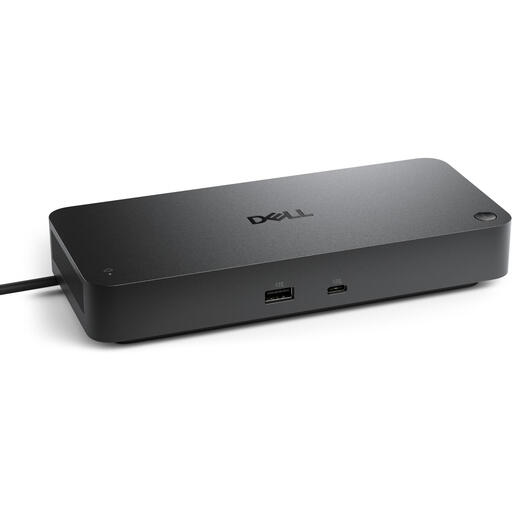
Dell Pro SD25 USB-C dock, black

Dell Pro SD25 USB-C dock

A dock to consider if your USB-C workspace needs both a wired network connection and ports for peripherals.

USB-C host interface; USB 3.2 Gen 2 (3.1 Gen 2); black.

Joybuy

Verbatim CMH-13 USB Type-C hub

Verbatim CMH-13 USB Type-C hub

An option for a USB-C workspace where you want to combine Ethernet with extra ports.

The product information states USB Power Delivery of up to 100 W. Use certified USB-C cables and power adapters, and do not exceed the stated PD limit.

Joybuy

Frequently asked questions

How do I connect an adapter if my laptop doesn’t have an Ethernet port?

Connect an adapter with the right USB connection to your laptop, then use an Ethernet cable to connect its RJ45 port to a LAN port on your router. If the connection doesn’t work in Windows, check the cable and connections first, then consult Microsoft’s troubleshooter and the driver information for the exact adapter model.

Do I automatically need a 2.5-gigabit adapter for video calls?

No, not necessarily: start by checking which laptop port is free and the speed of your network equipment. Sitecom states that connected equipment must support 2500 Mbps to achieve that speed; an adapter’s maximum specification alone does not prove that it will improve video calls.

Can an Ethernet adapter charge my laptop at the same time?

Only if the model you choose supports Power Delivery and your laptop can charge through the connection you’re using. Sitecom states that the AD-1020 supports up to 100 W, while the AD-1008 does not support USB-C Power Delivery, according to Sitecom.

What rights do I have in the Netherlands when I buy an adapter online?

For a standard online consumer purchase, ACM ConsuWijzer says you generally have a statutory cooling-off period of up to 14 days after delivery, subject to legal exceptions. If a product does not meet reasonable expectations under normal use, the seller is responsible under the terms of the statutory guarantee for providing an appropriate remedy at no cost. This is separate from any voluntary manufacturer’s warranty.
