
Studio user without a network port
You want to connect your laptop directly to the wired network. TP-Link Netherlands lists adapters with USB-A and USB-C connections; check which port is available on your laptop.


First, choose an adapter that fits an available port on your laptop and works with its operating system. Then match its network speed to the connection to the server. Gigabit is suitable when the other connections support gigabit, while 2.5 gigabit is only worthwhile if the relevant switch port, server connection and cabling can all handle that speed. If you need one USB-C port for both Ethernet and charging, check that the power pass-through meets your laptop’s and charger’s requirements.
You want to connect your laptop directly to the wired network. TP-Link Netherlands lists adapters with USB-A and USB-C connections; check which port is available on your laptop.
You regularly move large files and want to know whether 2.5 gigabit is right for your existing server connection. TP-Link Netherlands and StarTech.com Netherlands list models with this network speed rating.
You also need a connection to charge your laptop while working on a wired network. Belkin lists USB-C power pass-through alongside gigabit Ethernet for the INC019btBK.
First, check your laptop port and system requirements, then the speed of the entire connection to the server. After that, consider whether you need to charge through the same USB-C connection.
| What to consider | What should you check? | Who is this important for? |
|---|---|---|
| Compatible laptop connection | Check whether USB-A or USB-C is available and compare it with the full model variant. | If I want to connect my laptop directly to the studio’s wired network, the adapter needs to fit the available port. Around 36% of consumers prioritise this connection. |
| Speed to the server | Check what speed the relevant switch port and server connection support; for 2.5 gigabit, check the cabling too. | If I regularly move large files, I want the adapter’s speed to match the rest of the connection, without paying for speed I can’t use. Around 29% of consumers prioritise file transfer speed. |
| Operating system support | Check the OS version and requirements for the exact model, including any driver requirements. | When I connect the adapter to my laptop, I want to be sure that the model variant works with my operating system. Around 21% of consumers prioritise system compatibility. |
| Combining Ethernet and charging | Check whether your laptop can charge through the USB-C port and whether the power pass-through suits your charger and charging needs. | If I need just one USB-C port for both wired networking and charging, I’m looking for suitable power pass-through. Around 14% of consumers prioritise this combination. |
The adapter’s rated speed is just one part of the connection. A 2.5-gigabit adapter won’t make a gigabit connection faster.
Ask the studio administrator about the speed of the relevant network ports and check the cable before choosing between gigabit and 2.5 gigabit.
Models differ in their USB connections and operating system support. Some models may also require a driver.
Check the full model name, available laptop port and OS version in the manufacturer’s product information.
The adapter provides the physical network connection, but accessing file shares and network security also requires the right settings and permissions.
Ask the administrator what server access is permitted. Microsoft warns that turning off the Windows Firewall can leave your device more vulnerable; don’t disable it to work around a connection problem.
TP-Link lists USB-A and USB-C adapters for gigabit, as well as USB-C models for 2.5 gigabit.
StarTech.com lists, among other products, the USB-C to 2.5-gigabit adapter US2GC30 and an adapter with two gigabit ports.
UGREEN’s European product page describes model 25051 as a USB-A to RJ45 adapter supporting up to 2.5 Gbps.
For model INC019btBK, Belkin lists USB-C gigabit Ethernet with power pass-through.
Anker describes the PowerExpand A8313 as a compact USB-C to gigabit adapter.
This selection includes USB-C options for wired network access, including gigabit models and a TP-Link adapter with 2.5 gigabit. That higher speed is only relevant if the server connection and cabling can support it too.
 No image available
An option for a laptop with USB-C when the server connection supports gigabit.
Connection: USB Type-C to RJ45; gigabit Ethernet.
 No image available
An option if you want to connect a USB-C laptop to the network using a cable.
Before buying, check that the stated network speed and system requirements suit your setup.
 No image available
Suitable for a USB-C setup when you need a wired gigabit connection.
The product name specifies Type-C and Gigabit LAN.
 No image available
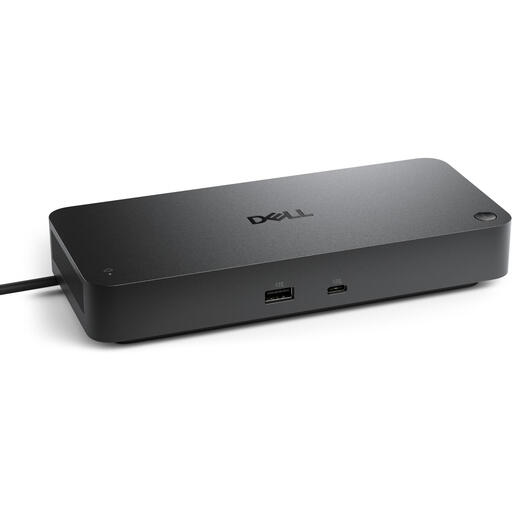
A USB-C solution to consider if you want wired network access as part of a docking setup.
Check that the connections and features suit the equipment in your studio.
 No image available
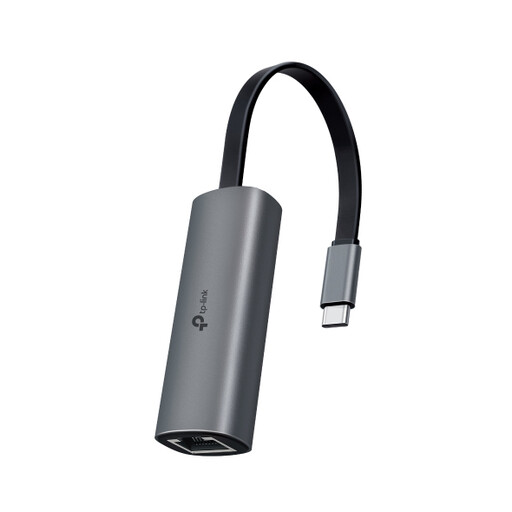
An option for a USB-C laptop if the relevant network connection also supports 2.5 gigabit.
TP-Link specifies a maximum speed of 2.5 Gbps for the UE302C and recommends Cat5e or higher for peak performance. This doesn’t guarantee the same speed for file transfers.
No, not automatically. First check the relevant switch port, server connection and cable. TP-Link specifies a maximum speed of 2.5 Gbps for the UE302C and recommends Cat5e or higher for peak performance; this doesn’t guarantee the same speed for file transfers.
First, check that the cable is plugged in securely and that your operating system recognises an Ethernet connection. Microsoft Support and Apple Support provide connection troubleshooting steps; then ask the studio administrator about the correct network port, server settings and access permissions. A working network connection doesn’t automatically give you access to server files.
No, don’t turn off the firewall as a general fix. Microsoft Support warns that this can leave your device more vulnerable and provides guidance on checking your network profile and allowed apps. Ask the studio administrator to arrange the server access you need.
For an eligible online consumer purchase in the Netherlands, ACM ConsuWijzer states that you have a 14-day cooling-off period after delivery. The legal guarantee isn’t simply limited to two years: according to ACM ConsuWijzer, it depends on what you could reasonably expect from the product under normal use. Check that you’re buying as a consumer; these consumer rules don’t necessarily apply to a business order placed by the studio.