What should you look for when choosing?
First check the connection and system compatibility, then the network speed. Next, consider whether you need to charge through the same port and whether the studio equipment supports 2.5 gigabit.
| What to consider |
What to look for |
Who is this important for? |
| Connection and system |
Check the USB-A or USB-C port, its USB data capability, and support for your operating system and adapter model. |
I want to avoid choosing an adapter that won’t work with my laptop port or system; compatibility is the main purchase concern for around 36% of consumers. |
| Gigabit connection |
Find out what speed the studio’s RJ45 port supports, and check the USB speed of your laptop port too. |
If I simply want a wired connection without needing multigigabit speeds, I focus on finding a suitable gigabit adapter; around 29% of consumers prioritise this basic connection. |
| Networking and charging |
Check whether your laptop charges through the USB-C port you plan to use, and whether your laptop, charger and cable support the required charging power. |
I only have one suitable USB-C port and want to charge and connect to the network at the same time; this is the main reason for around 21% of consumers. |
| 2.5 gigabit |
Confirm the speed of the studio port and check the cable. TP-Link specifies Cat5e as the minimum for peak performance with the UE302C. |
When I transfer large files over a suitable high-speed studio connection, the speed of the whole connection matters; around 14% of consumers prioritise this multigigabit requirement. |
Joybuy products for a wired studio workspace
These product options include USB-C gigabit adapters, a USB-C hub with Ethernet and pass-through charging, and a dock with a 2.5-Gbps Ethernet port. Compare the connection and features with what your laptop and shared studio actually support.
 No image available
TP-Link USB-C-to-RJ45 gigabit adapter
An option if you need a free USB-C data port and a wired gigabit connection.
The product description lists USB 3.0, RJ45 Ethernet up to 1000 Mbps, and support for Windows, macOS, ChromeOS and Linux. It also mentions a foldable design.
Joybuy
 No image available
HP USB-C-to-RJ45 Adapter G2
An option to compare if your laptop has a compatible USB-C port and you need gigabit Ethernet.
The product description lists Gigabit Ethernet and Windows 10 and Windows 11 as supported systems. Check that your laptop and operating system version are compatible.
Joybuy
 No image available
Acer USB-C-to-Gigabit LAN dongle
A compact option for a USB-C laptop that needs to connect to a gigabit network.
The product details list RJ45 Ethernet with a speed of 1 Gbps.
Joybuy
 No image available
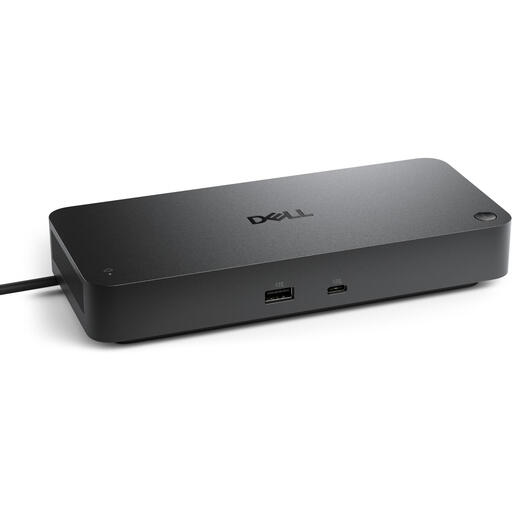
Dell Pro SD25 Wired USB 3.2 Gen 2 (3.1 Gen 2) Type-C dock
A dock to consider for a fixed workspace where you need several connected devices as well as Ethernet.
The product details list a USB-C host interface, a 2.5 Gbps RJ45 port, USB-C Power Delivery up to 130 W, and support for up to four monitors. A power source is required.
Joybuy
 No image available
Verbatim CMH-13 USB-C hub
A hub to compare if you want to combine Ethernet with extra laptop connections.
The product details list 13 ports, 1-Gbps Ethernet and USB Power Delivery up to 100 W. A power source may be needed for Power Delivery.
Joybuy
Frequently asked questions
How do I set up an Ethernet adapter if my Mac has no internet connection?
In System Settings, check under Network to see whether the adapter appears as a network service. Apple Support describes configuration using options such as DHCP; if you’re unsure about the studio’s settings, ask the network administrator what details you need.
Can I use any Ethernet wall socket in the studio?
No, an adapter doesn’t give you network access by itself. Ask the administrator which connection is intended for your laptop and whether you need access or IP settings.
Does a wired connection automatically make a shared network private?
No. Consider network access and file sharing separately: the National Cyber Security Centre warns that allowing file sharing on a shared network can increase risks.
Am I automatically entitled to exactly two years’ legal guarantee in the Netherlands?
No, the Netherlands has no fixed statutory guarantee period. According to the Dutch government, how long a product should remain in good working order depends on what you can reasonably expect from it. If a product is faulty, contact the seller; a manufacturer’s guarantee is separate.
Is CE an independent quality mark for USB Ethernet adapters?
No. According to Business.gov.nl, CE is not an independent quality mark; it is the manufacturer’s declaration that the applicable EU requirements have been met. The obligations depend on the product, and a declaration for one model doesn’t prove that a differently numbered version or offer meets them.


