
Traveller with one USB lamp
You’d rather pack as little as possible. Check that the lamp cable fits the USB-A or USB-C port and that the output meets the lamp’s power requirements.


First, check which USB connection and power supply your lamp needs. Without this information, it’s not possible to confirm that a specific charger is suitable. A compact wall charger may be enough if the socket is nearby, while a charging station with a cable may be more convenient if the socket is awkwardly positioned or you have several devices—provided its ports and power output suit your setup.
You’d rather pack as little as possible. Check that the lamp cable fits the USB-A or USB-C port and that the output meets the lamp’s power requirements.
You want to be able to put the lamp on the desk, even if the socket is further away. Belkin states that the P-WCH010 has a 2 m power cable; check that it’s long enough for the room layout.
You want to connect the lamp alongside other devices. Belkin and Anker describe models with USB-A and USB-C ports; check how many ports you need to use at once and how the power is shared between them.
| What to consider | What should you check? | Who is this important for? |
|---|---|---|
| Connection and power supply | Check the type of USB connection and the required input voltage, current or power shown on the lamp or in its manual. Compare these with the output of the port you plan to use. | If I’m taking one USB lamp, I want to be sure the connection and power supply are right for it. Around 42% of consumers prioritise lamp compatibility. |
| Distance from the socket | Check where the socket and lamp will be positioned. Look at the length of the power cable and the lamp cable. | If the socket is inconveniently far from the desk, I still want the charging ports within reach. Around 33% of consumers prioritise having their charging point within reach. |
| Several devices at once | Count the USB-A and USB-C ports you need. Check the power output per port when several devices are connected. | If I want to use the lamp alongside other devices, I want to know whether there are enough suitable ports and how the output is shared. Around 25% of consumers prioritise connecting devices simultaneously. |
The power output may change when you connect a second device. For the Anker A2331, Anker states that simultaneous use provides up to 20 W via USB-C and 12 W via USB-A; the stated 33 W USB-C maximum does not apply unchanged in this setup.
Compare the output of each port you use with the requirements of your lamp and other devices, especially when connecting them at the same time.
If the power distribution doesn’t suit your devices, you may need a different charger.
Having the right USB port isn’t enough if you don’t have a cable that fits both the lamp and the charger. Belkin lists only the wall charger as included with the WCB009vfWH.
Before choosing a charger, check the connections at both ends of the cable and what you’re already bringing with you.
You may need a separate compatible cable for the WCB009vfWH.
A charger needs room to release heat. The Fire Service also advises against charging devices under a pillow or duvet, and recommends not using damaged cables.
Keep the charger uncovered and use only cables with no visible damage.
Belkin offers both compact USB wall chargers and a four-port charging model with a mains cable.
The Anker 323 Charger, model A2331, is described as a compact charger with a USB-A port and a USB-C port.
The Nexode listing describes a 65W charger for multiple devices.
Baseus describes the GaN3 Pro Desktop Powerstrip AC+2U+2C as a desk solution with USB and mains connections.
This selection includes USB wall chargers and extension leads with USB ports for use with a desk lamp. Check your lamp’s connection and power requirements before choosing a model. In the Netherlands, mains-powered chargers placed on the market must carry CE marking, according to the Netherlands Food and Consumer Product Safety Authority. A CE logo alone does not prove that a product has been independently tested.
 No image available
Consider this model if your lamp cable fits a USB-A or USB-C port; compare its output with your lamp’s power requirements.
The product information lists 65 W, two USB-C ports and one USB-A port. The output per port when several are used at once needs to suit your setup.
 No image available
This may be suitable if your lamp cable connects to one of the listed ports; also check your lamp’s power requirements.
The product name lists 30 W and one USB-C and one USB-A connection. Check how the power is shared if you want to use both ports at once.
 No image available
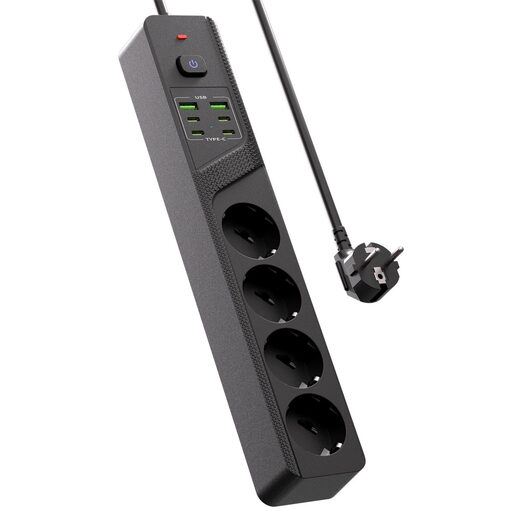
Consider this model if you want to connect the lamp and several devices at one desk, using compatible cables.
The product name lists four Schuko sockets, four USB-C ports, two USB-A ports and an on/off switch.
 No image available
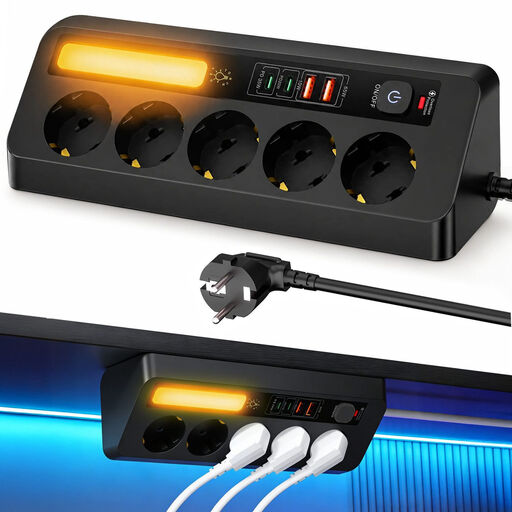
This may be useful if you want to position the charging ports closer to your desk; check that the cable is long enough for the room.
The product name lists a 2 m cable, PD 35 W and five sockets. The description lists two USB-C ports and two USB-A ports.
 No image available
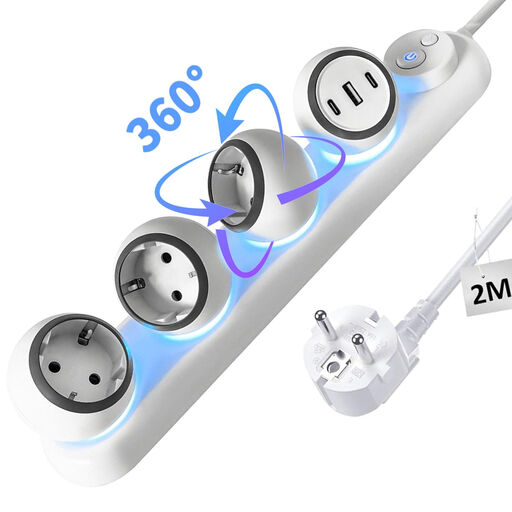
Consider this model if you want to place an extension lead with USB ports by your desk; check that the connections are suitable for your lamp and other devices.
The product name lists two USB-C ports, one USB-A port and a 2 m cable. The title also mentions wall mounting.
No. Compare your lamp’s power requirements with the output of the port you’ll use. When several devices are connected, the power may be shared differently from the maximum for a single port; Anker states this for the A2331.
Place the charger in the open so heat can escape, and don’t use damaged cables. The Fire Service advises against charging devices under a pillow or duvet; also follow the instructions for your lamp and charger.
Yes. According to the Netherlands Food and Consumer Product Safety Authority, CE marking is compulsory for mains-powered electrical products placed on the market in the Netherlands. A CE logo alone is not proof of independent product testing.
For many online consumer purchases, you have a 14-day cooling-off period, subject to exceptions, according to the Government of the Netherlands. Check whether the rule applies to your purchase and whether you need a compatible cable.