
People with one USB lamp and few available sockets
You want to make the most of a mains socket without needing to add more. First, check what power supply your lamp needs, as shown in product information from IKEA Netherlands.


First, check your lamp’s manual to see whether it uses USB-A or USB-C, what power supply it needs, and whether it charges a battery or only works while plugged in. A multi-port USB charger is suitable if you only need to connect USB devices; choose an extension lead with USB if you also need standard mains sockets. If you’ll be using several devices at once, compare the power available at each port with your devices’ instructions. Place the charger in a clear space and use undamaged cables.
You want to make the most of a mains socket without needing to add more. First, check what power supply your lamp needs, as shown in product information from IKEA Netherlands.
You want to connect several devices to one charger. Compare the port types and the power available when devices are connected at the same time. Product examples from Anker and UGREEN help illustrate what to consider.
As well as USB ports, you need standard mains sockets. Consider where the extension lead will go, how the cables will run and how much space it takes up. For example, brennenstuhl provides specifications for cable length and the desk thickness its clamp will fit.
| What to consider | What to check | Who is this important for? |
|---|---|---|
| Connection and power supply | Check the connection, cable and specified power supply in your lamp’s manual. Also check whether the lamp charges a battery or only needs power while it is in use. | When choosing a charger for my lamp, I want to know that its connection and power supply match the manual. Around 36% of consumers say lamp compatibility is their main consideration. |
| Number of connections | Count USB ports and standard mains sockets separately. Also check the plug type and the stated maximum load. | If I want to connect other devices alongside my lamp in the same place, I need to know whether I need USB ports, standard sockets or both. Around 29% of consumers prioritise having extra connections. |
| Power when using several devices at once | Check how much power is available to the ports you plan to use at the same time. Compare this with your devices’ power supply instructions. | If I want to use my lamp alongside other devices, I don’t want to look only at the total power. Around 21% of consumers focus mainly on the power available when using several devices at once. |
| Positioning and cables | Measure the available space and plan the cable route. Keep the charger clear and don’t use damaged cables. | If my desk has limited space, I want to keep the connections accessible without trapping the charger or cables. Around 14% of consumers give their workspace layout top priority. |
The stated total power isn’t necessarily available at each port when several devices are connected at once. Anker states that the USB-A ports on the A2045 share power; UGREEN lists a maximum total output of 65 W for the Nexode 65195.
For the combination you plan to use, compare how power is shared between the ports with the power supply instructions for your lamp and other devices.
A multi-port USB charger can connect USB devices, but it won’t give you an extra socket for a standard mains plug.
Before you buy, count how many USB devices and how many devices with mains plugs you want to connect at the same time.
Different models may have different ports or accessories. In 2024, the Netherlands Food and Consumer Product Safety Authority issued a specific warning about the IKEA ÅSKSTORM 40W USB charger, model ICPSW5-40-1. This warning doesn’t automatically apply to other chargers.
Check the full model number and product information. If in doubt, consult the safety information for that exact model.
Anker offers multi-port USB desktop chargers, including the 543 Charger A2045, as an example for a workspace with USB devices.
The Nexode Desktop GaN Charger 65W, 5-Port is an example of a desktop charger for several USB devices.
The estilo Duplex 1153580210 is an example of an extension lead with USB for a workspace with both USB devices and standard mains plugs.
These products are designed for charging USB devices from one charger, or for using an extension lead with USB when you also need to connect standard mains plugs.
 No image available
Suitable for a desk setup where you want to connect both USB devices and standard mains plugs.
Three AC sockets, three USB-A ports and one USB-C port; maximum 2500 W and a 1.5 m cable.
 No image available
An option to compare if you want to connect several USB devices to one charging station.
The product name lists two retractable USB-C cables.
 No image available
Worth comparing if you want to connect several USB devices to one charger.
The product name lists USB-A and USB-C connections. According to the product description, charging performance depends on the port, the connected device and the total power available.
 No image available
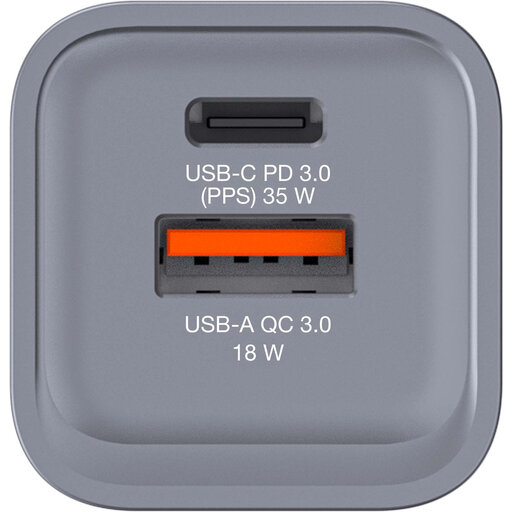
A two-port charger to compare if you want to connect your lamp and another USB device.
The product name lists one USB-C PD port and one USB-A QC 3.0 port. According to the product information, it must not be used in a damp environment.
 No image available
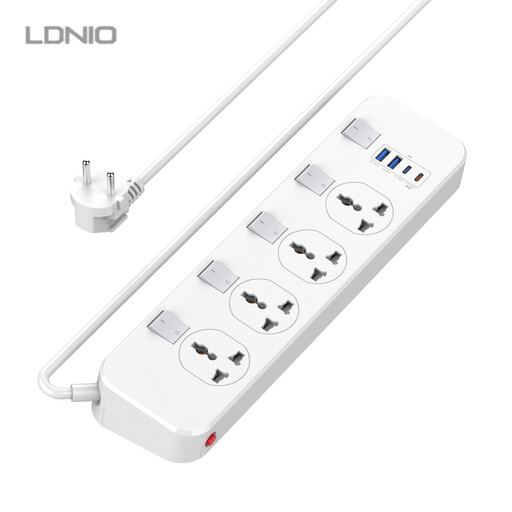
Suitable for a workspace where you want to connect standard mains plugs as well as USB devices.
The product name lists four sockets, two USB-A ports and two USB-C connections, one of which supports 20 W USB-C PD. The product name states that the cable is 6.5 ft long.
No. Check your lamp’s manual: USB may power the lamp without charging a battery. For example, IKEA Netherlands describes the HÖSTULOTA as a USB-C lamp that lights up when plugged in. This example doesn’t tell you anything about other lamps.
Follow the product instructions, leave the charger unobstructed so heat can escape, and don’t use damaged cables. Don’t connect extension leads together. These are recommendations from the Netherlands Fire Service; they aren’t a guarantee for any specific product.
There is no fixed statutory warranty period in the Netherlands; your legal rights depend on what you could reasonably expect from the product. The Dutch government distinguishes between statutory rights and any manufacturer’s warranty.
For a mains-powered charging station in the Netherlands, check whether the relevant safety requirements and mandatory CE marking apply. The Netherlands Food and Consumer Product Safety Authority makes clear that CE marking alone doesn’t prove independent testing. Also check the product information and any usage restrictions.
Don’t assume so: the Dutch government’s announcement about common chargers covers specific categories of devices and doesn’t confirm that every desk lamp is included. Check the connection on your own lamp and its power supply instructions.