
Cook with little dry worktop space
Wants to use a lamp in the kitchen, but first needs to work out whether the charger and cable can be kept away from water and heat.


Start by checking your lamp’s connection and power requirements: having a USB-C or USB-A port, or a high total power output, does not by itself mean a charger is suitable. Then choose only the number of ports and cable reach you need. Use the charger in a dry spot, away from water and hot cooking appliances; if you can’t do that, charge the lamp elsewhere.
Wants to use a lamp in the kitchen, but first needs to work out whether the charger and cable can be kept away from water and heat.
Needs help comparing the lamp’s connection and power requirements with the specifications of the individual charging ports.
Wants to connect other devices as well as the lamp, and needs to weigh up port types, power output when charging several devices at once and the space available.
First, decide where you can charge safely, then check the connection and power supply your lamp requires. Only then consider how many ports you need and what cable reach would be practical.
| What to consider | What to look for when buying | Who this matters to |
|---|---|---|
| Safe location | Choose a dry, stable spot away from the sink and hob. Don’t run the cable near heat or across a walkway. | I want to charge the lamp on the kitchen worktop without the charger or cable being near water or hot surfaces. Around 36% of consumers make a safe place to charge their top priority. |
| Suitable for the lamp | Compare the lamp’s connection, cable and permitted power input with the specifications of the port you want to use. | If I still need to check my lamp’s requirements, I want to know which port and power supply are permitted first. Around 29% of consumers put compatibility first. |
| Charging several devices | Check the number of USB-A and USB-C ports and the power output per port when charging several devices at once. | I want to connect other devices too, so I need suitable ports and must not confuse the total power output with the output of each port. Around 21% of consumers prioritise charging several devices. |
| Space and cable reach | Measure the dry worktop space available and the distance to the socket before choosing a wall charger or a model with a cable. | If there’s little room on the worktop, I want to know whether a wall charger will do or whether a charging hub with a cable can be placed safely. Around 14% of consumers prioritise available space and cable reach. |
A charger may have different port types and power outputs per port, while the lamp’s required power supply may be different.
Compare the lamp’s instructions with the output specifications of the specific port you want to use.
A longer cable gives you more flexibility when positioning the station, but it won’t remove the risks from water, heat or an awkward cable route.
First, decide where the station can sit securely and stay dry. If there’s nowhere suitable, charge the lamp elsewhere.
The Fire Service advises plugging high-power appliances, such as electric deep-fat fryers and heaters, directly into a wall socket rather than an extension lead.
Don’t assume a charging solution for the lamp is also suitable for connecting high-powered kitchen appliances.
These brands are worth looking at when comparing specific charging setups. Their inclusion doesn’t mean that a particular model will automatically suit your lamp.
The SJÖSS range includes compact USB-C wall chargers. Check that the connection suits your lamp’s cable and power requirements.
The BoostCharge WCB009vfWH is a wall charger to consider if you need both USB-A and USB-C.
Desktop chargers are an option if you want to connect several devices in one dry, available spot.
This selection includes USB chargers and extension leads or desk sockets with USB ports for a desk lamp and possibly other devices. For every mains-powered product, check that it has the required CE marking: the NVWA lists this as mandatory for electrical products. A CE marking doesn’t prove that a charger is suitable for your lamp.
 Image unavailable
An option if you want to connect the lamp and other devices to one charging point. Check beforehand that the lamp’s cable and power requirements are compatible.
The description lists two USB-C ports, two USB-A ports and charging for up to six devices at once.
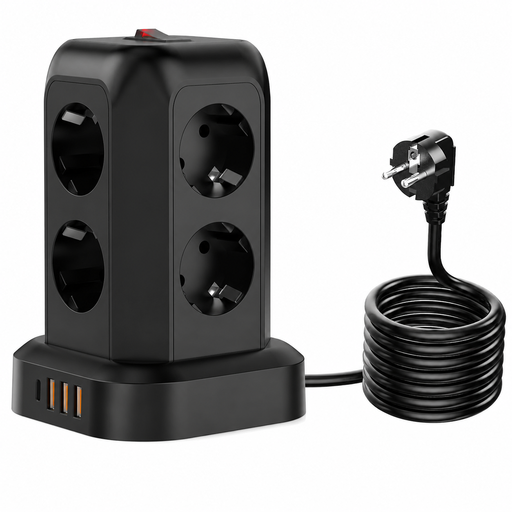 Image unavailable
Could be suitable if you need several mains sockets as well as USB connections in one place. Keep the charging area dry and stable.
The USB output is listed as 2.4 A in total. Don’t use the total output as an indication of what each individual port provides.
 Image unavailable
A compact wall-mounted option to consider if you have a suitable socket. Check the lamp’s requirements for each port.
The product details list up to 65 W, USB Power Delivery 3.0 with PPS and charging for up to three devices.
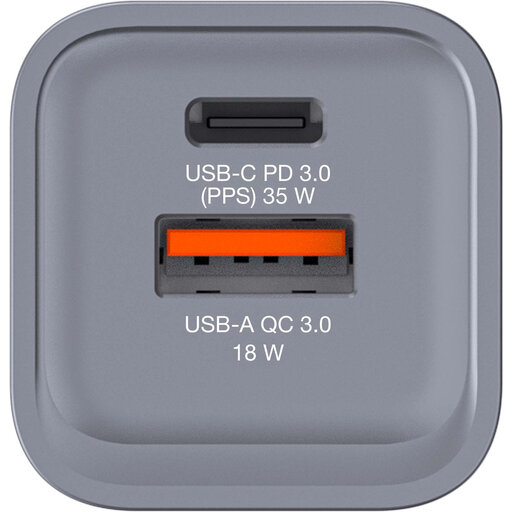 Image unavailable
A wall charger to consider if you need one USB-C port and a USB-A port as well. Check that the lamp’s power requirements match the port you choose.
The listed version has one USB-C PD port, one USB-A QC 3.0 port and a maximum output of 34 W.
 Image unavailable
An option if you want to attach the sockets to the edge of a worktop. Check beforehand that the clamp and location are suitable for your setup.
The description lists two 20 W USB-C ports, one 18 W USB-A port and three Schuko sockets. This model attaches with a clamp.
No, not based on the connection or advertised wattage alone. Compare the cable and permitted power input in the lamp’s instructions with the output specifications of the port you want to use.
Choose a dry, stable spot away from splashes and hot surfaces, and don’t run the cable near the hob. If there’s no suitable spot, charge the lamp elsewhere. This advice doesn’t mean that a charging station is suitable for a wet worktop.
Yes. The NVWA states that CE marking is mandatory for electrical products. Check the specific product; a CE marking doesn’t tell you whether its power specifications suit your lamp or whether the charger is water-resistant.
Don’t use damaged charging equipment. The Fire Service advises charging equipment with a battery in a room with a working smoke alarm.
Yes. According to ACM ConsuWijzer, if a product breaks sooner than you could reasonably expect during normal use, the retailer must resolve the issue free of charge, for example by repairing or replacing it, or refunding you. There is no single fixed statutory warranty period for every product in the Netherlands.