Start by checking your laptop’s USB port, your headphone plug and whether you also need a headset microphone. A dongle takes up very little space, while a desktop DAC is a better fit if you’ll actually use its extra connections or controls. If your laptop’s headphone socket already meets your needs, a separate DAC may not be necessary.
Who is this for?
Listener with limited desk space
You want to connect wired headphones to a laptop without adding another box or power supply to your desk. iFi describes the GO link as a USB-C dongle with a flexible 6 cm cable section; the FiiO K11, by contrast, needs space for a separate device and power supply.
Laptop user with a wired headset
You want to use the microphone during calls too. Creative specifies a four-pole CTIA socket and microphone recording for the Sound Blaster PLAY! 4 (SB1860). Also check your headset’s wiring and whether its software is supported by your operating system.
Listener who wants extra connections
Perhaps you’re looking for a volume knob or a 6.35mm or 4.4mm output, and have room for a larger device. FiiO lists these outputs for the K11, which measures 147 × 133 × 32.3 mm and uses a separate power supply, according to FiiO.
What should you look for when buying?
First, check that the ports and plugs are compatible, and whether you need a microphone. Then decide between a compact dongle and a device that takes up a permanent spot on your desk.
| What to consider |
What should you check? |
Who is this important for? |
| Desk space and cables |
Measure the available space and check the cable direction and whether a separate power supply is needed. The iFi GO link has a flexible 6 cm section, according to iFi; the FiiO K11 measures 147 × 133 × 32.3 mm and uses a 12 V/2 A power supply, according to FiiO. |
If I want to keep desk space and cables to a minimum, the form factor matters a lot. Around 36% of consumers put desk space first. |
| Compatible connections |
Note your laptop’s USB port and your headphones’ analogue plug. Check whether the USB-C port supports audio and whether any adapter you use is suitable for USB audio. |
If I want to keep using my existing laptop and headphones, their connections need to be compatible. Around 29% of consumers put compatibility first. |
| Microphone and controls |
Check whether there’s a microphone path and whether your headset has a compatible four-pole CTIA plug. Creative notes that headset button functionality depends on the headset manufacturer; the SmartComms features described are designed for Windows. |
If I want to make calls with my wired headset, I need both microphone support and compatible wiring. Around 21% of consumers prioritise calls and microphone controls. |
| Extra outputs and controls |
Check that the output matches your headphone plug and whether you need a physical volume knob. Bear in mind the space and power supply required by a desktop DAC. |
If I need a particular output or a volume knob, I can choose a larger device. Around 14% of consumers put extra connections or controls first. |
Common pitfalls
-
Confusing a headphone output with a headset connection
An output for playback doesn’t necessarily support the microphone on a wired headset.
Before buying, check specifically whether the DAC has a microphone path and whether its socket is compatible with your headset’s plug.
Allow for desk space and an additional power cable.
-
Confusing a manufacturer’s warranty with your statutory rights
According to ACM ConsuWijzer, your statutory rights depend on what you could reasonably expect from the product; they don’t automatically end when a shorter manufacturer’s warranty expires.
Keep your proof of purchase and the product description. If a product is faulty, contact the seller.
Brands to compare
iFi audio
The GO link is a compact USB-C dongle for wired headphones.
- According to iFi, the GO link has a flexible 6 cm cable section.
- Check that the USB-C connection and headphone plug are compatible with your devices; the product description alone doesn’t guarantee better sound with your particular setup.
Creative
The Sound Blaster PLAY! 4 (SB1860) is worth considering if you also make calls using a wired headset.
- Creative specifies a four-pole CTIA socket, microphone recording and a mute button.
- Creative notes that headset button functionality depends on the headset manufacturer; the SmartComms features described are designed for Windows.
FiiO
The K11 is a desktop DAC with extra connections; the KA11 is a more compact portable option.
- According to FiiO, the K11 has 6.35mm and 4.4mm outputs, plus a volume knob.
- The K11 measures 147 × 133 × 32.3 mm and uses a separate 12 V/2 A power supply, according to FiiO. FiiO compares the KA11’s compactness with its predecessor, not with products from other brands.
AudioQuest
The DragonFly Black v1.5 is a USB stick-sized DAC for laptop use.
- AudioQuest lists compatibility with Windows and Apple computers and an output of 1.2 V.
- Check which USB connection or adapter your laptop needs; these specifications alone don’t tell you whether the model is suitable for your headphones.
Product selection at Joybuy
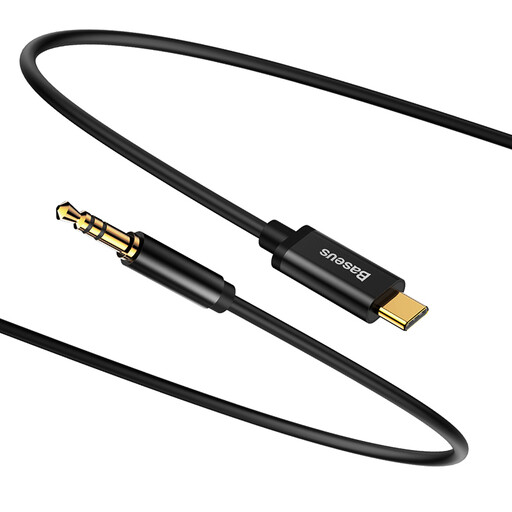
This is a USB-C to 3.5mm audio cable for connecting wired headphones to a laptop that supports audio over USB-C. Check for this support before buying; not every USB-C port carries audio.
 No image available
Baseus Yiven Type-C male to 3.5 male Audio Cable M01 Black
Connects wired headphones with a 3.5mm plug to a device that supports audio over USB-C.
USB-C male to 3.5mm male; cable length approximately 1.2 metres.
Joybuy
Frequently asked questions
Does my laptop always need a separate USB DAC?
No. You can keep using your existing headphone socket if it has the right connection and features, and gives you enough volume. A manufacturer’s claim of better sound doesn’t prove that it will improve the sound from your particular laptop and headphones together.
How do I connect a wired headset with a microphone?
Check the plug configuration and whether the USB DAC has a microphone path. Creative specifies a four-pole CTIA socket and microphone recording for the Sound Blaster PLAY! 4 (SB1860); according to Creative, headset button functionality depends on the headset.
How can I safely use a DAC at a higher volume?
Start at a low volume and increase it only if needed. The World Health Organization gives 80 dB for up to 40 hours a week as an example of listening exposure; this isn’t a guaranteed volume setting for a DAC.
What cooling-off period and warranty apply to an online purchase in the Netherlands?
According to ACM ConsuWijzer, online purchases generally come with a statutory cooling-off period of up to 14 days after delivery, although there are exceptions. You may also have statutory rights if a product doesn’t perform as you could reasonably expect under normal use; these are separate from any manufacturer’s warranty.


