Who is this guide for?

Listeners troubled by laptop audio

You want to find out whether the sound is coming from the speakers or whether the existing headphone output is noisy before buying a USB DAC. Microsoft Support recommends checking which output is selected when you have multiple audio output devices.

Listeners without a compatible connection

You already have wired headphones and are looking for a USB connection that matches your laptop port and headphone plug. iFi audio and Creative describe solutions for wired headphones and headsets.

Listeners at a desk

You usually listen in one place and are considering extra outputs or a physical volume control. FiiO describes these features on the K11.

What should you look for?

Test your laptop’s existing output first

Choose this if: your wired headphones are already connected and the sound from that output isn’t noisy; select the correct audio output first.

Bear in mind: this won’t add a new connection or fix a noisy analogue output.

Compact USB DAC for listening

Choose this if: your laptop’s output is unavailable or noisy and you want to use wired headphones without taking up much desk space.

Bear in mind: a dongle uses a USB port; a headphone output alone doesn’t guarantee microphone support.

USB audio adapter for a headset microphone

Choose this if: you also want to speak through your wired headset and the exact model has a compatible plug configuration and microphone input.

Bear in mind: Creative says the app and SmartComms Kit for the PLAY! 4 are only available for Windows.

Desktop DAC with extra controls

Choose this if: you’ll genuinely use a volume control or extra outputs at a fixed workstation; FiiO describes these features on the K11.

Bear in mind: a desktop device with extra connections isn’t necessary if a simple headphone connection already solves your problem.

Consideration What should you check? Who should consider this?
Cause of the sound Test your wired headphones and check which audio output device is selected. If you simply want to stop sound coming from your laptop speakers, check the output setting first; around 36% of consumers put identifying the cause of the sound first.
Connections Compare your laptop port with the DAC connection and your headphone plug. If you mainly want to connect existing wired headphones, compatible plugs and ports are crucial; around 29% of consumers make connection compatibility their top priority.
Headphones and microphone Check the output and, if you want to make calls, confirm that the exact model explicitly supports a microphone. If you want to know whether your headphones will connect properly and whether your headset microphone will work, look up the relevant specifications; around 21% of consumers start by checking headphone connections and controls.
Compact or desktop Decide whether you need a portable connection or will genuinely use extra outputs and controls. If you want to take your DAC with you or are looking for a volume control at a fixed workstation, compare the design and connections; around 14% of consumers prioritise choosing between a compact model and one for desktop use.

Common pitfalls

  • Buying a DAC before checking the sound source

    If the wrong audio output is selected, sound may still come from your laptop speakers. A USB DAC won’t eliminate physical fan noise.

    First, test your headphones with the existing output and check which output device is selected.

  • Assuming a headphone output supports a microphone

    A headphone output alone doesn’t tell you whether the microphone on a wired headset will work. Creative specifies a four-pole CTIA connection and a microphone input for the Sound Blaster PLAY! 4 (SB1860).

    Check the microphone support and plug configuration for the exact model.

  • Using the USB adapter to charge at the same time

    Creative says that the PLAY! 4’s included USB-C-to-USB-A adapter doesn’t support USB-PD charging.

    Use that adapter for the USB data purpose specified by Creative, and check charging features separately if you need them.

  • Turning the volume up to drown out background noise

    The World Health Organization points out that both volume levels and listening duration affect the risk of hearing damage.

    Start at a low volume and don’t turn it up just to drown out background noise.

Brands to consider

FiiO

The KA11 is a compact USB DAC, while the K11 is a desktop DAC with multiple inputs and outputs.

  • FiiO describes the KA11 as small. For the K11, the manufacturer lists a volume control, USB input, and 4.4mm and 6.35mm outputs.
  • Check which model and plug are right for your headphones and workspace.

Creative

The Sound Blaster PLAY! 4 (SB1860) is a compact USB adapter for anyone who also wants to use a wired headset microphone.

  • Creative specifies a four-pole CTIA connection and support for headphones with an impedance of 16–150 ohms.
  • According to Creative, the Creative app and SmartComms Kit are only available for Windows. The included USB-C-to-USB-A adapter doesn’t support USB-PD charging.

iFi audio

According to iFi audio, the GO link is designed for compact listening with wired headphones when a suitable analogue output isn’t available.

  • The manufacturer describes the GO link as a portable DAC for wired headphones.
  • A manufacturer’s claim that it offers better audio than most computers doesn’t prove that you’ll hear an improvement with your laptop; check the connections and how you plan to use it first.

Joybuy product picks

These product picks are for wired listening via USB, including USB-C headsets and a wired gaming headset with USB audio.

Samsung EO-IC100 wired in-ear headset with USB Type-C

Samsung EO-IC100 Wired In-ear Headset for Calls and Music, USB Type-C, Black

For anyone who wants to listen using a wired USB Type-C headset.

Connection: USB Type-C. Design: wired in-ear headset for calls and music.

Joybuy

Logitech G G432 wired gaming headset

Logitech G G432 7.1 Surround Sound Wired Gaming Headset

A wired gaming headset for anyone looking for a USB audio connection who also wants to use a microphone.

Design: wired gaming headset. Before buying, check that the connection and microphone function suit your laptop and how you plan to use it.

Joybuy
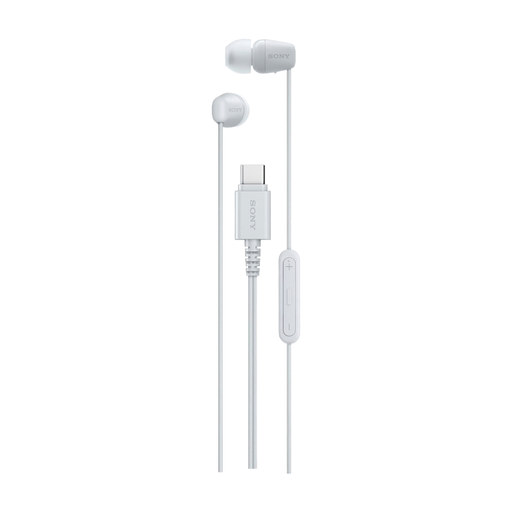
Sony IER-EX15C wired in-ear headphones with USB Type-C

Sony IER-EX15C Wired In-ear Headset for Calls and Music, USB Type-C, White

For wired listening and calls on a device with a compatible USB Type-C connection.

Design: wired in-ear headphones for music and calls. The product information warns against using them in traffic, for example while cycling, because of their passive noise isolation.

Joybuy

Frequently asked questions

How do I stop sound coming from my laptop speakers?

In your audio settings, select the connected headphones or USB DAC as the output device. Microsoft Support recommends checking which output is selected when you have multiple output devices.

Can any USB DAC use the microphone on my wired headset?

No. Don’t assume it can just because it has a headphone output. Creative specifies a four-pole CTIA connection and a microphone input for the PLAY! 4; check these details separately for every other model.

How can I use a USB DAC without drowning out background noise?

Start at a low volume and don’t turn it up just to drown out background noise. The World Health Organization points out that both volume levels and listening duration affect the risk of hearing damage.

What applies if a DAC I buy in the Netherlands is faulty?

You’re entitled to a product that works properly, and you can contact the seller if there’s a problem. The Dutch government states that there’s no fixed statutory warranty period for all products in the Netherlands; a manufacturer’s warranty is separate from your statutory rights.

What rules apply to USB DACs and disposing of them in the Netherlands?

The relevant EU RoHS restrictions apply to electrical and electronic equipment unless a legal exemption applies; this doesn’t confirm that a specific model has been checked individually. According to the Dutch government, you can dispose of an unwanted device by returning it to the shop or online retailer where you buy a new, similar device, or by taking it to a municipal recycling centre.
