Start by checking the connections on your laptop and headphones, then decide whether you also need to use your headset microphone. For calls, it’s important to choose an adapter with a compatible microphone input. If you only need to listen, a compact DAC may be all you need, while a desktop model makes sense mainly if you’ll use its extra outputs and controls. Check that your own equipment is compatible: a higher stated audio resolution doesn’t, by itself, prove that you’ll hear an improvement.
Who is this buying guide for?
Home worker who takes calls using a wired headset
You want to hear calls and use the microphone on your existing headset. So check the type of headset plug and whether the adapter supports the corresponding microphone input, as Creative and UGREEN specify for the models described.
Laptop user without a usable audio port
You want to connect your wired headphones without buying a different pair. Check which USB port your laptop has and whether you only need audio output. FiiO also explains how to select the KA11 as an output device.
Listener with a permanent workspace
You often use your headphones at the same desk and want to know whether extra outputs, a volume knob or amplification features would be useful for your headphones. FiiO’s K11 specifications are manufacturer-provided and don’t, on their own, predict how every pair of headphones will sound.
What should you look for when buying?
Adapter for calls
Choose this if: you want to use your wired headset’s microphone with your laptop.
Bear in mind: the microphone input must match the plug. The UGREEN adapter we looked at supports TRS, not TRRS, on that input.
Compact USB DAC
Choose this if: you mainly want to send audio to wired headphones using a small dongle.
Bear in mind: don’t assume a headphone output supports a microphone too. Check your laptop port and headphone plug as well.
Audio adapter with charging
Choose this if: you want to combine audio and charging through a single USB-C connection.
Bear in mind: Belkin specifies Power Delivery pass-through of up to 60 W for the NPA004. Audio and charging support depend on your laptop, port and charger.
Desktop DAC with headphone amplifier
Choose this if: the device will stay at a permanent workstation and you’ll use its extra outputs or volume knob.
Bear in mind: the FiiO K11 needs a separate power supply and takes up desk space.
Your choice depends mainly on your top priority: making calls, adding an audio connection, listening or keeping your USB-C port free for charging.
| What to consider |
What should you check? |
Who is this most important for? |
| Calls and microphone |
Check that the headset plug and microphone input are compatible, and consider whether you need a mute button. |
If I make frequent calls at home, I want to use my existing headset microphone without relying on an incompatible input. Around 36% of consumers prioritise call audio and microphone support. |
| Headphone connection |
Check whether your laptop has USB-A or USB-C, and make sure the adapter works with the connection you have. |
If my laptop’s audio port is missing or unusable, I want to be able to connect my wired headphones directly. Around 29% of consumers prioritise having a working connection. |
| Outputs and amplification |
Check that the headphone plug matches the output, and consider the stated power alongside the specified load. |
If I mainly listen at my desk, I want to know whether the output suits my headphones and whether I need extra controls. Around 21% of consumers prioritise listening outputs and amplification. |
| Ports and desk setup |
For a combined adapter, check that the USB-C port supports both audio and charging. For a desktop model, check its power requirements and how much space it needs. |
If I have few ports or a permanent desk setup, I want to know how charging and audio will work together and how much space is available. Around 14% of consumers place the greatest importance on port layout and desk setup. |
Common buying mistakes
-
Assuming every USB DAC supports your headset microphone
A headphone output doesn’t automatically support the microphone on a four-pole headset. According to UGREEN, the separate microphone input on the adapter we looked at accepts a three-pole TRS plug, not a four-pole TRRS plug.
Before choosing an adapter for calls, compare your headset’s plug configuration with the microphone input on the exact model.
You may need a different adapter or a compatible microphone solution.
-
Assuming a USB-C audio and charging adapter works as a universal laptop charger
Belkin specifies that the NPA004 is for devices with compatible USB-C audio support only. The charging speed you can achieve also depends on your device and charger.
Check separately whether your laptop’s USB-C port supports audio and how much charging power you need.
You may also need a compatible cable or charger.
-
Choosing a desktop DAC based on a single power rating
FiiO lists different output ratings for the K11 depending on the output and load, and specifies a 12 V/2 A power supply. One figure doesn’t make its performance comparable with a dongle or tell you whether it will suit your headphones.
Compare the output and stated load with your headphones’ connections and specifications. Only choose extra features if you’ll use them.
Allow for a compatible plug or adapter, a mains socket and space for the device.
Brands to compare
Creative
Creative presents the Sound Blaster PLAY! 4 we looked at as a USB audio solution for existing headphones or a compatible headset.
- Creative lists a physical microphone mute button and SmartComms features.
- Creative describes the software features for Windows users. Claims about call quality aren’t based on independent tests of their effectiveness.
FiiO
The KA11 is a compact DAC, while the K11 is a larger desktop model. They’re different options for different workspaces.
- FiiO explains how to connect and select output on the KA11, and lists multiple outputs and a volume knob for the K11.
- The K11 requires a separate 12 V/2 A power supply. Its stated performance figures are provided by the manufacturer and depend on the output and load.
iFi audio
iFi presents the GO link as a way to connect wired headphones to digital devices.
- iFi lists a built-in DAC and headphone amplifier.
- iFi’s claim that the device outperforms the built-in audio of most devices is a brand claim, not the result of an independent listening test. Check separately whether you need microphone support.
Belkin
According to Belkin, the RockStar NPA004 we looked at combines a 3.5 mm socket with USB-C charging pass-through for compatible devices.
- Belkin specifies Power Delivery pass-through of up to 60 W.
- Audio and charging compatibility, as well as the charging speed you can achieve, depend on your laptop, port, cable and charger.
UGREEN
UGREEN describes the external USB sound card we looked at as a way to add an audio connection or replace a faulty 3.5 mm port.
- The model we looked at has separate headphone and microphone sockets.
- According to UGREEN, the microphone input supports a three-pole TRS plug, not a four-pole TRRS headset plug. Check the exact model.
Products at Joybuy
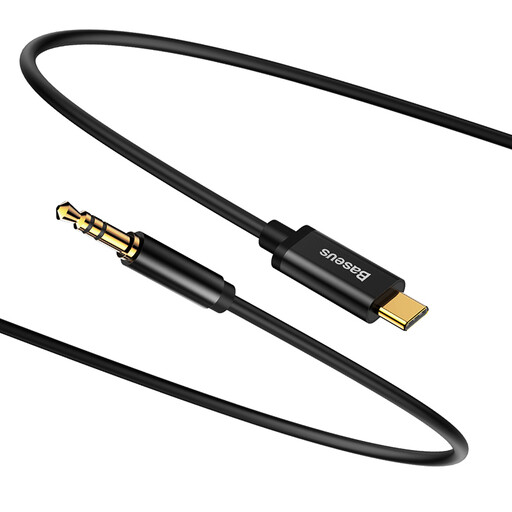
A cable option for wired headphones with a 3.5 mm plug and a laptop with USB-C. Check that the USB-C port supports audio output.
 No image available
Baseus Yiven M01 USB-C male to 3.5 mm male audio cable, black
A cable option for connecting a 3.5 mm socket to a USB-C connection. Check that your laptop’s USB-C port supports audio output.
View at Joybuy
Frequently asked questions
Can I use my headset microphone straight after connecting it?
Not always. Check that the adapter’s microphone input is compatible with your headset plug. According to UGREEN, the separate microphone input on the adapter we looked at supports three-pole TRS only, not four-pole TRRS. Creative describes the PLAY! 4 as suitable for use with compatible headsets.
What should I do if sound still comes from my laptop speakers after connecting the DAC?
Check the connection and select the DAC as the audio output device in your operating system or playback software. FiiO gives this advice specifically for the KA11.
Can I return a DAC bought online if the connection isn’t compatible?
For online purchases from a business, the Dutch government generally allows a 14-day cooling-off period, with some exceptions. This doesn’t apply to online purchases from a private individual. Check the seller’s returns information too.
How can I avoid listening too loudly through a DAC?
Start at a low volume and only turn it up as much as needed. The World Health Organization links listening time to sound level: for example, it gives 80 dB for up to 40 hours a week, compared with 90 dB for four hours a week. This is general health guidance, not a guaranteed safe volume for a particular DAC or pair of headphones.


