
Listeners with housemates
Don’t want to use your laptop speakers while other people are in the same student room or home? Start with a suitable pair of headphones. You only need a DAC if your connection or audio output gives you a reason to get one.


You usually don’t need an external DAC if your wired headphones work with your laptop and its existing output doesn’t produce distracting noise. Choose a compact USB DAC if you need a compatible digital connection or want to bypass your laptop’s analogue output. A desktop amplifier is mainly worthwhile if you’ll actually use its extra outputs or physical controls. A DAC won’t block out noise in your room, and more output power isn’t a reason to listen at a higher volume.
Don’t want to use your laptop speakers while other people are in the same student room or home? Start with a suitable pair of headphones. You only need a DAC if your connection or audio output gives you a reason to get one.
Don’t your wired headphones fit the available output, or do you want to bypass it? Compare your laptop port, headphone plug and any microphone support.
Would you like a physical volume knob or extra outputs, and do you have space for a permanent setup? Check which connections the exact model has and whether they suit your headphones.
First, check whether your current headphones and laptop output are up to the job. Then choose between a compact USB DAC and a desktop device based on its connections, where you’ll use it and how you want to control it.
| What to consider | What to look for | Who is this important for? |
|---|---|---|
| Private listening | First, check whether your headphones work with your existing laptop output and whether it produces distracting noise. | If you mainly want to listen without turning on your laptop speakers, you’ll want to know whether your current headphones are all you need. Around 36% of consumers give private listening top priority. |
| Connections | Compare the USB port, headphone plug and any microphone support. | If you have wired headphones that don’t fit the available laptop output, you’ll need a direct connection that works. Around 29% of consumers give finding a suitable connection top priority. |
| Driving your headphones | Compare the output on the exact model with your headphones’ plug and specifications; start with the volume low. | If you want the output and volume control to suit your headphones, the overall combination matters more than the power rating alone. Around 21% of consumers give suitable headphone support top priority. |
| Space and controls | Decide whether you’ll take the device with you or leave it on your desk, and allow space for plugs and cables. | If you move around to listen, or would rather have a knob and extra outputs in one fixed spot, your preference will determine which setup is most practical. Around 14% of consumers give portability or desk controls top priority. |
A DAC sends audio to your headphones, but it won’t block out background noise. Using headphones instead of your laptop speakers won’t automatically solve the problem of noise around you.
First, work out whether the problem is your laptop speakers, its analogue output or noise from outside your headphones.
A headphone output doesn’t necessarily mean your headset’s microphone will work too. Creative lists microphone support for the four-pole CTIA connection on the Sound Blaster PLAY! 4; that doesn’t automatically tell you anything about other DAC models.
Check the plug type and microphone support separately if you also use your headset for online lectures or calls.
A specification on its own doesn’t prove that your setup will sound noticeably better. The usable output also depends on the output you choose and your headphones.
Compare the exact model, the output you’ll use and the corresponding load conditions. Prioritise solving a connection or control problem.
FiiO’s range includes the compact KA11 DAC/amplifier and the K11, a desktop setup with several connections.
iFi audio describes the GO link as a portable DAC/amplifier for wired headphones connected to a digital source device.
The Sound Blaster PLAY! 4 is a USB audio adapter that may also be worth considering if you use your headset for calls as well as listening.
AudioQuest describes the DragonFly Black v1.5 as a USB DAC with a headphone amplifier.
These Joybuy products are wired headphones or headsets for listening; they are not DAC headphone amplifiers.
 No image available
A wired headset for laptops with a compatible 3.5mm headphone socket.
The product description lists a microphone, volume wheel and flip-to-mute controls.
The product information warns against listening at a high volume for long periods.
 No image available
A wired USB headset if you want to use a connection on your laptop or PC without needing a separate DAC.
The product description lists USB-A, a USB-C adapter cable, volume control and a mute microphone.
The product information warns against listening at a high volume for long periods.
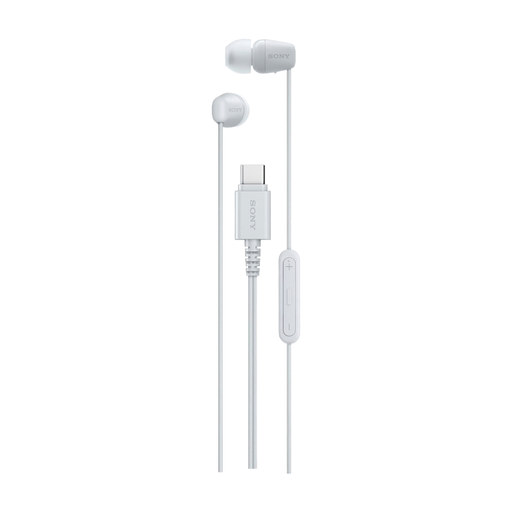 No image available
A direct wired option for listening through earbuds if your laptop has a USB-C port.
The product information lists a built-in microphone and controls for music and calls.
The product information warns against listening at a high volume for long periods.
 No image available
A wired headset for a laptop or PC; use the connection that suits your device.
The product name lists USB and 3.5mm connections, RGB and 50mm drivers.
The product description lists a microphone and volume control on the headset.
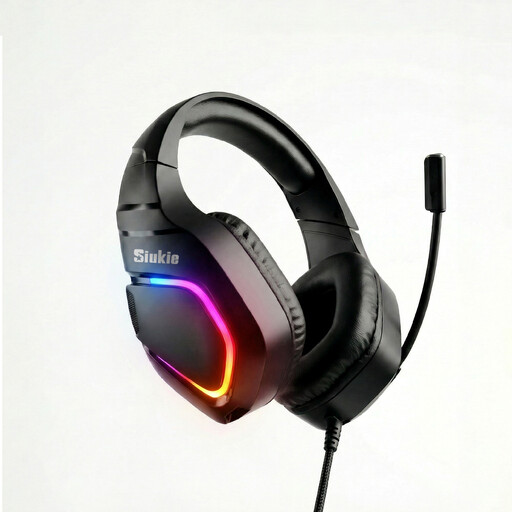 No image available
A wired headset for a laptop or PC; check which connection suits your device.
The product name lists USB and 3.5mm connections and RGB.
The product information mentions a microphone and soft ear cushions.
No, a DAC won’t block out background noise. You can use headphones instead of your laptop speakers, though. The World Health Organization recommends considering a good fit or noise cancellation if background noise is tempting you to turn up the volume.
First, compare your laptop’s USB connection with the input on the exact DAC model, then connect your headphones to a compatible output. Check separately whether your headset’s microphone is supported if you use it too.
Start with the volume low and turn it up gradually. According to the World Health Organization, the risk to your hearing depends on both the sound level and how long you listen; more output power isn’t a reason to listen at a higher volume.
For an eligible distance purchase by a consumer, there is usually a 14-day cooling-off period, with some exceptions. You’re also covered by the statutory guarantee. ACM ConsuWijzer explains that in the Netherlands this doesn’t have a fixed end date of exactly two years; it depends on what you can reasonably expect from the product.
Not for every product without exception: the requirement depends on the product rules that apply to it. Dutch government information on CE marking explains that it applies conditionally. For the specific device and any power supply, check which rules apply and what conformity information should accompany it.