If you simply want to stop sound coming from your laptop speakers, you don’t necessarily need a USB DAC: connect your wired headphones and select them as the audio output. Microsoft Support explains how to choose the right output device in Windows. Only consider a USB adapter if you don’t have a suitable port or the existing output isn’t usable, and check microphone support separately. A DAC won’t solve fan or background noise; a desktop model is most useful if you’ll use its extra connections or controls.
Who might benefit from a USB DAC?
Home worker who listens privately
You want to listen at your sit-stand desk without sound coming through your laptop speakers. First, check that your current headphones connect to your laptop and are selected as the audio output. Microsoft Support explains how to do this in Windows. If background noise bothers you, consider the headphones themselves too.
Caller using a wired headset
You want to listen and speak from the same workstation. The microphone connection and plug standard both affect whether an adapter is suitable; Creative and UGREEN describe different connection options for their models.
Listener with a permanent workstation
You keep your equipment on your desk and may want a volume control, extra connections or adjustable gain. FiiO specifies these features for the K11; bear in mind that it also needs a separate power supply and takes up desk space.
What to look for in a USB DAC or headset
No new DAC
Choose this if: your wired headphones fit the existing laptop output and it works properly. Select your headphones as the audio output.
Bear in mind: you won’t gain another connection or a separate volume control.
Compact USB DAC for listening
Choose this if: your laptop doesn’t have a usable headphone output, or you deliberately want to bypass it. Check that the USB connection and headphone output are compatible with your devices.
Bear in mind: an extra DAC isn’t a proven fix for background noise and won’t necessarily make an audible difference.
USB adapter for headset calls
Choose this if: you also want to use your wired headset’s microphone. Check the plug standard against the specified microphone connection.
Bear in mind: the wrong plug may stop the microphone from working; check whether any software is required too.
Desktop DAC with headphone amplifier
Choose this if: you’ll make use of extra connections, a physical volume control or amplifier settings at your permanent workstation.
Bear in mind: a desktop model such as the FiiO K11 needs a separate 12V power supply and space on your desk.
| What to consider |
What to look for |
Who is it important for? |
| Private listening |
Check that your headphones connect to your laptop and can be selected as the audio output. Consider any problems with background noise separately by looking at the headphones’ fit or noise cancellation. |
If I simply want to hear sound through my headphones, I start with the existing output and the correct output setting. Around 31% of consumers prioritise private listening. |
| Compatible connection |
Compare the available USB port on your laptop with the input on the exact model, and check that its output fits your headphone plug. |
I want to connect my wired headphones directly to my laptop or adapter, so I check both plugs. For around 31% of consumers, finding a compatible connection is their top purchasing priority. |
| Headset microphone |
Check whether your headset has a combined CTIA plug or separate plugs, and whether the exact model supports microphone recording. |
If I want to use the same wired headset for work calls, I check that the microphone input supports its plug standard. Headset calls are a priority for around 23% of consumers. |
| Controls and placement |
Decide whether you’ll use the control and extra outputs; also check the power supply, space and cable length in both sitting and standing positions. |
At my permanent desk, I only want extra controls if I’ll actually use them. I also check where the power supply and cables will go when I adjust the desk. For around 15% of consumers, workstation controls are their top priority. |
USB DAC buying pitfalls
-
Buying a DAC when the wrong audio output is selected
Windows may send sound to a different output device from the one you intended.
First, connect your existing headphones and select them as the output. Microsoft Support explains where to choose the audio output in Windows.
-
Assuming a headphone output supports your headset microphone
The Creative and UGREEN models we looked at have different microphone plug requirements.
Compare your exact headset plug with the specified recording function and connection. Otherwise, you may need a suitable adapter or a different headset.
-
Taking a high power or resolution figure as proof of better sound
FiiO’s stated K11 power output applies to a specific output and 32 Ω load. That figure doesn’t describe how every headphone combination will sound.
Compare the output and specified load with your needs rather than simply choosing the biggest number.
-
Choosing a desktop DAC without allowing for space and power
The FiiO K11 uses a separate 12V power supply and takes up desk space.
Before buying, check where the device, power supply and cables will go when you use your desk in both sitting and standing positions.
Brands to compare
Creative
The Sound Blaster PLAY! 4 (SB1860) is a USB adapter for a compatible wired headset that you also want to use for calls.
- Creative specifies USB-C, a USB-C-to-A adapter included in the box, and one four-pole CTIA connection for headphones and a microphone.
- Check that the required software features work with your operating system and that your headset plug is compatible.
UGREEN
The USB sound card described has separate connections for headphones and a microphone.
- UGREEN states that the separate microphone input on this model supports three-pole TRS.
- According to UGREEN, that input doesn’t support a four-pole TRRS plug. This applies to the model described, not all UGREEN adapters.
iFi audio
The GO link Max is a compact USB-C DAC for wired headphones with a compatible plug.
- iFi specifies a 3.5 mm output and a balanced 4.4 mm output.
- Check which output suits your headphones, and don’t assume that a headphone output supports a microphone.
FiiO
The K11 is a desktop DAC and headphone amplifier for a permanent workstation where extra connections or controls come in handy.
- FiiO specifies USB, optical and coaxial inputs, multiple outputs and three gain settings.
- The K11 needs a separate 12V power supply and is less portable than a compact adapter.
AudioQuest
AudioQuest describes the DragonFly Black v1.5 as a USB-stick-sized DAC and headphone amplifier for devices including laptops.
- AudioQuest states that it supports Windows and Apple computers and native decoding up to 24-bit/96kHz.
- The stated resolution alone doesn’t prove an audible benefit. Also check that the physical USB connection is compatible with your laptop.
Joybuy products for listening via USB-C
These products are wired USB-C headsets for listening through a compatible laptop port.
 Image unavailable
Samsung EO-IC100 wired in-ear headset, USB Type-C, black
A wired USB Type-C headset for listening through a compatible laptop port; the product name states that it’s for music and calls.
View at Joybuy
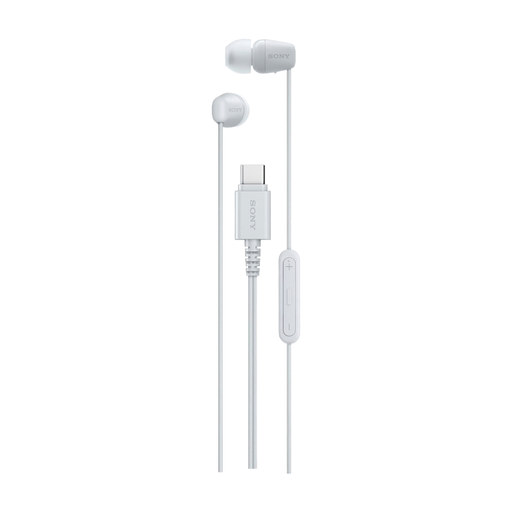 Image unavailable
Sony IER-EX15C wired in-ear headset, USB Type-C, white
A wired USB Type-C headset for listening through a compatible laptop port; the product name states that it’s for music and calls.
The product description warns against listening at high volume for extended periods.
View at Joybuy
Frequently asked questions
Will a USB DAC stop sound coming from my laptop speakers?
Not automatically: select your connected headphones or USB DAC as the audio output. Microsoft Support explains how to do this in Windows. If your existing headphone output works, you can try this before buying anything.
Will my headset microphone work with any USB DAC?
No. Check both microphone recording support and the plug standard. Creative specifies a four-pole CTIA connection for the PLAY! 4; according to UGREEN, the separate microphone input on the UGREEN model described accepts three-pole TRS, not four-pole TRRS.
What can I do if sound crackles or distorts in Windows?
First, check the selected output, audio enhancements and drivers by following Microsoft Support’s guidance. This can help you find out whether a setting is to blame before replacing any hardware.
What should I bear in mind when listening for long periods at my sit-stand desk?
Consider both the volume and how long you listen: the World Health Organization identifies both as relevant factors in exposure to loud sounds. A DAC won’t solve background noise, so assess your headphones separately for that.


