Who is this guide for?

Speaker owner who wants to be sure it will charge

You want to check that the connection and power supply are suitable for your speaker before buying. For example, JBL lists a USB-C port and a charging time at 5 V/3 A for the Charge 5; these details do not automatically apply to other speakers.

User of a shared charging spot

You want to connect your speaker and your colleagues’ devices at the same time. So don’t just check the number of ports; also look at how the power is distributed when several ports are in use.

Setting up a tidy desk

You want accessible connections and a cable layout that won’t get in the way. A desktop charger with a mains cable and a USB extension lead offer different placement options from a wall charger.

What should you look for?

USB desktop charger

Choose this if: your speaker charges via a suitable USB cable and you need a dedicated spot on your desk for several USB devices.

Bear in mind: the maximum power per port may not be available when several devices are connected at once.

Extension lead with USB

Choose this if: you need mains sockets as well as USB charging ports at the same desk.

Bear in mind: ACT states that the AC2420 provides 15 W in total when two or three USB ports are used together.

Model-specific speaker dock

Choose this if: your exact speaker model appears on the compatibility list and you charge it in a permanent spot.

Bear in mind: Ultimate Ears lists the BLAST, MEGABLAST, BOOM 3 and MEGABOOM 3 models as compatible with POWER UP; other models are not automatically compatible.

Compact multi-port wall charger

Choose this if: you want to take the charger with you after using the shared desk and three USB connections are enough.

Bear in mind: ACT states that the AC2170 delivers 45 W, 6 W and 6 W when all three ports are in use.

What to consider What should you check? Who should consider this?
Connection and power supply Check the exact speaker model, charging connection and specified input voltage and current. For a dock, compare the full model name with the compatibility list. Checking whether your speaker will work with the charging solution first helps you avoid choosing based on appearance alone. Around 29% of consumers prioritise compatibility.
Charging several devices at once Check the power available for the combination of ports you want to use at the same time. ACT states that the AC2420 provides 30 W through one USB port and 15 W in total when two or three USB ports are in use. If you want to charge your speaker alongside work devices, it helps to know how the power is shared. Around 23% of consumers prioritise charging several devices at once.
Positioning and cable reach Measure the distance to the socket and consider where cables and devices can go. UGREEN and Belkin specify a 2-metre mains cable for the desktop chargers discussed here; ACT specifies 1.5 metres for the AC2420. If you want an accessible charging spot without awkwardly placed cables, pay particular attention to your desk layout. Around 18% of consumers prioritise positioning.
Safe use Follow the instructions, use undamaged cables and leave the charger uncovered so heat can escape. Don’t connect extension leads to each other. If you’re setting up a permanent charging spot in a shared space, you’ll want to use the cables and equipment safely. Around 18% of consumers prioritise safe use.
Cost and aftercare Check which cables and accessories are included and read the aftercare terms. An additional manufacturer’s warranty does not replace your statutory rights. If you don’t want to pay for connections or features you won’t use, take the components you need and aftercare into account. Around 12% of consumers prioritise cost and aftercare.

Common buying mistakes

  • Choosing a speaker dock because it looks like it will fit your speaker

    A dock may only be designed for a limited list of models. A similar or newer speaker is not automatically included.

    Compare the full model name with the dock manufacturer’s compatibility list.

  • Confusing the maximum wattage with the power available when charging several devices

    The available power can change when colleagues use additional ports. ACT states that the AC2420 provides 15 W in total when two or three USB ports are in use.

    Check the power distribution for the ports you want to use at the same time.

  • Mistaking a USB hub for a standalone charging station

    The ACT AC6125 is a USB hub that adds extra ports to a computer. Its USB-C power input is for powering the hub when connected devices need more power; this does not automatically make the hub a standalone charger for a speaker.

    Check whether the port is designed to charge your speaker and what power supply it needs.

    ACT states that a charger and cable are not included with the AC6125; allow for a separate suitable power supply and cable.

  • Setting up a permanent charging spot without considering cables and heat

    Damaged cables and insufficient ventilation can pose risks. Extension leads must also be used correctly.

    The Fire Service advises placing chargers in an unobstructed area, not using damaged cables and not connecting extension leads to each other.

Brands to consider

UGREEN

The Nexode desktop charger discussed here is designed for several USB devices in a permanent spot and has a 2-metre mains cable.

  • UGREEN specifies five ports and up to 45 W through USB-C1 for this model.
  • The power rating for a port doesn’t tell you how much power each port supplies when several devices are connected at once.

Belkin

The BoostCharge Pro desktop charger discussed here has four ports and is designed to sit on a desk.

  • Belkin specifies two USB-C and two USB-A ports, up to 108 W in total and a 2-metre mains cable for this model.
  • The total power doesn’t mean that each port supplies 108 W or that every speaker model is compatible.

ACT

The AC2420 discussed here combines USB ports with mains sockets, while the AC2170 is a compact multi-port wall charger.

  • ACT publishes specific power distributions for these models. It states that the AC2420 provides 15 W in total when two or three USB ports are used at the same time.
  • The power distribution for the AC2170 does not automatically apply to the AC2420.

Ultimate Ears

The POWER UP speaker dock is designed for the BLAST, MEGABLAST, BOOM 3 and MEGABOOM 3 models listed by Ultimate Ears.

  • The compatibility list shows which of the listed models the dock is designed for.
  • Don’t assume this list includes support for the BOOM 4 or other speakers that aren’t listed.

Joybuy products

These Joybuy products offer USB charging options for a shared desk: mainly extension leads with USB ports, plus a compact USB adapter. Before use, check that the connection and power supply are suitable for your speaker.

Extension lead with 4 sockets, 3 USB-A ports and 2 Type-C ports

Extension lead with 4 sockets, 3 USB-A and 2 Type-C ports

An option if you need mains sockets as well as USB ports at your charging spot.

The product name specifies a 3 m cable and a maximum of 2500 W. Don’t exceed the stated maximum or connect extension leads to each other.

View at Joybuy
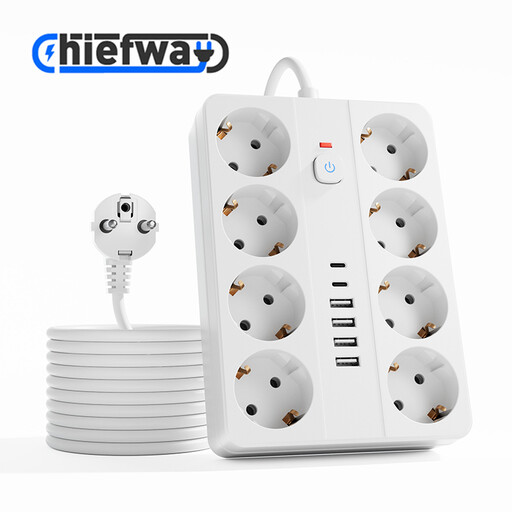
Extension lead with 8 sockets, 4 USB-A ports and 2 Type-C ports

Extension lead with 8 sockets, 4 USB-A and 2 Type-C ports

Suitable for a charging spot where you need several mains sockets as well as USB connections.

The product name specifies a 3 m cable and a maximum of 2500 W. Don’t exceed the stated maximum or connect extension leads to each other.

View at Joybuy
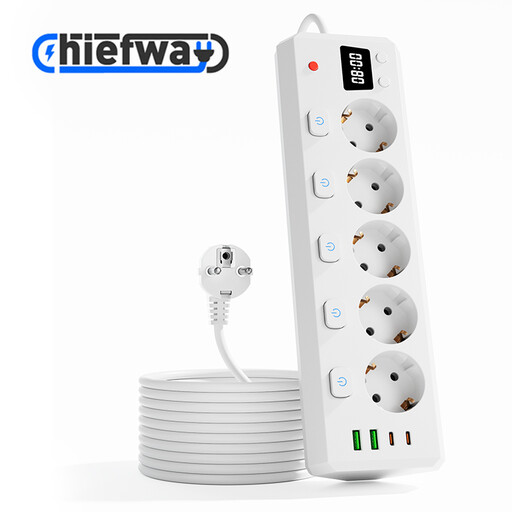
Extension lead with 5 sockets, 2 USB-A ports and 2 Type-C ports

Extension lead with 5 sockets, 2 USB-A and 2 Type-C ports

An option if you want to use both USB connections and mains sockets at your desk.

The product name specifies individual switches, a digital clock, a 3 m cable and a maximum of 2500 W. Don’t exceed the stated maximum or connect extension leads to each other.

View at Joybuy

Cube-shaped extension lead with multiple sockets, USB-A and Type-C ports

Cube-shaped extension lead with USB-A and Type-C ports

A compact design may suit you if you want mains and USB connections together at your charging spot.

The product name specifies a 1.5 m cable and a maximum of 2500 W. Don’t exceed the stated maximum or connect extension leads to each other.

View at Joybuy

OnePlus 80W SUPERVOOC adapter with USB-A and USB-C ports

OnePlus 80W SUPERVOOC adapter with USB-A and USB-C

A compact option if you’re looking for a wall adapter with two different USB connections.

The product name specifies 80 W and USB-A and USB-C ports. Check that the connection and power supply meet your speaker’s charging requirements.

View at Joybuy

Frequently asked questions

Do I need a USB-C charger for every portable speaker?

No. Check the instructions for your exact model. JBL specifies a USB-C port and a four-hour charging time at 5 V/3 A for the Charge 5; this does not automatically apply to other speakers. Ultimate Ears’ POWER UP dock is designed for the specific models listed.

Why isn’t the maximum wattage enough to choose a charger?

The available power can change when several ports are used at the same time. ACT specifies up to 30 W through one USB port and 15 W in total when two or three USB ports are in use for the AC2420. So check the power distribution for the ports you want to use at the same time.

How can I set up a safe charging spot?

Follow the speaker’s instructions, don’t use damaged cables and place the charger where heat can escape. The Fire Service also advises against connecting extension leads to each other and overloading an extension lead with too many devices.

What are my rights if a charger turns out to be faulty after purchase?

If a product is faulty, the seller must provide a solution under the rules set out by the Government of the Netherlands. Depending on the circumstances, this could mean a repair or replacement. There is no fixed statutory warranty period in the Netherlands; an additional manufacturer’s warranty does not replace your statutory rights.

Which product rules apply to a mains-powered charging station?

According to the Netherlands Food and Consumer Product Safety Authority, products covered by the Commodities Act Decree on Electrical Equipment must carry a CE marking. The rules that apply depend on the product and the relevant requirements. CE is a declaration by the manufacturer, not a centrally issued safety certificate. The marking alone does not confirm that an individual item offered for sale is compliant.
