
Charging one hand warmer
You want to check which cable and power supply your hand warmer needs before paying for a larger charging station.


Start by checking your hand warmer’s charging requirements and cable. A high wattage or USB-C port doesn’t automatically mean the device will charge faster. Choose extra ports only if you also want to charge other devices at the same time. The Fire Service advises placing chargers in an open space; Fire Service Twente recommends using a hard surface and charging while you’re nearby.
You want to check which cable and power supply your hand warmer needs before paying for a larger charging station.
You’re looking for a dry, stable spot where the charger can sit in the open and release heat.
You want to connect other devices as well as your hand warmer, so you’re comparing port types and where to put the charging station.
First check your hand warmer’s charging requirements, then decide whether you need extra ports or more flexibility when choosing where to put it. For consumers who want to charge a USB hand warmer on the worktop, the percentages show the factor they prioritise most when buying.
| What to consider | What to look for | Who is this most important for? |
|---|---|---|
| Compatibility | Check the manual for the cable, connection and power supply specified for your exact hand warmer model. | I want to make sure the cable and power supply are right for my hand warmer first; around 36% of consumers prioritise compatibility. |
| Safe placement | Choose a dry spot on a hard surface and leave the charger uncovered so it can release heat. | I’m looking for a dry, stable spot on the worktop, away from water, where the charger can sit in the open; around 29% of consumers prioritise safe placement. |
| Ports for charging multiple devices | Count the cables you’ll use at the same time, then compare USB-A and USB-C ports and the power specifications for each port. | If I also want to connect other devices at the same time, having enough suitable ports is important to me; around 21% of consumers prioritise charging multiple devices at once. |
| Space and cables | Consider the position of the socket, the shape of the charger and any stated cable length. | I want to position the charger and cables so there’s still space left on the worktop; around 14% of consumers prioritise a tidy set-up. |
A charger’s power output doesn’t automatically determine how quickly a hand warmer charges. The right cable and power supply depend on the requirements of the exact device.
First compare the manual and the cable supplied with the charger’s connections and charging specifications. Choose extra power or ports only if you need them for other devices.
A spot close to water or where the charger could be covered isn’t automatically suitable for charging a device.
Fire Service Twente recommends using a hard surface, while the Fire Service advises placing the charger in an open space. Choose a dry spot and, ideally, charge while you’re nearby.
A computer-powered hub gets its power through a computer’s USB port; a desktop charger plugs into a wall socket separately.
Check whether the product has its own mains power supply and whether its USB ports are designed for charging devices.
With a computer-powered hub, you may still need a suitable power adapter to charge devices from a wall socket.
Belkin describes the BoostCharge Pro P-WCH010 as a desktop charger with four ports.
Anker describes the 543 Charger (65W II), model A2046, as a slim desktop charger with four ports.
UGREEN describes the Nexode Pro Smart Display Charger (100W, 4-Port, GaN) as a compact adapter for use by a wall socket.
These product picks include built-in units with USB ports and USB wall chargers. Choose based on the type of installation you want, the ports you need and a dry, clear space for charging. The Netherlands Food and Consumer Product Safety Authority states that CE marking is mandatory for electrical products; check the marking on the version you buy.
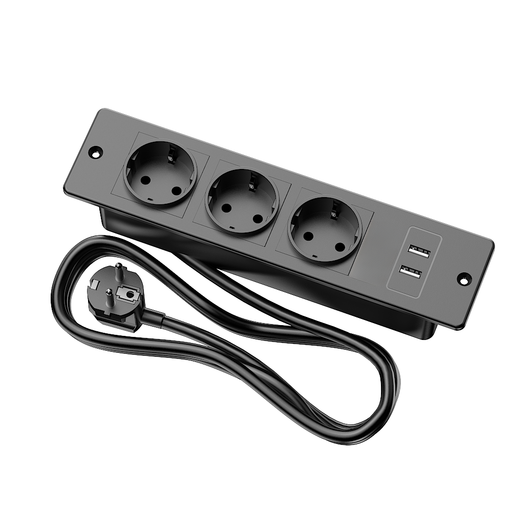 No image available
Suitable for a fixed built-in set-up if your hand warmer cable has a compatible USB-A plug.
Listed with 3 AC sockets, 2 USB-A ports and a 1.5 m cable. Installation requires a cut-out in the furniture.
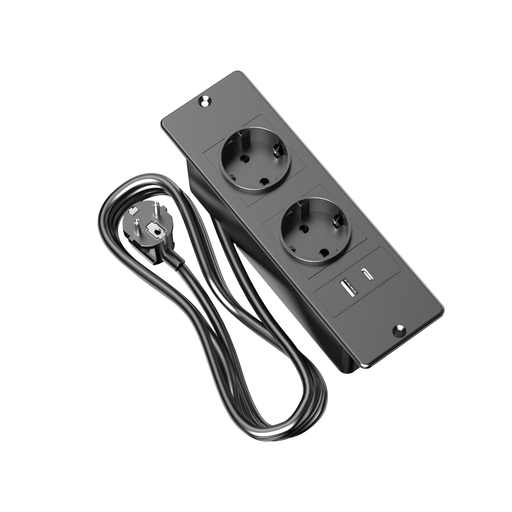 No image available
Suitable for a fixed installation if you want to connect cables with USB-A and USB-C plugs as well as your hand warmer.
Listed with 2 AC sockets and a 1.5 m cable. The unit is designed to be built into a surface.
 No image available
Suitable for a wall charger set-up if your hand warmer’s specified cable connects to one of the ports.
The product title lists 65 W, 1 USB-A port and 2 USB-C ports. The description says it’s for indoor use in dry conditions.
 No image available
Suitable for a wall socket set-up if your hand warmer cable connects to the USB-A or USB-C port.
The product title lists 30 W, one USB-A port and one USB-C port.
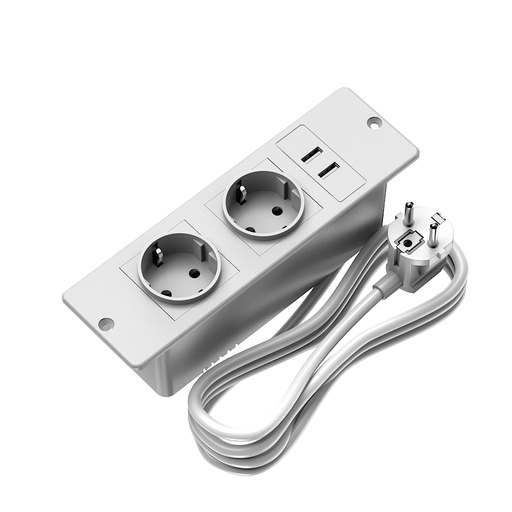 No image available
Suitable for a fixed built-in location if your hand warmer cable has a USB-A plug and you don’t want a separate wall charger on the worktop.
Listed with 2 AC sockets, 2 USB-A ports and a 1.5 m cable. The description limits use to indoor, dry locations.
Not based on that figure alone. The stated UGREEN output is the maximum for one port on the charging station. Follow the manual for your exact hand warmer model and use the specified cable and power supply.
Put the hand warmer on a hard surface in a dry spot. Leave the charger in the open so it can release heat, and don’t use a damaged cable. The Fire Service advises staying nearby while charging; this isn’t a product-specific assessment of a spot near water.
Contact the seller if the product is faulty. The Government of the Netherlands says that you’re entitled to a product that works properly; depending on the circumstances, you may be entitled to a free repair, replacement or refund. There is no set statutory guarantee period for all products.
Yes. The Netherlands Food and Consumer Product Safety Authority states that CE marking is mandatory for electrical products. The marking is the manufacturer’s declaration that the applicable rules have been met; it doesn’t automatically prove that an independent assessment has taken place. Check the marking on the version you buy.