
USB desk fan
You’re looking for a dedicated charging spot for a fan that, according to its instructions, charges via USB. Check your model’s connection and charging input.


Start by checking your fan’s charging connection and instructions: a USB charging station will only work if its port, cable and output are suitable for your model. If your fan needs its own dock, check the exact model code and any serial number restrictions. If you want to charge other devices at the same time, compare the ports and power available when they’re all in use, not just the maximum wattage.
You’re looking for a dedicated charging spot for a fan that, according to its instructions, charges via USB. Check your model’s connection and charging input.
You want to connect other devices as well as your fan. If so, check the range of ports and the power available when several outputs are in use at once.
You’re looking for a charging base for a fan you already own. The exact model code and, in some cases, the serial number range determine which dock will fit.
Choose this if: your fan’s instructions allow USB charging and the port, cable and output are compatible.
Bear in mind: power is shared when charging several devices at once. A high maximum output doesn’t guarantee a faster charge for your fan.
Choose this if: your fan uses a compatible dock of its own. Duux lists separate compatibility details for different Whisper Flex generations and types.
Bear in mind: a dock like this isn’t automatically interchangeable with other fan models, and a dock-only set may not include all the parts you need.
If you’re choosing a rechargeable fan for your home office, start with the way the fan charges. Then consider any other devices you need to charge, charging safety and whether a dedicated dock will fit.
| What to consider | What should you check? | Who is this most important for? |
|---|---|---|
| Connection and charging input | Check the label or manual for the port type, required output and suitable cable. | I want to make sure my fan can charge using this connection first. Around 36% of consumers rank charging compatibility as their top priority. |
| Charging several devices at once | Count the USB-A and USB-C ports you need and check the specifications for simultaneous use. | I want to connect my work devices to the same charging spot without constantly swapping cables. Around 29% of consumers prioritise having enough ports and useful shared power. |
| Safe charging | Check the exact product model and any safety warnings. Don’t use a product if a warning applies to that model. | I want a dedicated charging spot without overlooking a warning about the charger or cable. Around 21% of consumers name charging safety as their top priority. |
| Dedicated fan dock | Compare the full model code, any serial number restrictions and the contents of the package. | I’m looking for a dock that fits my specific fan, not just a charging point with the same brand name. Around 14% of consumers prioritise finding a dock that fits their model. |
A charging station’s maximum power doesn’t tell you how much power its port will deliver to your fan. The fan must also support the type of charging on offer.
First check your fan’s charging input, then compare it with the output of the port you want to use.
Duux distinguishes between docks for different Whisper Flex generations and serial numbers. A dock for one type won’t necessarily fit another.
Compare the full model code and any serial number restrictions with the compatibility information. Also check which parts are included with the set you’ve chosen.
A standalone Duux dock may not include a battery or charging cable. If you need them, you’ll have to arrange these separately.
On 21 July 2026, the NVWA issued a warning about the charging cable for a specific Mini Rechargeable Handheld Fan because of the risk of overheating and fire. A charger that still works doesn’t rule out a problem with the cable or a specific product.
Check whether the warning applies to your exact product and, if it does, follow the instructions not to use it.
A USB charging station with both USB-A and USB-C connections is useful for a desk with different types of cable.
The Nexode 65W with retractable USB-C cable is designed for a charging setup with USB-C and USB-A.
The RockStar B2B139 is designed for a desk with several devices that connect via USB-A.
Duux offers docks and battery sets for specific Whisper Flex models.
The GaN3 Pro Desktop Powerstrip AC+2U+2C combines USB ports with a mains socket for a mixed-use workspace.
These products are USB charging stations and desk connection points with charging ports. Always check the connection and charging input required by your fan.
 No image available
Worth considering if your fan’s manual allows USB charging and you need several connections at your desk.
The product name lists USB-A, USB-C, several mains sockets, a maximum of 2500 W and a 1.5 m cable.
 No image available
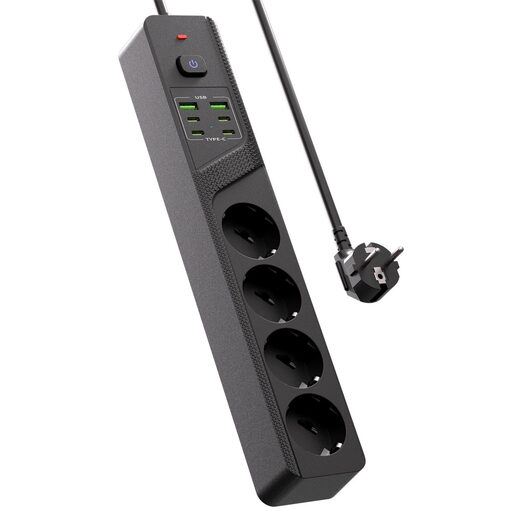
Worth comparing if you want to connect your fan and other devices to a single desktop charging point.
The product name lists four Schuko sockets, four USB-C ports, two USB-A ports and an on/off switch.
 No image available
Worth considering if you want to connect several USB devices to one charging point and your fan’s instructions allow USB charging.
The product name describes a charger with ten ports, including USB-A and USB-C. Check the port layout of the version you choose.
 No image available
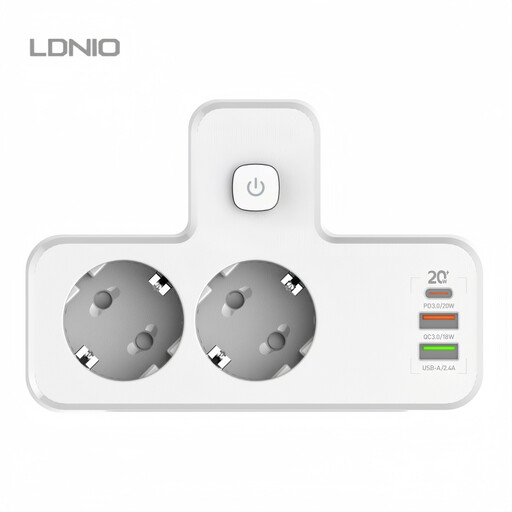
Worth comparing if you’re looking for a USB charging point for several devices and your fan’s instructions allow it to charge via USB.
The product name lists PD20W and Multi-USB. Check that the connection and charging output are suitable for your fan.
 No image available
Worth considering if you want to clamp a charging point to the edge of your desk and your fan charges via a suitable USB connection.
The product name lists a clamp mount, USB-C and USB-A ports, and Quick Charge. The name alone doesn’t confirm compatibility with a specific fan model.
No. Check the fan’s connection first. European common charger rules apply to specified categories of radio equipment, but that doesn’t mean every rechargeable fan has a USB-C port.
Follow the instructions for your fan and charger, and don’t use a product if a safety warning applies to its exact model. On 21 July 2026, the NVWA issued a warning about the charging cable for a specific Mini Rechargeable Handheld Fan because of the risk of overheating and fire.
No. Duux states that the battery and charging cable aren’t included with a standalone Whisper Flex dock. Before buying, check compatibility and the contents of the set you’ve chosen.
Online purchases in the Netherlands generally come with a statutory cooling-off period, which, according to ACM ConsuWijzer, ends 14 days after delivery. This is separate from your statutory rights if a product doesn’t meet what you could reasonably expect under normal use. Contact the seller about this.
According to the NVWA, products covered by the Commodities Act Decree on Electrical Equipment must carry a CE marking. This marking is the manufacturer’s declaration that the product meets the applicable requirements; it doesn’t automatically mean the product has been independently tested. Check the product information and whether the requirements apply to the specific charging station.