First, check your recorder’s manual to see whether USB charges the batteries or simply powers the device: the manufacturer describes USB on the Zoom H1essential as a power source alongside standard batteries. A compact charger may be suitable if you’re only connecting the recorder; for several devices, the port types and power output per port matter more than the total wattage alone. On the kitchen worktop, also consider moisture, cable placement and space for heat to dissipate.
Who is this for?
Recorder users checking USB functionality
You want to know whether your recorder’s USB port charges its batteries or simply powers the device. The Zoom H1essential manual describes USB as a power source alongside standard batteries. This does not confirm that the batteries can be charged inside the recorder.
Households with one shared charging spot
You want to connect a recorder and other USB devices in the same place. So, look at the combination of USB-A and USB-C ports, how power is distributed and how far the charger is from the socket.
Cooks with limited dry worktop space
You need a spot where the charger and cables won’t get in the way, and where the charger has room to dissipate heat. Brandweer Nederland advises placing chargers in an open space; keep the charging spot away from moisture too.
What should you look for when buying?
Start by checking the USB function of your exact recorder model. Then decide how many devices you want to connect at once and where the charger can sit on the worktop.
| What to consider |
What should you check? |
Who is this important for? |
| USB function and connection |
Check the manual for your exact recorder model to see whether USB charging is supported, and check the required port and cable type. |
I want to avoid buying a charger for a function my recorder doesn’t offer. Around 36% of consumers prioritise checking whether their recorder charges via USB. |
| Position and heat |
Choose a dry, stable spot; check the cable for damage and leave space around the charger. |
I want to use the charger in a fixed spot without moisture, a damaged cable or a lack of space for heat to dissipate becoming a problem. Around 29% of consumers put safe placement first. |
| Ports and power output |
Count the USB-A and USB-C connections you need, and check the power output per port as well as when several ports are in use at once. |
I want to connect my recorder and other devices together and know what each port can deliver. Around 21% of consumers prioritise having multiple devices and how power is distributed. |
| Space and cable reach |
Check the dimensions, the distance to the socket and whether the ports are accessible where you plan to place the charger. |
I have limited worktop space and don’t want a charger or cable to get in the way. Around 14% of consumers prefer a compact set-up. |
Common mistakes
-
Confusing USB power with battery charging
A USB connection doesn’t automatically mean the recorder’s batteries can be charged inside the device. Zoom describes USB on the H1essential as a power source alongside standard batteries.
Check the manual for your exact model for separate information about USB power and battery charging.
-
Assuming the total wattage is the power output per port
For a charging station, the total power output and the maximum output of an individual port are different specifications. The TRONIC TUCSAC A1’s stated total of 30,5 W and maximum of 18 W per USB-C port illustrate the difference.
Compare the specifications for the port you’ll use and for situations where several devices are connected at once.
-
Setting up a charger without checking the location
Moisture, a damaged cable and insufficient space for heat to dissipate are all things to consider with chargers. Brandweer Nederland advises placing chargers in an open space and not using damaged charging equipment.
Choose a dry spot first, then check that the cable can lie there without being pulled tight or damaged.
Brands to consider
TRONIC
The TUCSAC A1 is a charging station with USB-A and USB-C connections, designed for a fixed charging spot with several devices.
- The mix of port types may suit devices with different USB connections.
- Check the port configuration and power specifications for your needs; total power is not the same as power output per port.
UGREEN
The Nexode Desktop GaN Charger 65W, 5-Port is designed for a desktop set-up with multiple USB-C connections.
- UGREEN lists four USB-C ports, one USB-A port, a maximum total output of 65 W and a 2 m cable.
- The stated specifications don’t prove that a particular recorder is compatible or will charge faster. Also check the details for the specific mains version.
Belkin
The models reviewed include a compact USB-C wall charger and a desktop charger with several USB-A and USB-C ports.
- For the BoostCharge WCA006vfWH, Belkin lists one USB-C port and a maximum output of 20 W. For the BoostCharge Pro WCH010, Belkin lists two USB-C and two USB-A ports, a maximum total output of 108 W and a 2 m cable.
- These maximum outputs don’t show how quickly your recorder will charge. Choose based on the connections and power requirements of all the devices you’ll connect.
Anker
The Anker Charger A2154 is a desktop charger for a set-up with both USB-C and USB-A devices.
- Anker lists three ports of each type and a total output of 112 W.
- The total power output doesn’t prove that a recorder will charge faster; check the port specifications for simultaneous use and your recorder’s requirements.
Joybuy products
This selection of Joybuy products includes compact wall chargers and multi-port charging stations for a recorder and, if needed, other USB devices.
 No image available
320W 6-in-1 charging station with 2 retractable USB-C cables
The multiple connections may suit a shared charging spot for your recorder and other USB devices; check that your recorder supports the connection provided.
The product description lists two retractable USB-C cables and four additional ports. Designed for indoor use in a dry environment.
View at Joybuy
 No image available
65W charger with 2 USB-C ports and retractable cable
This charger may suit you if you want to connect your recorder and another USB-C device; first check your recorder’s port type and power requirements.
The product description lists two USB-C ports and a 70 cm retractable USB-C cable. For indoor use only; avoid moisture and contact with water.
View at Joybuy
 No image available
65W charger with 2 USB-C ports and 1 USB-A port
The combination of USB-A and USB-C may suit you if you want to use devices with different connections together; check which connection your recorder requires.
The product name lists two USB-C ports and one USB-A port. For indoor use only; avoid moisture and contact with water.
View at Joybuy
 No image available
30W charger with USB-A and USB-C ports
The two port types may suit you if you want to connect a recorder or another device with USB-A or USB-C. Check that the connection and power supply are suitable for your recorder model.
The product description lists a maximum combined output of 30 W and simultaneous use of both ports. Designed for indoor use in dry conditions only.
View at Joybuy
 No image available
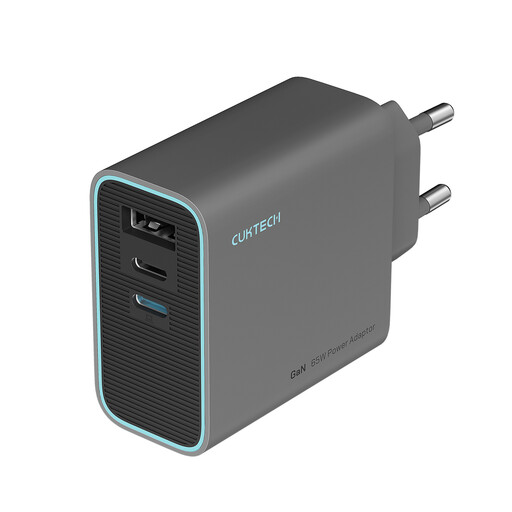
CUKTECH 65W USB-C charger with 3 ports, grey
This charger may suit you if you want to connect several USB devices; check your recorder’s manual to make sure the connection and power supply are suitable.
The product name lists three ports and a folding design. Do not use in wet or damp environments.
View at Joybuy
Frequently asked questions
Will a USB charging station charge the batteries in every audio recorder?
No, the presence of a USB port doesn’t mean that it will. Zoom describes USB on the H1essential as a power source alongside standard batteries, not as confirmation that those batteries can be charged inside the recorder. Check the manual for your exact recorder before buying a charger for this purpose.
How can I position a charger safely on the kitchen worktop?
Choose a dry, stable spot, make sure the charger and cable are undamaged, and leave space for heat to dissipate. Brandweer Nederland advises placing chargers in an open space and not using damaged cables or chargers. This advice does not set a specific legal distance from a sink.
What can I do if the charging station breaks early during normal use?
In the Netherlands, the statutory guarantee may apply if the product doesn’t perform as you could reasonably expect during normal use. ACM ConsuWijzer explains that the seller must resolve the problem in line with the applicable terms. Keep your proof of purchase and contact the seller.
Does a charging station need a CE marking in the Netherlands?
For electrical equipment covered by the Dutch Electrical Equipment Decree, the Netherlands Food and Consumer Product Safety Authority describes CE marking as mandatory. The applicable rules depend on the specific product; the European Commission explains that the manufacturer uses the CE marking to declare that the product complies with the relevant EU rules. The marking alone is not an independent product test.


