First, check your recorder’s manual to see whether USB charges its battery or only supplies power. This determines whether a USB charging station can do what you need. Then choose the right connection and cable, and make sure there are enough ports for the other devices you want to connect at the same time. Place charging devices on a hard surface and, ideally, charge them while you’re awake.
Who is this relevant to?
Recorder owners who want to charge their device
If you want your recorder ready by the bed for later, check whether your exact model charges its internal battery via USB or uses USB only as a power supply. The Zoom H1essential manual describes operation with batteries or an external USB power supply.
Careful overnight chargers
If you’re looking for a charging spot in the bedroom, make sure the device won’t be charging among the bedding. Brandweer Nederland and Brandweer Twente recommend using a hard surface and, ideally, charging while you’re nearby.
People with multiple devices
If you want to connect other USB devices as well as your recorder, choose the number and type of ports to suit the cables you use and the space available on your bedside table.
What should you look for when buying?
Compact wall charger
Choose this if: your recorder can run on or charge from a suitable USB power supply and you’ll connect no more than one other device at a time.
Bear in mind: two ports offer less room to expand than a desktop charger. Also check that the connection and power supply are suitable for your recorder.
Desktop USB charging station
Choose this if: several USB devices need one dedicated charging spot and you have room for a separate station.
Bear in mind: extra ports or a higher total power rating don’t prove that your recorder’s battery charges via USB. Check how power is allocated across the ports when they’re used at the same time.
No extra USB charging station
Choose this if: the manual describes USB as an external power supply only, or you already have a suitable power supply and enough connections.
Bear in mind: supplying external USB power while the recorder is in use is not the same as charging the batteries inside it.
| What to consider |
What should you check? |
Who is this important to? |
| Recorder’s USB function |
Check the manual for your exact model to see whether USB charges the battery or only supplies external power. |
I want to use my recorder later with a full battery and don’t want to assume USB will charge it. Around 36% of consumers are mainly looking for clarity about the charging function. |
| A safe spot by the bed |
Use a hard surface, check the charger and cable for damage, and ideally charge while you’re nearby. |
I want a dedicated spot by the bed without leaving a charging device among the bedding. Around 29% of consumers prioritise safe placement. |
| Port and cable |
Check the connection on the recorder, the charger end of the cable and the model’s power instructions. |
I want to make sure my existing cable fits both the recorder and the power supply. For around 21% of consumers, finding the right connection and cable is the main concern. |
| Number of devices connected at once |
Count the devices you’ll connect at the same time, then check the number and type of ports and the space available on your bedside table. |
I want to connect my recorder and other USB devices in one place. Around 14% of consumers consider simultaneous use the most important factor. |
Common buying mistakes
-
Assuming USB charges the recorder’s battery
A recorder can use USB as an external power source without charging the batteries inside it. The Zoom H1essential manual describes operation with batteries or an external USB power supply.
Before buying, check the power and charging instructions for your exact recorder model.
-
Confusing a wireless phone charger with a USB power supply
A recorder that needs USB power requires a suitable wired connection. A wireless charging pad won’t replace it unless the device explicitly supports wireless charging.
Check which wired USB output and cable your recorder needs.
-
Choosing a charger based on its maximum total power
A high stated total power rating doesn’t, by itself, tell you whether your recorder’s battery charges via USB, which cable you need or how power is shared between ports.
First, work out what you need the charger to do and how many devices you’ll connect at once. Then check the specifications for each port.
-
Leaving a charging device on the bedding
Placing a device or charger among soft furnishings isn’t in keeping with charging safety advice.
Use a hard surface, follow the instructions for your recorder and power supply, and ideally charge while you’re nearby.
Brands to consider
Belkin
Belkin’s WCB009vfWH is a wall charger with one USB-C output and one USB-A output, offering a compact set-up for up to two connected devices.
- Belkin states a maximum of 30 W for USB-C and 12 W for USB-A.
- Phone charging claims don’t confirm that a specific audio recorder’s battery will charge with this charger. Check your recorder’s manual.
Hama
Hama describes both a two-port wall charger and a separate five-port USB charging station.
- For model 00201978, Hama lists three USB-C ports, two USB-A ports and a total power output of 140 W.
- The number of ports and stated total power don’t confirm that a particular recorder’s battery will charge via USB. Also check the power available from each port when several are in use at once.
Philips
The Philips DLP4345CB/12 is described as a wall charger with one USB-A port and one USB-C port.
- Philips states a maximum output of 45 W and protection against overheating, overloading and overcurrent.
- These product specifications and manufacturer claims don’t confirm that your recorder’s battery will charge with this charger.
Products at Joybuy
This selection includes USB power supplies, extension leads and a bedside table with connections. Check whether USB charges your recorder or only provides external power.
 No image available
Extension lead with four sockets, USB-A and USB-C
An option if you want to connect a recorder and other devices in one place. First check whether your recorder charges via USB or only receives power from it.
Four sockets, three USB-A ports and two USB-C ports; maximum 2500 W; 3 m cable.
View at Joybuy
 No image available
Cube-shaped extension lead with USB-A and USB-C
A compact option for a spot by the bed. Check that the USB connection and power supply meet your recorder’s requirements.
Multiple sockets, USB-A and USB-C ports; maximum 2500 W; 1.5 m cable.
View at Joybuy
 No image available
20W wall charger with USB-A and USB-C
A good fit if you want to connect one other device as well as your recorder, provided the recorder and cable work with the power supply.
Two ports: USB-A and USB-C; stated output 20 W.
View at Joybuy
 No image available
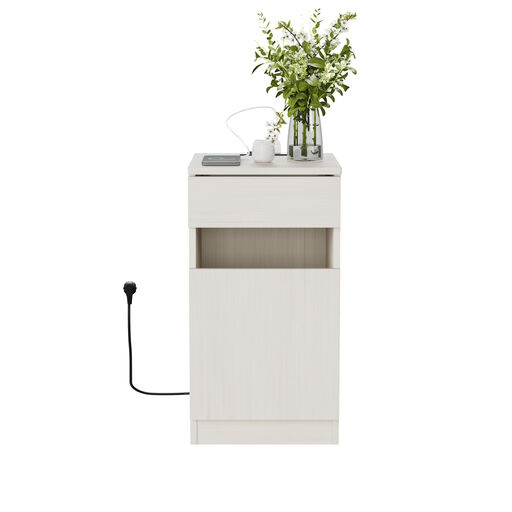
MDF bedside table with drawer and USB connections
An option if you’re looking for a bedside table as well as a USB power point. Check your recorder’s manual before assuming it charges via USB.
USB-A, USB-C and power socket; 33 × 40 × 61,5 cm; white with a light wood-look finish.
View at Joybuy
 No image available
Apple Original USB-C Power Adapter 20W
A simple option with one USB-C connection, if it meets your recorder’s power requirements.
One USB-C output; stated output 20 W. The USB-C cable is sold separately.
View at Joybuy
Frequently asked questions
Does every USB audio recorder charge its batteries via USB?
No. You can’t tell just from the fact that it has a USB port. The Zoom H1essential manual describes USB as a possible external power source alongside batteries. In your exact model’s manual, look specifically for information about charging the battery or batteries inside the recorder.
Can I leave a charging recorder in bed overnight?
Don’t leave a charging device among the bedding. Brandweer Nederland recommends using a hard surface and having a working smoke alarm in the room. Brandweer Twente recommends charging during the day, when you’re nearby.
What can I do if a USB charger I’ve bought becomes faulty?
In the Netherlands, you’re entitled to a product that’s of satisfactory quality. The Dutch government states that there’s no fixed statutory guarantee period. Contact the seller if a product develops a fault.
Do the USB-C rules mean my existing audio recorder must suddenly have a USB-C connection?
No. Those rules don’t change the connection on an existing recorder. On 22 December 2023, the Dutch government said that common-charger requirements apply to new devices in the relevant product categories; for laptops, they apply from April 2026. Check the connection on the recorder you already own.


