What should you look for?
Start with the manual for your exact microphone model or charging case. Then choose the number and type of ports to suit what you want to charge at the same time.
| What to consider |
What should you check? |
Who is this important for? |
| Charging port, cable and output |
Compare your microphone or charging case’s charging port and cable with the specified input voltage and current, and with the output of the charger port you’ll be using. |
If I want to charge my microphone in my hotel room, I want to know that the cable and power supply are suitable for my exact model. Around 36% of consumers say that compatible connections and charging specifications are their main consideration. |
| Product safety |
Check the product information and CE marking for the specific charger, and read any relevant safety warnings for that exact product. |
Anyone taking a mains-powered charger wants to choose a suitable product and be able to check its safety information. Around 29% of consumers put product safety first. |
| Charging two devices at once |
Check the number of USB-C and USB-A ports and each port’s output specifications, including when they’re used at the same time. |
If I also want to charge a phone, multiple ports are useful; the total output doesn’t necessarily tell you what a single port can deliver. Around 21% of consumers say simultaneous charging is their top priority. |
| Plug and travel convenience |
Check that the plug fits the socket and that the charger is suitable for 230 V, 50 Hz. Also check which type of socket is available in the room. |
Anyone travelling light wants to know in advance whether the charger will plug straight into the hotel socket. Around 14% of consumers prioritise travel convenience and a suitable plug. |
Joybuy products for charging on the go
These Joybuy products are wall chargers with USB-C ports for charging a microphone with a suitable cable; some models also have USB-A or extra ports for other devices. Before buying, check the output per port, the cable you need and the product information for the specific charger.
 No image available
65 W wall charger with two USB-C ports and retractable cable
Could be suitable if you need a USB-C cable for your microphone; check the output per port against your model’s charging requirements.
The product information lists two USB-C ports and a built-in 70 cm retractable USB-C cable. Use the charger indoors and not in a damp environment.
View at Joybuy
 No image available
65 W wall charger with two USB-C ports and one USB-A port
An option to compare if you want to connect other devices as well as your microphone; check the output of the port you’ll be using.
The product information lists two USB-C ports, one USB-A port and simultaneous charging for three devices.
View at Joybuy
 No image available
30 W wall charger with USB-C and USB-A ports
Could be useful if you want to connect your microphone and another device at the same time; check which output is available for your microphone.
The product information lists USB-C and USB-A ports, with simultaneous charging for two devices. For indoor use in dry conditions only.
View at Joybuy
 No image available
20 W wall charger with USB-C and USB-A ports
An option to compare if you want to connect two devices; check the output per port against your microphone’s charging specifications.
The product information lists USB-C and USB-A ports, a total output of 20 W and simultaneous charging for two devices. For indoor use in dry conditions only.
View at Joybuy
 No image available
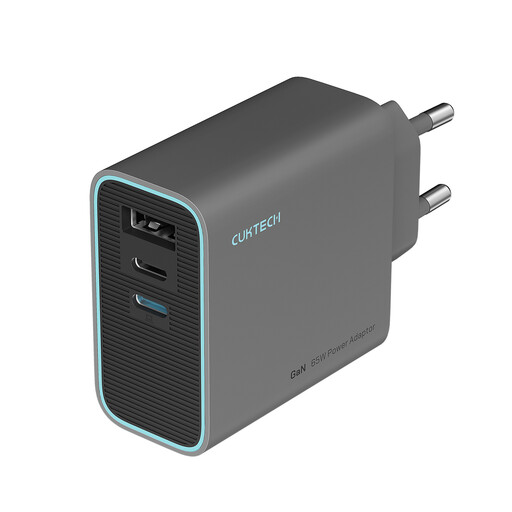
CUKTECH 65W USB C Charger, 3-Port Compact and Foldable Fast Charger Block, Color: Gray
Could be suitable if you want to connect several devices while travelling; compare the output of the port you’ll use with your microphone’s charging requirements.
The product information lists a maximum output of 65 W, three ports and a foldable design. Do not use in wet or damp conditions.
View at Joybuy
Frequently asked questions
Can I use any 20 W USB-C charger with my microphone?
No. The 20 W figure alone doesn’t confirm that it’s suitable. Check the charging requirements for your exact microphone model or charging case, and compare the cable, port and output. DJI lists a maximum of 5 V and 1,5–2 A for the Mic Mini charging case; don’t apply these specifications to another model without checking.
How do I charge a microphone kit with a charging case?
Follow the instructions for your kit and use the charging port on the case intended for that purpose. For the Mic Mini version, DJI describes a charging case for storing and charging the components; check which version you have.
Will my charger fit a hotel socket in the Netherlands?
The Netherlands uses 230 V and 50 Hz. Check both the physical plug and your charger’s input specifications. When you arrive, also check which type of socket is actually available in the room.
Is CE marking required for a mains-powered USB charger?
CE marking is required for electrical equipment covered by the applicable Dutch low-voltage regulations. The Netherlands Food and Consumer Product Safety Authority sets out this product requirement; the marking alone doesn’t prove that the product has undergone a mandatory independent inspection or is suitable for your microphone.
Who should I contact if my charger is faulty after I buy it in the Netherlands?
Contact the seller. According to the Dutch government, the seller must provide a solution if there’s a problem with a product; any manufacturer’s warranty is separate.


