What should you look for when buying?
First, check the connection, cable and power supply required for your microphone or charging case. Then decide how many devices you want to connect at once and where the charger can sit safely.
| What to consider |
What should you check? |
Who is this important for? |
| Connection and power supply |
Compare the charging port, cable connectors and specified power supply with the manual for your microphone or charging case. |
I want to make sure the charger and cable are suitable for my exact microphone or case; specifications for another model won’t help. Around 29% of consumers rank compatibility as their main concern when buying. |
| Safe charging by the bed |
Set aside a clear space for the adapter, device and cable; don’t use damaged parts, and don’t charge under bedding. |
I want to charge my microphone by the bed without putting it under a pillow or duvet. Around 29% of consumers prioritise a clear, suitable place to charge; the Netherlands Fire Service advises against charging under bedding. |
| Cable and reach |
Check which type of cable you need, whether one is included and whether it will reach your clear charging spot. |
I want my microphone to sit in a clear space without the cable being stretched, so I also check which cable comes in the box. Around 24% of consumers rank reach and a suitable cable as their main concern when buying. |
| Charging multiple devices at once |
Check the number and type of ports, and the power available per port when connecting multiple devices. |
I want to charge another device as well as my microphone, and I want to know how much power the charger supplies when both are in use. Around 18% of consumers rank charging multiple devices at once as their main concern when buying. |
USB chargers at Joybuy
These options are USB wall chargers for a setup with a microphone and, if needed, a second device. Before buying, check that the port, cable and power supply are suitable for your exact microphone or charging case.
 No image available
65 W wall charger with 2 USB-C ports and retractable cable
A handy option if you want a retractable cable as well as multiple ports; check that the power supply is suitable for your microphone.
According to the product name: up to 65 W, 2 USB-C ports and a retractable USB-C cable.
View at Joybuy
 No image available
65 W wall charger with 2 USB-C ports and a USB-A port
An option if you want to connect a USB-C microphone and a second device; check how much power is available when both are in use.
According to the product name: 65 W, 2 USB-C ports and 1 USB-A port.
View at Joybuy
 No image available
30 W wall charger with USB-C and USB-A ports
A good fit for a setup that needs both USB-C and USB-A connections; check which cable your microphone uses.
According to the product name: 30 W, 1 USB-C port and 1 USB-A port.
View at Joybuy
 No image available
Fairphone 65 W charger, dual USB-C + USB, black
An option if you need different types of connection; bear in mind that cables aren’t included.
According to the product name: 65 W, two USB-C ports and a USB port.
View at Joybuy
 No image available
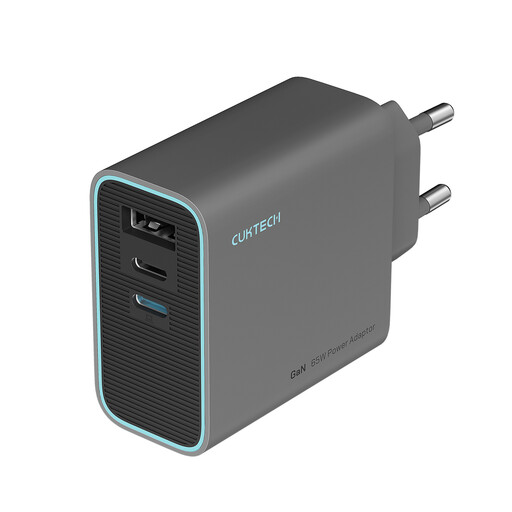
CUKTECH 65 W USB-C charger with 3 ports, grey
Could be useful if you want to connect multiple devices; check the port allocation and power supply for your microphone before choosing.
According to the product name: 65 W and 3 ports. The product name describes the charger as foldable.
View at Joybuy
Frequently asked questions
Can I use any USB-C charger for my wireless microphone?
Not without checking the specifications for your exact model. Compare the charging port, cable and specified power supply for the microphone or charging case with the charger; DJI, for example, lists separate charging specifications for components of the Mic 2. European rules on common chargers apply to the device categories listed, not automatically to every wireless microphone.
How can I charge my microphone safely by the bed?
Follow the manual, keep the charger and device clear of bedding, and don’t charge under a pillow or duvet. The Netherlands Fire Service also advises against using damaged cables or chargers.
Will a higher-wattage charger charge my microphone faster?
Not necessarily: the charger’s maximum power doesn’t show how quickly your microphone will charge. Compare the power specifications for your microphone or charging case, and if the charger has multiple ports, check how much power is available when they’re used at the same time.
What warranty applies to a USB charger in the Netherlands?
When you buy as a consumer, the product must meet the standards you’re entitled to expect; contact the retailer if there’s a problem. According to the Dutch government, the Netherlands has no fixed statutory warranty period. Any manufacturer’s warranty is separate from your statutory rights.
What safety rules apply to a USB wall charger in the Netherlands?
According to the Netherlands Food and Consumer Product Safety Authority, the Low Voltage Directive applies to electrical equipment with a rated AC voltage of 50 V to 1,000 V; check the product information and applicable marking for the exact charger. A CE marking is not, by itself, the result of an independent test. European rules on a common charging connection are limited to the device categories listed in those rules.


